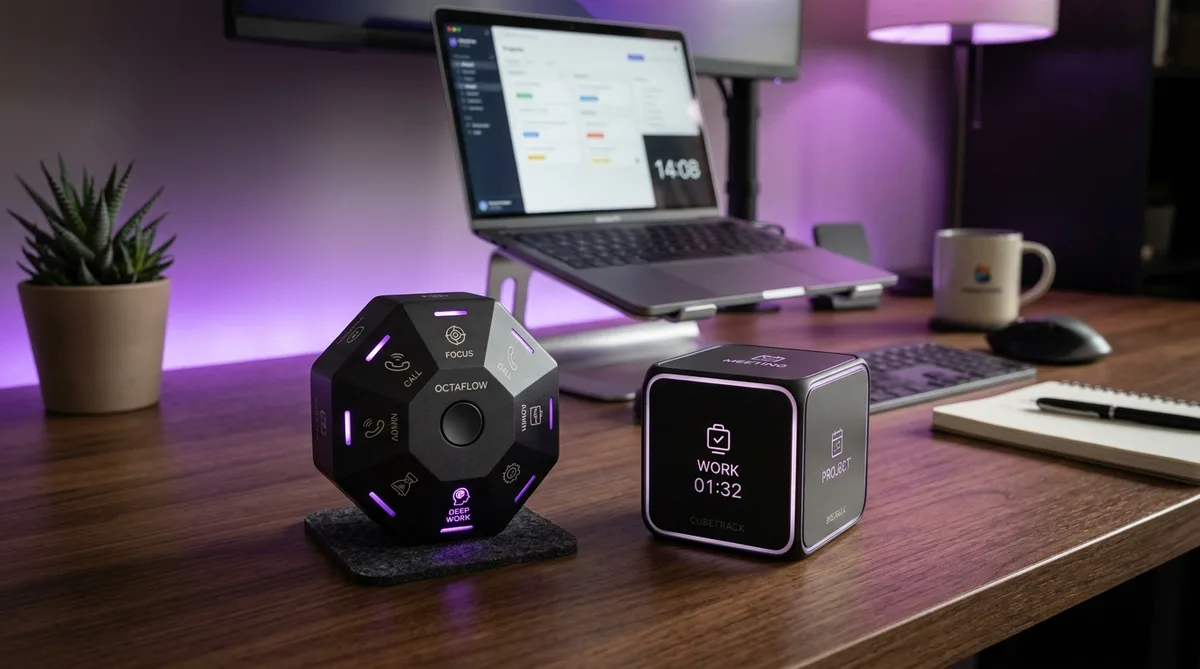
Why Physical Time Trackers Still Matter
Software time trackers like Toggl and Clockify are free, feature-rich, and available on every platform. So why would anyone pay for a physical device that does less? The answer comes down to one behavioral problem: most people forget to start the timer.
Starting a software timer means switching context. You have to find the app, pick a project, click start. That 10-second interruption is enough to break focus, and over days and weeks, forgotten timers create gaps in your data that make timesheets unreliable. Physical time trackers solve this by turning timer control into a gesture. Flip a device to a different side, and the corresponding task starts tracking. No screen, no clicks, no context switch. The action takes under a second and becomes automatic within a few days.
Timeular and TimeFlip are the two main products in this niche. Both use Bluetooth-connected physical devices paired with companion apps, but they differ significantly in design philosophy, software quality, team capabilities, and long-term cost. This comparison will help you decide which one is actually worth your money based on how you work. For a broader look at time tracking tools, see our guide to the best time tracking software in 2026.
Timeular (EARLY) Overview
Timeular rebranded to EARLY in March 2025. The name changed, but the product remained the same: an 8-sided polyhedron (technically a truncated octahedron) paired with a full-featured time tracking app. Each of the 8 sides is assigned to a task or project via the companion software. Flip the Tracker so the relevant side faces up, and that project's timer starts automatically. Flip to another side, and the previous timer stops while the new one begins.
The Device
The Timeular Tracker connects via Bluetooth Low Energy and works with macOS, Windows, iOS, and Android. It weighs about 57 grams and is roughly the size of a tennis ball. Battery life is one of its strongest hardware features: a single CR2032 coin cell lasts approximately 5 to 6 months with daily use. No charging cables, no USB ports. When the battery dies, you pop it out and replace it for under a dollar.
Each side has a writable surface for labeling tasks. Timeular includes dry-erase markers in the box, so you can rename sides whenever your projects change without peeling off old stickers. The device costs $69 as a one-time purchase, with volume discounts available for teams ordering 10 or more.
The App
This is where Timeular separates itself from TimeFlip. The EARLY app is a fully standalone time tracker that works with or without the physical device. You can start timers with keyboard shortcuts, drag to create entries on a calendar view, or use the built-in timer interface directly. The device is an optional input method, not a requirement.
Reports include daily, weekly, and monthly breakdowns with project-level filtering, tag-based analytics, and CSV export. The app also offers leave tracking, overtime calculations, and goal setting on the higher-tier plans. For teams, it includes shared projects, timesheet approvals, manager dashboards, and multi-member reporting. This makes Timeular the only physical time tracker that works for organizations, not just individuals.
Integrations
Timeular connects to over 3,000 apps through its native Zapier integration. Direct integrations include Jira, Asana, Google Calendar, Microsoft Outlook, and Toggl Track (with a migration tool that imports existing Toggl data). The API is well-documented for anyone building custom workflows.
Pros
- App works fully without the physical device
- Strong team features (approvals, roles, shared projects)
- 5-6 month battery life with cheap replaceable coin cell
- Rewritable dry-erase labels on the device
- 3,000+ integrations via Zapier, plus native Jira/Asana/Calendar
- 30-day free trial
Cons
- Only 8 task slots per device
- Requires an ongoing subscription for the app ($7.50/mo minimum)
- No LED indicators on the device to show the active task
- Device cost ($69) is on top of the subscription
TimeFlip Overview
TimeFlip makes a 12-sided dodecahedron (the TimeFlip2) that works on the same flip-to-track principle. The key hardware advantage is straightforward: 12 sides instead of 8, giving you 50% more task slots without needing a second device. The TimeFlip2 is the current model as of 2026.
The Device
The TimeFlip2 connects via Bluetooth 4.0 LE and uses two standard AA batteries with a service life of approximately 6 to 12 months depending on usage. It includes colored LED indicators that glow briefly when you flip to a new side, confirming which task is now active without checking the app. This is a genuinely useful feature that Timeular lacks.
Each side gets an adhesive sticker label for identification. Stickers are included in the box and replacements are available. The device also supports a tap-to-pause gesture: tap the TimeFlip once to pause the current timer without flipping to another side, then tap again to resume. The device has onboard memory for offline tracking, so it logs flips even when your phone or computer is out of Bluetooth range and syncs when reconnected.
The TimeFlip2 retails for approximately $59 as a one-time purchase. Bulk pricing is available: three devices for ~$179, five for ~$269.
The App
TimeFlip's companion app is more basic than Timeular's. It handles timer display, task assignment, simple reporting (daily and weekly views), and data export in XLS/CSV format. The app supports both direct timer mode and a Pomodoro timer mode for structured work intervals. It works on iOS, Android, macOS, and Windows.
The critical difference: TimeFlip's app is device-dependent. You can view reports and edit existing entries without the cube, but the primary tracking method is the physical flip. There is no standalone software timer with keyboard shortcuts or calendar drag-and-drop like Timeular offers. If you leave the device at home, your tracking stops.
TimeFlip does not include team features, timesheet approvals, or administrative controls. It is designed for one person, one device, one workflow.
Integrations
TimeFlip integrates directly with Google Calendar, Apple Calendar, and Outlook Calendar. It also connects to Zapier for broader automation, and offers a public API and BLE protocol for developers who want to build custom integrations. The integration list is shorter than Timeular's, but covers the most common calendar-based workflows.
Pros
- 12 task slots (50% more than Timeular)
- No ongoing subscription required for core features
- LED indicators confirm which task is active
- Tap-to-pause gesture without flipping sides
- Pomodoro timer mode built in
- Lower total cost of ownership
- Open API and BLE protocol for custom development
Cons
- App is basic and device-dependent
- No team features, shared projects, or approvals
- Adhesive sticker labels are harder to change than dry-erase
- No standalone software timer (device required for tracking)
- Fewer direct integrations than Timeular
Head-to-Head Comparison
| Feature | Timeular (EARLY) | TimeFlip |
|---|---|---|
| Device shape | 8-sided polyhedron | 12-sided dodecahedron |
| Task slots | 8 per device | 12 per device |
| Battery | CR2032 coin cell, ~5-6 months | 2x AA batteries, ~6-12 months |
| LED indicators | No | Yes (colored glow on flip) |
| Side labeling | Dry-erase markers (rewritable) | Adhesive stickers |
| Tap-to-pause | No | Yes |
| Device price | $69 one-time | ~$59 one-time |
| App quality | Full standalone timer, calendar, reports | Basic, device-dependent |
| Works without device | Yes (keyboard shortcuts, app timer) | Limited (view/edit only) |
| Team features | Yes (shared projects, approvals, roles) | No |
| Pomodoro mode | No | Yes |
| Platforms | macOS, Windows, iOS, Android, Web | macOS, Windows, iOS, Android |
| Integrations | 3,000+ (Zapier, Jira, Asana, Toggl, API) | Calendars, Zapier, open API/BLE |
| Offline tracking | Yes (syncs when reconnected) | Yes (onboard memory) |
| Subscription required | Yes (from $7.50/mo) | No (all features included) |
| Free trial | 30 days | N/A (no subscription) |
| Best for | Teams, freelancers, agencies | Individual users, budget-conscious |
Pricing Breakdown
Timeular (EARLY) Pricing
Timeular separates device and software costs. The Tracker device is a one-time purchase of $69. The software runs on a monthly subscription:
- Personal — $7.50/mo (billed annually). Unlimited tracking, basic reports, integrations. Single user.
- Personal Pro — higher tier with goals, leave tracking, overtime calculations, and advanced analytics.
- Team — $15.80/user/mo (billed annually). Shared projects, timesheet approvals, manager dashboards, team reporting. Minimum 2 users.
- Enterprise — Custom pricing. Dedicated support, custom onboarding, advanced admin controls.
All plans include a 30-day free trial. The Tracker device is optional since the app works standalone.
TimeFlip Pricing
TimeFlip uses a simpler model: buy the device, and all app features are included with no subscription.
- Single device — ~$59 one-time. Includes the 12-sided TimeFlip2 and full access to all companion app features.
- 3-pack — ~$179 (~$60/device). For small teams or keeping devices at multiple locations.
- 5-pack — ~$269 (~$54/device). Best per-unit price for teams.
Total Cost Over 2 Years
For a single user, the math favors TimeFlip significantly:
- Timeular: $69 (device) + $180 (Personal plan, 24 months at $7.50) = ~$249 total
- TimeFlip: $59 (device) = $59 total
That is a $190 difference over two years. For teams, the gap widens further since each Timeular user needs their own subscription, while TimeFlip devices are a one-time cost with no per-user fees. However, Timeular is the only option if you need team management features, so the comparison only applies if those features do not matter to you.
For context, compare these costs to software-only alternatives: Toggl Track is free for up to 5 users, and Clockify offers unlimited free tracking. Physical trackers are a premium product for people who specifically value the tactile input method over a software-only workflow.
Which Should You Choose?
Buy Timeular (EARLY) If...
- You work on a team and need shared projects, timesheet approvals, and manager dashboards
- You want a robust standalone app that works with or without the physical device
- You need deep integrations with project management tools like Jira and Asana
- You prefer rewritable side labels over adhesive stickers
- You value the app's calendar view and keyboard shortcut tracking
- You already use Toggl and want to migrate your data natively
Buy TimeFlip If...
- You are an individual user tracking your own time with no team features needed
- You want more than 8 task slots — 12 sides gives you 50% more capacity
- Budget matters — one-time $59 versus $249+ over two years
- You like visual LED feedback confirming which task is active
- You want tap-to-pause functionality or Pomodoro mode
- You do not need a powerful standalone app — the device is your primary interface
Skip Both If...
If you already track time consistently with software, a physical device adds hardware cost without solving a real problem. The value proposition of these devices is specifically for people who struggle to remember to start timers. If that is not your issue, a free tool like Toggl or Clockify is the better investment.
Also consider: both devices track time, but neither addresses what happens when you step away from your desk. If you use time tracking software that monitors activity levels, a physical tracker will not keep your activity reports consistent during breaks. That is a separate problem that requires a separate solution.
Keep Your Time Tracker Active Between Flips
Whether you use Timeular, TimeFlip, or any software timer — TrickTack simulates natural mouse, keyboard, and app-switching activity to keep your reports consistent during breaks. Try it free for 7 days.
Download TrickTackFrequently Asked Questions
Is Timeular worth it in 2026?
Timeular (now rebranded as EARLY) is worth it if you need a physical time tracker with strong standalone software. The app works fully without the device, includes team management features, and integrates with over 3,000 tools through Zapier. However, the ongoing subscription cost means your total investment grows over time. If you already track time consistently with a free tool like Toggl or Clockify, the physical tracker adds cost without solving a real problem. Timeular is best for people who have tried software timers and failed to build a consistent tracking habit.
Does TimeFlip work with Toggl?
TimeFlip does not have a direct native integration with Toggl Track. However, you can connect the two through Zapier, which allows you to automatically push TimeFlip entries into Toggl as time entries. TimeFlip does integrate directly with Google Calendar, Apple Calendar, and Outlook Calendar, so if your workflow uses calendar-based tracking, that path is simpler. For a dedicated Toggl connection without Zapier, Timeular (EARLY) offers a native Toggl migration tool that imports your existing Toggl data directly.
Can you use Timeular without the physical device?
Yes. Timeular's app (now called EARLY) works as a fully standalone time tracker without the physical Tracker device. You can start and stop timers using keyboard shortcuts, the desktop app interface, or by dragging to create time entries on a calendar view. The 8-sided Tracker is an optional add-on that makes switching tasks faster through physical gestures, but every feature of the software is accessible without it. This is a meaningful advantage over TimeFlip, whose app is designed primarily around the physical device.
How many tasks can you track with TimeFlip?
TimeFlip has 12 sides on its dodecahedron-shaped device, meaning you can assign up to 12 different tasks or projects at once. Each side gets a colored sticker label and a corresponding color in the companion app. If you need to track more than 12 activities, you can reassign sides at any time through the app, though you can only have 12 active simultaneously. By comparison, Timeular's 8-sided tracker supports 8 active tasks. For most freelancers and consultants, 8 to 12 slots covers a typical workday without issue.
Which physical time tracker is better for teams?
Timeular (EARLY) is the only realistic option for teams. Its Team plan includes shared projects, timesheet approvals, manager dashboards, role-based access, and multi-member reporting. Each team member can have their own Tracker device linked to the same workspace. TimeFlip is built for individual use and does not offer team management, shared reporting, or administrative controls. If you need physical time trackers for more than one person in a coordinated workflow, Timeular is the only product in this niche that supports it.
Are physical time trackers better than software timers?
Physical time trackers solve a specific problem: forgetting to start and stop timers. The tactile gesture of flipping a device creates a stronger behavioral habit than clicking a button on screen, which is why people who have failed with software-only tracking often succeed with a physical device. However, if you already track time consistently with a software tool, a physical tracker adds hardware cost without improving accuracy. Physical trackers also still require companion software for reports and data storage, so you are not eliminating software entirely. They are a premium solution for a specific pain point, not a universal upgrade over free tools like Toggl or Clockify.
Conclusion
Timeular and TimeFlip target the same niche but serve different users. Timeular (now EARLY) is the premium choice: a polished standalone app with team features, deep integrations, and the flexibility to work with or without the physical device. You pay more for that polish, both upfront and monthly, but you get a complete time tracking platform. TimeFlip is the budget-friendly alternative with more task slots, LED feedback, and no ongoing fees. Its app is basic, but if you just need a device that starts timers when you flip it, the TimeFlip2 does that well for a fraction of the cost.
For teams, Timeular wins by default because TimeFlip does not compete in that space. For individuals, the decision comes down to how much you value the app. If you want calendar views, keyboard shortcuts, and the option to track without the device, Timeular justifies the subscription. If the device is your workflow and you prefer to keep costs low, TimeFlip delivers more task slots at a lower price.
Whichever device you choose, keep in mind that physical trackers log what you are working on, but they do not address activity monitoring. If your workplace uses tools that track mouse movement, keyboard input, or foreground applications, a physical tracker will not help during breaks. For that, see our guide on how to cheat time tracking software or try TrickTack to keep your activity reports consistent while you step away.


