Introduction
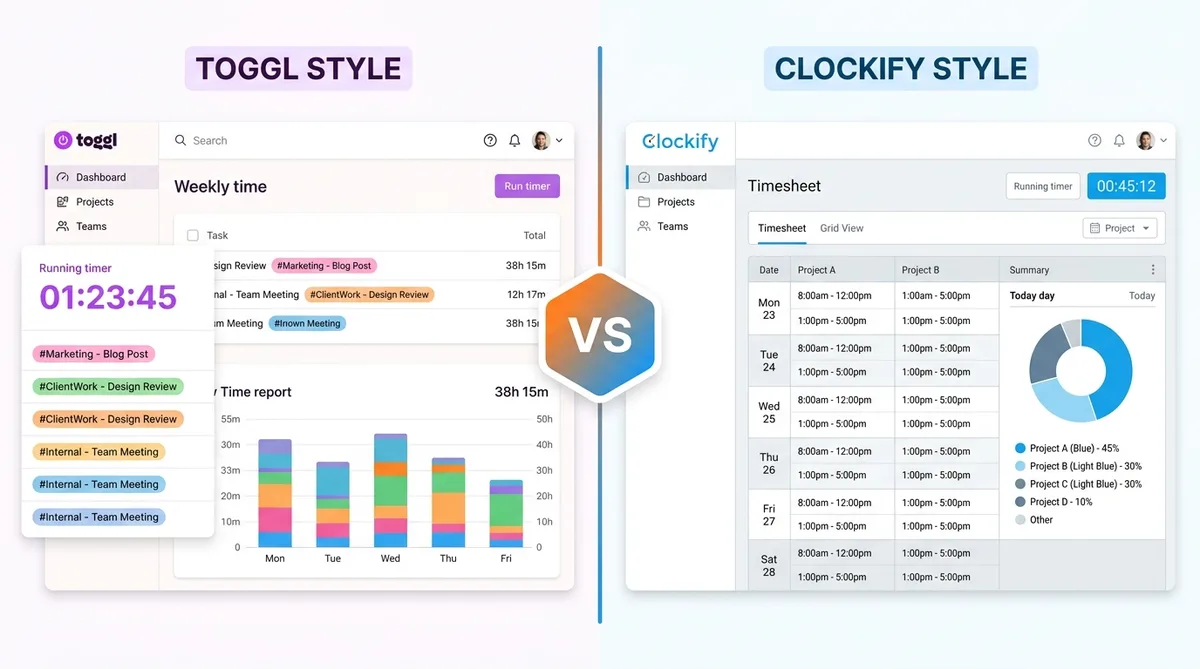
If you have been researching time tracking tools, two names almost certainly appear at the top of every recommendation list: Toggl Track and Clockify. Both are cloud-based time trackers, both offer genuinely usable free tiers, and both have earned millions of users worldwide. So which one actually deserves a spot on your desktop?
The answer depends on what you value most. Toggl Track leans into simplicity, polish, and a trust-based philosophy that deliberately avoids employee surveillance — our full Toggl Track review covers it in depth. Clockify counters with an unmatched free plan, lower paid pricing, and a deeper set of administrative controls that appeal to managers who want granular visibility into every billable minute.
In this guide we compare Toggl Track and Clockify across every dimension that matters in 2026: features, pricing tiers, free-plan limits, integrations, reporting, and platform support. By the end you will know exactly which tool fits your workflow, whether you are a solo freelancer, a growing agency, or a mid-size company managing distributed teams.
Looking for more comparisons? Check out our Harvest vs Toggl breakdown or our comprehensive top time tracking software roundup for a wider view of the landscape.
Toggl Track Overview
Toggl Track launched in 2006 in Tallinn, Estonia, making it one of the oldest dedicated time tracking applications still actively developed today. Over nearly two decades the product has stayed remarkably focused: it tracks time, and it does that one job exceptionally well.
Who Is Toggl Track For?
Toggl Track is built for knowledge workers, consultants, creative agencies, and software teams that need a fast, frictionless way to log hours without feeling monitored. If your team values autonomy over surveillance, Toggl's philosophy will resonate. There are no screenshots, no keystroke logging, and no GPS tracking. Time entries are entered by the person doing the work, either by starting a timer or logging time manually after the fact.
Key Selling Points
- One-click time tracking — Start a timer from the web app, desktop app, mobile app, or browser extension with a single click. Switching between projects takes one more click.
- 100+ integrations — Toggl connects natively with Asana, Jira, Trello, Notion, GitHub, Slack, Google Calendar, Salesforce, Basecamp, and dozens more. The browser extension lets you start timers directly inside these tools without switching tabs.
- Beautiful reporting — Summary, detailed, and weekly reports with charts, filters by client, project, tag, and team member. Export to CSV, PDF, or Excel.
- Cross-platform — Web, Windows, macOS, Linux, iOS, Android, and browser extensions for Chrome, Firefox, and Edge.
- Auto-tracker — The desktop app can detect which applications and websites you use and suggest time entries based on your activity (visible only to you, never to managers).
- Calendar integrations — Pull events from Google Calendar or Outlook and convert them into time entries, reducing manual logging.
- 30-day free trial of Premium features on every new account, no credit card required.
Toggl Track has consistently earned high ratings on review platforms, with users frequently praising its clean interface and the speed of everyday interactions. Where it sometimes falls short is in advanced project management and invoicing, features that competitors like Clockify include at lower price points.
Want to learn more about how Toggl's tracking actually works under the hood? Our article on how to trick Toggl time tracking walks through the entire system.
Clockify Overview
Clockify entered the market in 2017 with a bold pitch: 100% free time tracking for unlimited users. That strategy attracted over 4 million users and turned Clockify into one of the most widely adopted time trackers in the world. In 2026, however, Clockify capped its free plan at five users — the famous no-limit free tier is gone, though everything within those five seats stays unlimited. Our full Clockify review covers the change in detail.
Who Is Clockify For?
Clockify is ideal for budget-conscious teams, agencies that bill by the hour, and managers who want tighter controls over timesheets and employee activity. It is also a strong choice for freelancers who need invoicing and time tracking in one place without paying for a separate tool.
Key Selling Points
- Generous free plan — Free for up to five users, with unlimited projects and unlimited time tracking. The free tier is not a trial — you can use it indefinitely (it was unlimited-user until 2026, now capped at five).
- Affordable paid plans — Paid tiers start at just $3.99 per user per month (billed annually), significantly less than Toggl's $9 entry point.
- Timesheets and approvals — Built-in timesheet views with manager approval workflows (on paid plans), making Clockify a natural fit for agencies and consulting firms.
- Invoicing — Generate invoices from tracked billable hours, customize them, and send them directly to clients. Available on the Pro plan and above.
- Kiosk mode — Set up a shared device as a time clock so employees can clock in and out physically, useful for retail, manufacturing, or coworking environments.
- Employee monitoring — Screenshot capture, GPS tracking, idle detection, and attendance controls available on the Pro plan. These features give managers activity-level visibility when needed.
- Cross-platform — Web, Windows, macOS, Linux, iOS, Android, and browser extensions for Chrome and Firefox.
- 80+ integrations — Native connections to Jira, Trello, Asana, ClickUp, Todoist, QuickBooks, Xero, Google Calendar, Outlook, and Slack, plus 2,900+ apps through Zapier.
Clockify's weakness is its interface, which can feel busier and more utilitarian than Toggl's streamlined design. For teams that prioritize aesthetics and speed of interaction, the learning curve is slightly steeper. However, for teams that need more administrative muscle, Clockify delivers significantly more value per dollar.
Feature-by-Feature Comparison
The table below compares Toggl Track and Clockify across the features that matter most when choosing a time tracker. We note where a feature is available on the free plan versus a paid tier.
| Feature | Toggl Track | Clockify |
|---|---|---|
| Time Tracking | Timer + manual entry; free for up to 5 users | Timer + manual entry + timesheets; free for up to 5 users |
| Project Management | Projects, clients, tags; unlimited projects on free plan | Projects, clients, tags, tasks; unlimited on free plan |
| Reporting | Summary, detailed, weekly; visual charts; saved reports on Starter+ | Summary, detailed, weekly; shared reports on Standard+; export on all plans |
| Integrations | 100+ native integrations; Zapier support | 80+ native integrations; Zapier + 2,900 apps |
| Mobile Apps | iOS and Android with offline sync | iOS and Android with offline sync |
| Desktop Apps | Windows, macOS, Linux | Windows, macOS, Linux |
| Team Management | Teams and workspaces; 5 users free, unlimited on paid | Teams, groups, managers; 5 users free, unlimited on paid |
| Invoicing | Not built-in; relies on integrations (e.g., Xero, QuickBooks) | Built-in invoicing on Standard plan ($5.49/user/mo) |
| Offline Tracking | Yes, on desktop and mobile apps | Yes, on desktop and mobile apps |
| API Access | Yes; 30 requests/hour on free, higher on paid | Yes; available on all plans |
| Screenshots / Monitoring | Not available (by design) | Available on Pro plan; configurable intervals |
| GPS Tracking | Not available | Available on Pro plan |
| Timesheet Approvals | Not available | Available on Standard plan and above |
| Time-Off / PTO | Not available | Available on Standard plan and above |
| Kiosk Mode | Not available | Available on all plans including free |
| Billable Rates | Available on Starter plan and above | Available on Basic plan and above |
Key takeaway: Toggl Track wins on integration breadth, interface quality, and a privacy-first approach. Clockify wins on feature depth, administrative controls, and raw value for money. Both deliver solid core time tracking on every platform.
For a broader look at how these tools stack up against the rest of the market, see our top time tracking software guide.
Pricing Comparison
Pricing is where Toggl Track and Clockify diverge most sharply. Both offer free tiers, but their paid plans are structured differently and target different budgets. All prices below are per user per month, billed annually.
Toggl Track Pricing (2026)
| Plan | Price (Annual Billing) | Key Additions |
|---|---|---|
| Free | $0 (up to 5 users) | Unlimited tracking, projects, basic reports, calendar integration, browser extensions |
| Starter | $9 /user/month | Billable rates, time estimates, rounding, saved reports, project templates, email support |
| Premium | $18 /user/month | Custom report filters, profit and loss reports, fixed-fee projects, priority support, project forecasting |
| Enterprise | Custom pricing | Dedicated account manager, custom onboarding, SSO/SAML, data residency options |
Clockify Pricing (2026)
| Plan | Price (Annual Billing) | Key Additions |
|---|---|---|
| Free | $0 (up to 5 users) | Unlimited tracking, projects, kiosk mode, auto-tracker, basic reports, calendar view |
| Basic | $3.99 /user/month | Administration, time audit, custom fields, billable rates, required fields |
| Standard | $5.49 /user/month | Invoicing, timesheet approvals, time off / PTO, manager roles, bulk edits |
| Pro | $7.99 /user/month | Screenshots, GPS tracking, scheduling, expenses, labor cost & profit, budget alerts |
| Enterprise | $11.99 /user/month | SSO/SAML, custom subdomain, audit log, account manager, on-premises deployment option |
Cost Comparison for Real Teams
To put these numbers in perspective, here is what each tool costs for a team of 10 on a mid-tier plan (billed annually):
- Toggl Track Starter (10 users): $90 per month ($1,080/year)
- Clockify Standard (10 users): $69.90 per month ($838.80/year)
That is a savings of roughly $240 per year with Clockify for the same team size. The gap widens further at the Pro/Premium level: Toggl Premium for 10 users costs $180/month versus Clockify Pro at $99.90/month. For budget-sensitive teams, Clockify's lower price point is a significant advantage, especially since its mid-tier plan includes features like timesheet approvals and time-off management that Toggl does not offer at any price.
Free Plan Comparison
Both Toggl Track and Clockify offer genuinely useful free tiers, but they differ in scope and limitations. Here is a direct comparison of what you get for nothing.
Toggl Track Free
- User limit: Up to 5 team members
- Projects: Unlimited
- Time tracking: Unlimited (timer, manual entry)
- Reports: Basic summary, detailed, and weekly reports
- Calendar integration: Yes (Google Calendar, Outlook)
- Browser extension: Yes (Chrome, Firefox, Edge)
- Desktop and mobile apps: Yes, all platforms
- API: Limited to 30 requests per hour, 1 webhook
- Not included: Billable rates, time rounding, project templates, saved reports, sub-tasks, scheduled report delivery
Clockify Free
- User limit: Up to 5 users (was unlimited before 2026)
- Projects: Unlimited
- Time tracking: Unlimited (timer, manual entry, timesheets)
- Reports: Basic reports with export
- Kiosk mode: Yes (shared device clock-in/clock-out)
- Auto-tracker: Yes
- Calendar view: Yes
- Browser extension: Yes (Chrome, Firefox)
- Desktop and mobile apps: Yes, all platforms
- API: Available
- Not included: Billable rates, invoicing, timesheet approvals, time-off management, screenshots, GPS, locked timesheets, advanced reports
The Bottom Line on Free
The two free plans are now evenly matched on seats — both Toggl and Clockify cap the free tier at five users, after Clockify dropped its famous unlimited-user free plan in 2026. For solo freelancers and teams of up to five, either works well. Clockify still edges ahead on what is bundled free — kiosk mode plus unlimited projects and tracking within those five seats — but the days when it could serve a 50-person team for nothing are over. Once either team reaches six people you are paying, and that is where Clockify's much cheaper paid tiers become the deciding factor.
However, there is a notable trade-off. Clockify's free plan does not lock timesheets, meaning anyone can edit a time entry from weeks or months ago. For teams that need strict audit trails or billing compliance, this lack of immutability could be a deal-breaker that pushes you toward a paid plan anyway.
Pros and Cons
Toggl Track
Pros
- Best-in-class user experience — Clean, fast, and intuitive. Project switching takes one click. The interface stays uncluttered even with hundreds of entries.
- Privacy-first philosophy — No screenshots, no keystroke logging, no GPS surveillance. Time tracking is based on trust, which employees appreciate.
- Strongest integration ecosystem — Over 100 native integrations with the most popular project management, development, and communication tools.
- Excellent auto-tracking — The desktop app detects which apps you use and suggests time entries, reducing manual input without invading privacy.
- 30-day free trial of Premium — Every new user gets full access to the top tier for a month, no credit card required.
- Mature, stable product — Nearly 20 years of development means fewer bugs and a well-documented API.
Cons
- Free plan limited to 5 users — Teams of 6 or more must upgrade immediately.
- Higher price point — Starter at $9/user/month is almost double Clockify's entry-level paid plan.
- No built-in invoicing — You need a separate tool or integration for invoicing, adding complexity and potentially cost.
- No timesheet approvals — Managers cannot formally approve or lock timesheets within Toggl itself.
- No monitoring features — A positive for employees, but a limitation for managers in industries that require activity verification.
Clockify
Pros
- Generous free plan — Up to five users with unlimited projects and tracking, free indefinitely (the free tier dropped its unlimited-user policy in 2026).
- Lowest paid pricing — Plans start at $3.99/user/month (billed annually), making it the most affordable paid time tracker in its class.
- Built-in invoicing — Generate and send invoices from tracked hours without a third-party tool (Standard plan and up).
- Comprehensive admin controls — Timesheet approvals, time-off management, screenshots, GPS, kiosk mode. Everything a manager might need.
- Kiosk mode on free plan — Shared-device clock-in is free, useful for on-site teams and retail.
- Five pricing tiers — More granular pricing lets you pay for exactly the features you need.
Cons
- Busier interface — More features means more menus. The UI can feel cluttered compared to Toggl, especially for new users.
- Free plan lacks timesheet locking — Anyone can retroactively change entries, which creates audit and compliance risks.
- Fewer native integrations — Around 80 native integrations versus Toggl's 100+. The gap is partly closed by Zapier, but direct integrations are always smoother.
- Monitoring can create friction — Screenshot and GPS features, while optional, may make employees uncomfortable even when disabled.
- Reporting depth on free plan — The free plan limits detailed report filtering and export options compared to Toggl's free reporting.
Take Breaks Without Affecting Your Reports
Both Toggl and Clockify track your time constantly. TrickTack keeps your activity reports consistent while you step away.
DownloadVerdict — Which Should You Choose?
There is no single "best" time tracker. The right choice depends on your team size, budget, and management style. Here is our recommendation for three common scenarios.
For Solo Freelancers
Choose Toggl Track. As a single user, both free plans work perfectly. But Toggl's cleaner interface, stronger integrations, and superior reporting make the daily experience noticeably smoother. You will spend less time managing the tool and more time doing billable work. If you need invoicing, pair Toggl with a dedicated tool like FreshBooks or Wave.
For Small Teams (5-20 People)
Choose Clockify. Both free plans now cap at five users, so a team this size will pay either way — and that is where Clockify's much lower paid pricing creates a clear advantage. A team of 10 on Clockify's Standard plan pays $54.90/month (billed annually) for invoicing, timesheet approvals, and time-off management; the same team on Toggl Starter would pay $90/month for fewer features. Step up to Clockify Pro and it is $79.90/month with screenshots and GPS — still well under Toggl Premium at $180/month, which offers neither.
For Mid-Size and Enterprise Teams (50+ People)
It depends on your culture. If you run a high-trust, async-first organization where employees manage their own time, Toggl Track's philosophy and polish will be the better fit. If you need compliance-grade timesheet controls, GPS tracking for field teams, or screenshot-based activity verification, Clockify's Pro and Enterprise tiers give you those capabilities at a price that is hard to beat.
Both tools also have strong mobile apps for iOS and Android if your team needs to track on the go. For an even deeper dive into the time tracking landscape, including tools like Hubstaff, Harvest, and Time Doctor, explore our guide to employee monitoring software. If you are evaluating monitoring-heavy tools rather than simple timers, our Hubstaff vs Time Doctor comparison breaks down the two most popular employee surveillance platforms side by side. And to see Clockify pitted directly against a monitoring tool, read Hubstaff vs Clockify.
Both Tools Track Your Time — Here's How to Take Breaks
Whether you use Toggl Track or Clockify, both tools are designed to monitor how you spend your work hours. Toggl does it passively through timer data and app detection. Clockify can go further with screenshots, GPS, and idle detection. Either way, your activity reports are always being generated.
That raises a practical question: what happens to your reports when you step away from the keyboard? A quick coffee break, a phone call, or a few minutes of stretching can all create gaps in your activity data that make your timesheet look inconsistent, even if you are fully productive during the rest of your day.
Trick Tack is a lightweight desktop application that solves this problem. It simulates natural mouse movements, keyboard inputs, scrolling, and app-switching while you are away, keeping your activity reports smooth and consistent. It works alongside any time tracker, including Toggl Track, Clockify, Hubstaff, Time Doctor, and others.
- Simulates human-like mouse, keyboard, and scrolling activity
- Works with any time tracking or employee monitoring software
- Runs quietly in the background on Windows
- 7-day free trial — cancel anytime
Regardless of which time tracker you choose, Trick Tack ensures that your breaks do not create red flags in your reports.
Frequently Asked Questions
Is Clockify really free?
Yes. Clockify's free plan is genuinely free with no time limit. As of 2026 it supports up to five users (it previously had no user cap), with unlimited projects and unlimited tracked hours. The free tier includes core time tracking, basic reporting, kiosk mode, and calendar views. You only need to upgrade if you require features like billable rates, invoicing, timesheet approvals, time-off management, and employee monitoring, or if your team grows beyond five users.
Does Toggl have a free plan?
Yes. Toggl Track offers a permanent free plan that supports up to 5 users. It includes unlimited time tracking, unlimited projects, calendar integration, basic reports, and access to all apps (web, desktop, mobile, browser extensions). The main limitations are the 5-user cap, no billable rates, no saved reports, no project templates, and a lower API rate limit. Toggl also gives every new account a 30-day free trial of the Premium plan so you can test advanced features before deciding whether to pay.
Which has better reporting?
Toggl Track generally offers better reporting on the free plan, with cleaner visual charts and more intuitive filtering. Its summary, detailed, and weekly report views are well-designed and easy to read. Clockify's reporting catches up on paid plans (Standard and above), where you get shared reports, custom filtering, and data exports. At the Premium/Pro level, both tools provide robust analytics. For teams that need profit and loss reports or advanced project forecasting, Toggl Premium has an edge. For teams that need labor cost tracking and budget alerts, Clockify Pro delivers more.
Can you migrate from Clockify to Toggl?
Yes. You can export all of your time entries from Clockify as a CSV file and then import them into Toggl Track. Toggl supports CSV imports for time entries, projects, and clients. The process is straightforward: export from Clockify (Reports → Detailed → Export CSV), map the columns in Toggl's import tool, and verify the data. Projects and clients may need to be recreated manually first, but the actual time data transfers smoothly. Some users also use Zapier to sync data between the two tools during a gradual migration.
Do Toggl and Clockify have Mac desktop apps?
Yes, both have native Mac desktop apps. Toggl Track's Mac app includes a menu bar timer, idle detection, Pomodoro mode, and offline tracking with automatic sync. It runs natively on Apple Silicon. Clockify's Mac app offers similar features including a menu bar timer, auto-start options, and idle detection. Both apps are free to download and use with their respective free plans. For a full comparison of Mac time tracking options beyond these two, see our guide to the best time tracking software for Mac.
Conclusion
Toggl Track and Clockify are both excellent time trackers that have earned their places at the top of the market. Toggl Track is the better choice if you prioritize a clean interface, strong integrations, and a privacy-respecting approach that treats employees as adults. Clockify is the better choice if you need lower paid pricing, built-in invoicing, and administrative controls like timesheet approvals and optional employee monitoring — see our full Clockify review for the details.
For solo freelancers and teams of up to five, either tool works well on the free plan. For teams of six or more — where both now require payment — Clockify's much lower paid pricing gives it a clear cost advantage. For enterprise teams, the decision comes down to philosophy: trust-based tracking with Toggl or compliance-based tracking with Clockify.
No matter which tool you choose, both will monitor your activity throughout the workday. If you prefer a completely different approach to time tracking, our Timeular vs TimeFlip comparison explores physical tracking devices that let you log time by flipping a physical tracker rather than clicking a button on screen. And if you want to ensure that short breaks do not create gaps in your reports, Trick Tack keeps everything consistent in the background.
Try TrickTack Free for 7 Days
Keep your time tracking reports consistent with Toggl, Clockify, or any other tool. Cancel anytime during your trial.
Download

