1. Introduction
Time Doctor is a time tracking and productivity tool that allows businesses to manage their team’s time more effectively. With features such as
time tracking, screenshot monitoring, project management, attendance tracking, and payroll management, Time Doctor can help businesses stay organized and ensure that everyone is working towards the same goals.
The purpose of this review is to provide a closer look at Time Doctor’s features and benefits and to help businesses determine whether it is the right tool for their needs.
2. Time Doctor: A Brief History
Time Doctor was founded in 2012 by Liam Martin and Rob Rawson. Martin and Rawson were both
working as freelance software developers and struggled to manage their time effectively. They created Time Doctor to help themselves and other
freelancers stay on track and manage their time more effectively.
Since its inception, Time Doctor has grown rapidly and now serves businesses of all sizes around the world. The company has offices in Canada, Australia, and the Philippines and has been recognized as one of the fastest-growing companies in North America.
Today, Time Doctor has a
strong market presence and is used by thousands of businesses around the world. Its user-friendly interface, comprehensive features, and excellent customer support have made it a popular choice for businesses looking to
improve their time management and productivity.
3. Overview of Time Doctor Features
Time Doctor is a
comprehensive time tracking and productivity tool that offers a range of features to help businesses manage their team’s time and maximize productivity. Here is an overview of the key features of Time Doctor:
Time Tracking
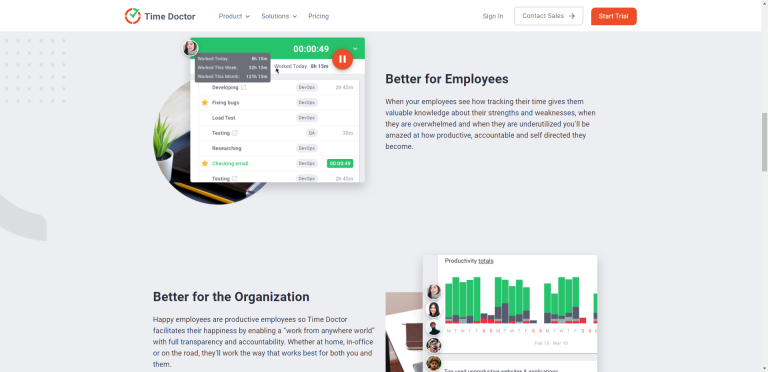
Time Doctor’s time tracking feature allows users to track the time spent on different tasks throughout the day. This
feature is useful for businesses that need to track their team’s time for billing, project management, or payroll purposes.
Screenshot Monitoring
Time Doctor’s screenshot monitoring feature captures screenshots of users’ screens at random intervals, providing a visual record of their activity throughout the day. This feature is useful for
managers and team leaders who want to monitor their team’s productivity and ensure that everyone is working towards the same goals.
Project Management
Time Doctor’s project management features allow businesses to manage multiple projects simultaneously. These features include
task assignment, task prioritization, time allocation per project, and project budgeting.
Attendance Tracking
Time Doctor’s attendance tracking features allow businesses to manage their team’s attendance and prevent time theft and absenteeism. These features include clock in and clock out, break tracking, and absence management.
Payroll Management
Time Doctor’s payroll management features allow businesses to automate their payroll calculations and process payments. This feature integrates with a wide range of accounting software, including QuickBooks and Xero.
Time Doctor’s features can help businesses of all sizes
stay organized and ensure that everyone is working towards the same goals. With its comprehensive time tracking,
project management, attendance tracking, and payroll management features, Time Doctor is an excellent choice for businesses looking to improve their time management and productivity.
4. Time Tracking Capabilities
Time Doctor’s time tracking feature is one of its core features, allowing users to track the time spent on different tasks throughout the day. Here are the key capabilities of
Time Doctor’s time tracking feature:
Manual vs. Automatic Time Tracking
Time Doctor allows users to track their time manually or automatically. Manual
time tracking requires users to enter their time manually, while automatic time tracking uses Time Doctor’s app to track time in the background.
Automatic time tracking is a more convenient option for most users and ensures that time is tracked accurately.
Real-time Tracking
Time Doctor’s real-time tracking feature provides users with a real-time view of their time usage. This feature allows users to see how much time they have spent on different tasks and adjust their work accordingly to stay on track.
Offline Tracking
Time Doctor’s offline tracking feature allows users to track their time even when they are not connected to the internet. This feature is useful for users who travel frequently or
work in areas with limited internet connectivity.
Time Tracking Accuracy
Time Doctor’s time tracking feature is highly accurate, ensuring that users’ time is tracked correctly. The app captures time down to the second, ensuring that even small increments of time are accounted for. Time Doctor also allows users to make manual adjustments to their time if needed, ensuring that their time is tracked accurately.
Time Doctor’s time tracking capabilities are comprehensive and flexible, allowing users to track their time manually or automatically and adjust their work accordingly to stay on track. The app’s
real-time tracking and offline tracking features ensure that time is tracked accurately, making it an excellent choice for businesses looking to improve their time management and productivity.
4.1. Time Tracking Integrations
Time Doctor integrates with a wide range of project management and communication tools, allowing users to track their time seamlessly and easily. Here are some of the most popular time tracking integrations supported by Time Doctor:
Trello
Trello is a popular
project management tool that allows users to organize their work using boards, lists, and cards. Time Doctor’s Trello integration allows users to track their time directly within Trello, making it easy to see how much time is being spent on different tasks.
Asana
Asana is a popular project management tool that allows users to manage tasks, projects, and teams. Time Doctor’s Asana integration allows users to track their time directly within Asana, making it easy to see how much time is being spent on different tasks and projects.
Basecamp
Basecamp is a popular
project management and communication tool that allows users to manage projects, tasks, and files. Time Doctor’s Basecamp integration allows users to track their time directly within Basecamp, making it easy to see how much time is being spent on different tasks and projects.
Slack
Slack is a popular
communication tool that allows users to send messages, share files, and collaborate with their team. Time Doctor’s Slack integration allows users to track their time directly within Slack, making it easy to see how much time is being spent on different tasks and projects.
Other Popular Integrations
Time Doctor also integrates with a range of other popular project management and communication tools, including Jira, GitHub, and Assembla. These integrations allow users to track their time seamlessly and easily, regardless of the tools they are using.
Time Doctor’s time tracking integrations are comprehensive and flexible, allowing users to
track their time seamlessly and easily within their favorite project management and communication tools. This integration ensures that users’ time is
tracked accurately and makes it easy for businesses to manage their team’s time and maximize productivity.
5. Screenshot Monitoring
Time Doctor’s screenshot monitoring feature captures screenshots of users’ screens at random intervals, providing a visual record of their activity throughout the day. While some users may have concerns about privacy, screenshot monitoring can be a valuable tool for businesses looking to monitor their team’s
productivity and ensure that everyone is working towards the same goals. Here is a closer look at Time Doctor’s screenshot monitoring feature:
Purpose and Applications
The purpose of Time Doctor’s screenshot monitoring feature is to help businesses monitor their team’s
productivity and ensure that everyone is working towards the same goals. This feature can be especially useful for
remote teams, as it allows managers and team leaders to see what their team members are working on and how much time they are spending on different tasks.
Customization Options
Time Doctor’s screenshot monitoring feature is highly customizable, allowing users to adjust the frequency of the screenshots and choose which applications and websites are monitored. Users can also choose to blur out sensitive information in the screenshots, ensuring that their team members’ privacy is protected.
Privacy Considerations
While screenshot monitoring can be a valuable tool for businesses, it is important to consider privacy concerns. Time Doctor’s screenshot monitoring feature only captures screenshots of the user’s screen, and not their keystrokes or mouse movements. Users can also choose to blur out sensitive information in the screenshots, ensuring that their team members’ privacy is protected. It is important for businesses to communicate clearly with their team members about the use of screenshot monitoring and ensure that their privacy concerns are addressed.
5.1. Screenshot Monitoring in Action
Real-life examples and case studies demonstrate the usefulness of screenshot monitoring. For example, one business reported that screenshot monitoring helped them identify that one team member was spending too much time on non-work-related websites, allowing them to address the issue and
improve their team’s productivity. Another business reported that screenshot monitoring helped them identify a software issue that was causing delays in their team’s work, allowing them to fix the issue and improve their team’s efficiency.
Time Doctor’s screenshot monitoring feature can be a valuable tool for businesses looking to monitor their team’s productivity and ensure that everyone is working towards the same goals. With customizable options and privacy considerations,
Time Doctor’s screenshot monitoring feature is a useful addition to any business’s time tracking and productivity toolkit.
6. Project Management Features
Time Doctor’s project management features are designed to help businesses manage multiple projects simultaneously and ensure that they are completed on time and within budget. Here are the key project management features offered by Time Doctor:
Task Assignment
Time Doctor’s task assignment feature allows team leaders and managers to assign tasks to individual team members. This feature ensures that everyone knows what they are
responsible for and helps to prevent confusion and duplication of work.
Task Prioritization
Time Doctor’s task prioritization feature allows team members to prioritize their tasks based on their importance and urgency. This feature ensures that everyone is working on the most important tasks first and helps to ensure that deadlines are met.
Time Allocation per Project
Time Doctor’s time allocation feature allows businesses to allocate time to individual projects and track how much time is being spent on each project. This feature is useful for businesses that
need to track their team’s time for billing or project management purposes.
Project Budgeting
Time Doctor’s project budgeting feature allows businesses to set budgets for individual projects and track how much money is being spent on each project. This feature is useful for
businesses that need to manage their expenses and ensure that they are staying within their budget.
Time Doctor’s project management features are comprehensive and flexible, allowing businesses to manage multiple projects simultaneously and ensure that they are completed on time and within budget. With features such as task assignment, task prioritization,
time allocation per project, and project budgeting, Time Doctor is an excellent choice for businesses looking to improve their project management and maximize productivity.
7. Attendance Tracking
Time Doctor’s attendance tracking features allow businesses to manage their team’s attendance and prevent time theft and absenteeism. Here are the key attendance tracking features offered by Time Doctor:
Clock in and Clock Out
Time Doctor’s clock in and clock out feature allows team members to record their time when they start and finish work. This feature ensures that businesses have an accurate record of their team’s attendance and can prevent time theft.
Break Tracking
Time Doctor’s break tracking feature allows team members to record their breaks and ensure that they are taking the appropriate amount of time off during the day. This feature can be used to prevent
burnout and ensure that team members are taking care of themselves.
Absence Management
Time Doctor’s absence management feature allows team members to request time off and have their requests approved by their team leader or manager. This feature ensures that businesses have an accurate record of their team’s absences and can plan accordingly.
Time Doctor’s attendance tracking features are comprehensive and flexible, allowing businesses to manage their team’s attendance and prevent time theft and absenteeism. With features such as clock in and clock out, break tracking, and absence management,
Time Doctor is an excellent choice for businesses looking to improve their attendance tracking and maximize productivity.
8. Payroll Management
Time Doctor’s payroll management features allow businesses to automate their payroll calculations and process payments. Here are the key payroll management features offered by Time Doctor:
Integration with Accounting Software
Time Doctor’s payroll management feature integrates with a wide range of accounting software, including QuickBooks and Xero. This integration ensures that payroll calculations are accurate and saves time by eliminating the need for manual data entry.
Automated Payroll Calculations
Time Doctor’s payroll management feature allows businesses to automate their payroll calculations and ensure that everyone is paid accurately and on time. This feature eliminates the need for manual calculations and reduces the risk of errors.
Reporting Capabilities
Time Doctor’s payroll management feature provides businesses with reporting capabilities, allowing them to generate customized reports and analyze their payroll data. This feature allows businesses to identify trends and make data-driven decisions about their payroll management.
Time Doctor’s payroll management features are comprehensive and
flexible, allowing businesses to automate their payroll calculations and process payments accurately and efficiently. With integration with accounting software, automated payroll calculations, and reporting capabilities,
Time Doctor is an excellent choice for businesses looking to improve their payroll management and maximize productivity.
9. Reporting and Analytics
Time Doctor’s reporting and analytics features allow businesses to analyze their team’s time usage and productivity and make data-driven decisions to improve their operations. Here are the key reporting and analytics features offered by Time Doctor:
Time Use Analysis
Time Doctor’s time use analysis feature provides businesses with a detailed breakdown of their team’s time usage. This feature allows businesses to see how much time is being spent on different tasks and identify areas where time can be saved.
Productivity Analysis
Time Doctor’s productivity analysis feature provides businesses with a detailed analysis of their team’s productivity. This feature allows businesses to see how much
work is being done and identify areas where productivity can be improved.
Customized Reporting
Time Doctor’s customized reporting feature allows businesses to generate customized reports based on their specific needs. This feature allows businesses to analyze their data in the way that makes the most sense for their operations and make data-driven decisions.
Time Doctor’s reporting and analytics features are comprehensive and flexible, allowing businesses to analyze their team’s time usage and productivity and make data-driven decisions to improve their operations. With features such as time use analysis, productivity analysis, and customized reporting, Time Doctor is an excellent choice for businesses looking to
improve their reporting and analytics capabilities and maximize productivity.
10. Integrations and API
Time Doctor offers a range of integrations and API capabilities, allowing businesses to seamlessly integrate Time Doctor with their existing
tools and systems. Here is a closer look at Time Doctor’s integrations and API capabilities:
Popular Integrations
Time Doctor integrates with a wide range of popular project management and communication tools, including Trello, Asana, Basecamp, and Slack. This integration ensures that users’ time is
tracked accurately and makes it easy for businesses to manage their team’s time and maximize productivity.
API Capabilities
Time Doctor’s API capabilities allow businesses to customize their Time Doctor experience and integrate Time Doctor with their existing tools and systems. With Time Doctor’s API, businesses can build custom integrations,
automate workflows, and access their data in real-time.
Time Doctor’s integrations and API capabilities are comprehensive and
flexible, allowing businesses to seamlessly integrate Time Doctor with their existing tools and systems and customize their Time Doctor experience. With popular integrations and API capabilities,
Time Doctor is an excellent choice for businesses looking to improve their time tracking and productivity capabilities.
11. Security and Privacy
Time Doctor takes
security and privacy seriously, implementing measures to ensure that users’ data is secure and protected. Here are the key security and privacy features offered by Time Doctor:
Data Encryption
Time Doctor uses bank-level
encryption to ensure that users’ data is protected and secure. This encryption ensures that users’ data is safe from unauthorized access and protects users’ privacy.
GDPR Compliance
Time Doctor is GDPR compliant, ensuring that users’ data is collected and processed in accordance with the GDPR’s strict privacy requirements. This compliance ensures that users’ data is protected and that their privacy is respected.
Data Storage
Time Doctor stores users’ data in secure servers located in the United States, Canada, and the European Union. These servers are protected by firewalls and other security measures to ensure that users’ data is safe and secure.
Time Doctor’s security and privacy features are comprehensive and ensure that users’ data is protected and secure. With features such as data encryption, GDPR
compliance, and secure data storage, Time Doctor is an excellent choice for businesses looking to protect their data and maintain their users’ privacy.
12. Mobile App
Time Doctor offers a mobile app for both iOS and Android devices, allowing users to track their time and productivity on-the-go. Here is a closer look at Time Doctor’s mobile app:
iOS and Android Compatibility
Time Doctor’s mobile app is compatible with both iOS and Android devices, making it easy for users to track their time and productivity from anywhere.
Mobile App Features
Time Doctor’s mobile app includes all of the same features as the desktop app, including time tracking, project management, and reporting and analytics. The mobile app also includes additional features, such as location tracking, which allows businesses to track their team’s location and ensure that they are working in the right place at the right time.
Time Doctor’s mobile app is a comprehensive tool for tracking time and productivity on-the-go. With compatibility with both iOS and Android devices and additional features such as location tracking,
Time Doctor’s mobile app is an excellent choice for businesses looking to improve their time tracking and productivity capabilities.
13. Pricing
Time Doctor offers a range of pricing plans to meet the needs of businesses of all sizes. Here is a closer look at Time Doctor’s pricing:
Pricing Tiers and Plans
Time Doctor offers three pricing tiers: Basic, Standard, and Premium. The Basic plan starts at $7 per user per month and includes time tracking, project management, and reporting and analytics features. The Standard plan starts at $10 per user per month and includes additional features, such as screenshot monitoring and payroll management. The Premium plan starts at $20 per user per month and includes advanced features, such as VIP support and concierge onboarding.
Free Trial Availability
Time Doctor offers a free 14-day trial for all of its pricing plans, allowing businesses to test out the features before committing to a plan. This trial period is a great way for businesses to see if Time Doctor is the right tool for their needs and to ensure that they are getting the most value for their money.
Time Doctor’s pricing is competitive and offers a range of features to meet the needs of businesses of all sizes. With pricing tiers and plans and a free trial availability,
Time Doctor is an excellent choice for businesses looking to improve their time tracking and productivity capabilities.
14. Customer Support
Time Doctor offers a range of support channels to help users get the most out of the tool. Here is a closer look at Time Doctor’s customer support:
Available Support Channels
Time Doctor offers several support channels, including email support, live chat support, and a comprehensive knowledge base. These support channels ensure that users can get the help they need, whether they have a quick question or need more in-depth support.
Response Time
Time Doctor’s response time is impressive, with most queries being resolved within 24 hours. This quick response time ensures that users can get the help they
need in a timely manner and get back to their work quickly.
15. User Interface and Ease of Use
Time Doctor’s user interface is intuitive and easy to use, making it easy for users to get started and navigate the tool. Here is a closer look at Time Doctor’s user interface and ease of use:
Design and Layout
Time Doctor’s design is sleek and modern, with a clean and easy-to-navigate layout. This
design ensures that users can easily find the features they need and track their time and productivity without any distractions.
Learning Curve
Time Doctor’s learning curve is minimal, with most users being able to get started and use the tool with little to no training. This ease of use ensures that businesses can get up and running quickly and start
improving their time tracking and productivity capabilities right away.
Time Doctor’s customer support is comprehensive and responsive, and the user interface and ease of use make it easy for businesses to get started and maximize productivity.
16. Time Doctor vs. Competitors
Time Doctor is a powerful time tracking and productivity tool that competes with other similar tools in the market. Here is a closer look at how Time Doctor compares to some of its competitors:
Toggl
Toggl is a popular
time tracking tool that offers similar features to Time Doctor, such as time tracking, project management, and reporting and analytics. However, Time Doctor stands out with its additional features such as screenshot monitoring, payroll management, and attendance tracking.
Time Doctor is also more affordable than Toggl, making it a better option for businesses looking for a comprehensive time tracking solution on a budget.
Hubstaff
Hubstaff is another time tracking and productivity tool that competes with Time Doctor. Hubstaff offers features such as time tracking, project management, and payroll management, similar to Time Doctor. However, Time Doctor has more advanced features such as screenshot monitoring, attendance tracking, and integrations with popular
project management tools, making it a better option for businesses looking for a more comprehensive solution.
RescueTime
RescueTime is a time tracking tool that focuses on helping users increase their productivity by monitoring how they spend their time. While
RescueTime offers some similar features to Time Doctor, such as time tracking and reporting and analytics, Time Doctor stands out with its additional features such as screenshot monitoring, attendance tracking, and payroll management. Time Doctor is also more affordable than RescueTime, making it a better option for
businesses looking for a comprehensive time tracking solution on a budget.
While there are other
time tracking and productivity tools available, Time Doctor stands out with its comprehensive features, affordability, and ease of use.
Time Doctor is an excellent choice for businesses looking to improve their time tracking and productivity capabilities.
17. Benefits of Using Time Doctor
Time Doctor offers a range of benefits to businesses of all sizes. Here are the key
benefits of using Time Doctor:
Increased Productivity
Time Doctor helps businesses increase their productivity by providing accurate time tracking and productivity analysis. By tracking how much time is spent on different tasks and identifying areas where time can be saved, businesses can optimize their operations and
improve their overall productivity.
Better Time Management
Time Doctor helps businesses manage their time more effectively by providing real-time tracking and reporting. This allows
businesses to identify areas where time can be better allocated and ensure that their team is working efficiently and effectively.
Simplified Payroll
Time Doctor’s payroll management feature simplifies the process of payroll calculation by automating the process. This saves businesses time and reduces the risk of errors, ensuring that employees are paid accurately and on time.
Enhanced Project Management
Time Doctor’s project management features, such as task assignment, task prioritization, and time allocation per project, help businesses manage their projects more effectively. This ensures that projects are completed on time and on budget, improving overall project management capabilities.
Time Doctor offers a range of benefits to businesses, including increased productivity, better time management, simplified payroll, and enhanced project management capabilities. With its comprehensive features and ease of use, Time Doctor is an excellent
choice for businesses looking to improve their time tracking and productivity capabilities.
18. Potential Drawbacks
While Time Doctor offers a range of benefits, there are some potential drawbacks to using the tool. Here are the key potential drawbacks of using Time Doctor:
Privacy Concerns
Time Doctor’s screenshot monitoring feature may raise privacy concerns among employees. While this feature can be turned off, it is important for businesses to
communicate clearly with their employees about the use of this feature and ensure that they are comfortable with it.
Limited Features for Certain Pricing Plans
Some of Time Doctor’s more advanced features, such as payroll management and VIP support, are only available on the higher-tier pricing plans. This may be a drawback for businesses looking for a more comprehensive solution but on a budget.
Learning Curve
While Time Doctor’s user interface is intuitive and easy to use, there may still be a learning curve for some users. It is important for businesses to provide adequate training and support to ensure that their team can use the tool effectively and get the most out of its features.
While Time Doctor offers many benefits, there are some potential drawbacks to consider. These include privacy concerns, limited features for certain pricing plans, and a learning curve for some users. However, with proper communication, budget planning, and training, businesses can mitigate these potential drawbacks and get the most out of Time Doctor’s features.
19. Testimonials and Case Studies
Here are some
success stories and case studies from Time Doctor users:
Success Stories from Time Doctor Users
Many
Time Doctor users have reported significant improvements in productivity and time management after implementing the tool. One user reported that
Time Doctor helped them increase their productivity by 30%, while another user reported that they were able to reduce their team’s idle time by 80%.
Challenges and Solutions
Some businesses may face challenges when implementing Time Doctor, such as privacy concerns or resistance from employees. However, there are solutions to these challenges. Clear
communication and transparency with employees about the use of Time Doctor’s features can help alleviate privacy concerns, and proper training and support can help employees overcome any resistance they may have to using the tool.
Time Doctor has received positive feedback from many of its users, with businesses reporting significant improvements in
productivity and time management. While there may be challenges in implementing the tool, there are solutions available to overcome them and get the most out of Time Doctor’s features.
20. Conclusion
Time Doctor is a powerful time tracking and productivity tool that offers a range of features to help businesses of all sizes improve their time management capabilities. From
time tracking and project management to payroll management and reporting and analytics, Time Doctor has everything businesses need to optimize their operations and improve their productivity.
With a user-friendly interface, comprehensive customer support, and competitive pricing,
Time Doctor is an excellent choice for businesses looking for a comprehensive time tracking and productivity solution. While there may be some potential drawbacks, such as privacy concerns and a learning curve for some users, these can be mitigated with proper communication, training, and support.
In summary, the key features and
benefits of Time Doctor include increased productivity, better time management, simplified payroll, enhanced project management, and comprehensive reporting and analytics. With its range of features, ease of use, and competitive pricing, Time Doctor is a
top choice for businesses looking to improve their time tracking and productivity capabilities.