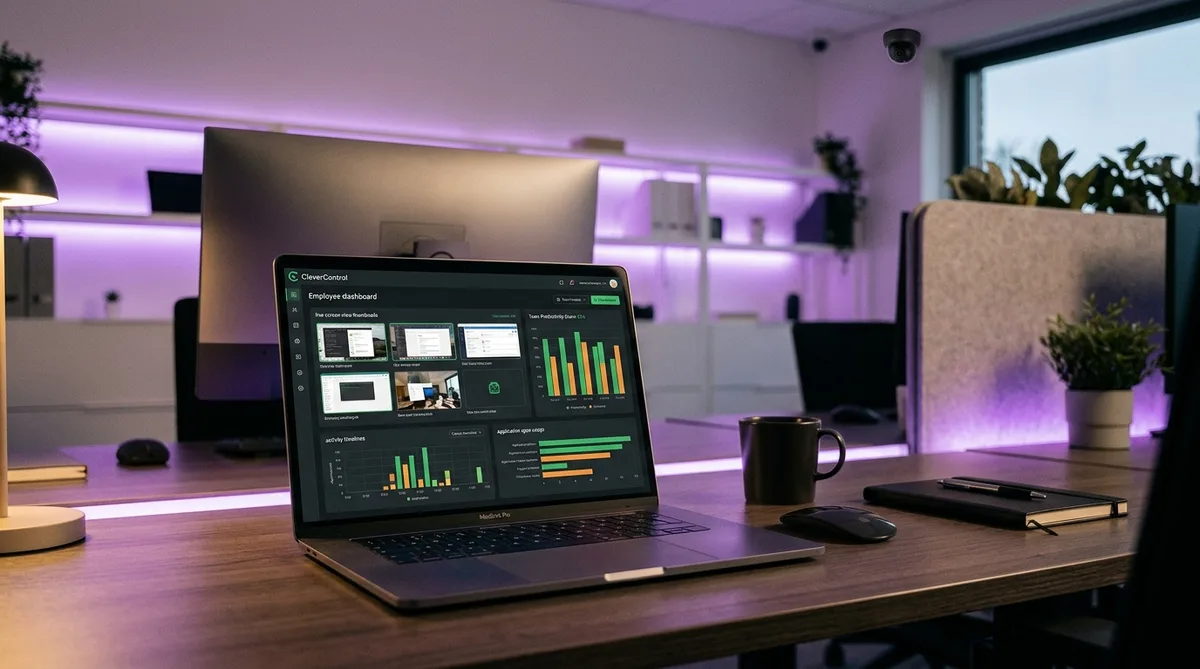
Why People Search for CleverControl Cheats
Most time trackers announce themselves. Hubstaff shows a timer, DeskTime sits in your tray, Time Doctor pops up screenshots warnings. CleverControl belongs to a different breed — it is monitoring software that can run with no tray icon, no Task Manager entry, and no listing in installed programs. Employees being watched by it often have no visual indication at all.
And what it watches is unusually broad. Beyond the standard app-and-website tracking, CleverControl records keystrokes, clipboard events, social media and messenger conversations, printed documents, and USB drives — and it can go further than almost any mainstream competitor by viewing the live webcam, recording microphone audio, and running face recognition on whoever sits at the machine.
Layered on top is an AI Scoring engine that reviews every application and website you touched, marks each as productive or unproductive for your specific role and industry, and assigns you a productivity score. Idle periods beyond a configured threshold are logged and reported per day, per employee.
All of that measurement still shares the same blind spot every tracker has: real work does not always generate input. Phone calls, reading, meetings away from the desk, and plain thinking all look identical to slacking. That gap is why people search for "how to cheat CleverControl" — and this guide covers what it monitors, what it costs, and how to keep your activity reports consistent when you step away. For the cross-platform picture, start with our guide on how to cheat time tracking software.
How CleverControl Tracks Your Activity
CleverControl ships in cloud and on-premise versions, with the agent installed on each monitored Windows or Mac computer. Here is what each layer of the monitoring stack does.
Hidden Mode — Invisible to Task Manager
This is CleverControl's defining feature. The agent supports a hidden mode in which it is not visible in the system tray, the Task Manager process list, or the installed programs list. An employer can choose a visible deployment for transparency, but the stealth option is a headline capability the company markets directly.
Two practical details matter here:
- Installation is manual. CleverControl has no remote or hidden installer — someone needs physical access to the computer with administrator rights. On company-managed machines, IT has exactly that.
- Detection is genuinely hard. The usual advice — check Task Manager, scan the tray, review installed programs — does not work against a hidden-mode agent. Indirect signs like unusual network traffic or sluggish performance are the only practical hints, and they are far from conclusive.
The takeaway: on a CleverControl-monitored machine, you should assume monitoring is always on, because there is no reliable way to confirm when it is.
Screenshots and Screen Recording
CleverControl captures screenshots triggered by events rather than timers — a change of active window, a new URL, or a clipboard operation each fires a capture. That means every app switch and every page you open can produce a screenshot, building a visual trail of your day that mirrors your actual navigation.
On top of triggered screenshots, the platform offers continuous screen recording and real-time live viewing — a manager can open a dashboard and watch your screen as you work, like a silent screen-share you did not start. Recordings are stored for later review and investigations.
Keystroke and Clipboard Logging
The agent records every keystroke across applications — documents, emails, chat messages, search queries — along with clipboard events, so copied and pasted text is captured too. Social networks and instant messengers get dedicated monitoring, meaning both sides of a conversation can end up in the logs.
Keystroke volume also feeds the activity picture. A long stretch of mouse motion with zero typing is plainly visible in the logs, which matters when we talk about simulation later.
Webcam, Microphone, and Face Recognition
This is where CleverControl goes beyond nearly every tool we have covered — even surveillance-heavy platforms like InterGuard stop short of audio and webcam recording. The platform supports:
- Live webcam viewing — managers can open the camera feed of a monitored computer in real time and track the surroundings, not just the screen
- Microphone recording — capturing sound around the computer, including conversations in the room
- Face recognition — identifying who is actually at the machine, used for attendance verification and detecting unauthorized users
- Call recording — logging voice calls made on the device
Whether an employer can legally enable these features varies enormously by jurisdiction — continuous audio and camera surveillance is restricted or illegal in many places. But the capability exists in the product, and on a monitored machine you cannot tell from the outside whether it is active.
AI Productivity Scoring
CleverControl's AI Scoring reviews the applications and websites you used, factors in your position and your company's industry, and marks each activity as productive or unproductive. It then calculates a productivity score per employee and effectively sorts the team into productive and unproductive workers — a ranking your manager sees on the dashboard.
This is the same direction enterprise tools like Veriato and Teramind have taken: raw activity data is no longer the product, the AI's interpretation of it is. The practical consequence is that what you appear to be doing matters as much as whether you appear active.
Idle Time Tracking
CleverControl records periods of inactivity that exceed a configured limit and reports total idle time per day for each team member. No mouse or keyboard input past the threshold, and the timeline marks you idle — those minutes are subtracted from your active hours and sit alongside your productivity score in the reports.
Combined with event-triggered screenshots, the idle log is precise: managers see not only that you were away, but exactly what was on screen before and after the gap.
CleverControl Pricing in 2026
CleverControl is priced per monitored computer, with the monthly rate dropping on longer commitments:
- 3-month plan — around $11 per PC per month
- 6-month plan — around $6.60 per PC per month
- 12-month plan — around $4.70 per PC per month, the cheapest rate
- On-premise version — for organizations that want monitoring data kept on their own servers, plus a configuration-free "Lite" edition for small businesses
- Free trial — 14 days with all features enabled
That pricing is notable: at under $5 per seat on an annual plan, CleverControl delivers surveillance capabilities — stealth mode, webcam access, keystroke logging — that enterprise platforms charge five times as much for. The low price point means it shows up in small businesses that would never budget for a Teramind or Veriato deployment.
Why Stealth Monitoring Changes the Stakes
With a visible tracker, you know the rules of the game: the timer is running, screenshots happen, you act accordingly. Hidden monitoring removes that certainty. You cannot adjust your behavior around something you cannot see, and you cannot tell the difference between an unmonitored machine and one that is logging every keystroke.
That asymmetry leads to one rational strategy: consistency, all the time. If your activity pattern is steady whether or not anyone is watching, the question of when the watching happens stops mattering. The employees who get flagged are the ones whose timelines show dramatic swings — fully active during known check-ins, dead air the rest of the day.
CleverControl's event-triggered screenshots reinforce this. Because captures fire on window changes and new URLs rather than on a schedule, there is no safe window between screenshots. Every transition you make is a potential capture, so the visual record tracks your real behavior closely. The full breakdown of how these systems correlate signals is in our guide to tricking employee monitoring software.
How to Maintain Consistent Activity Under CleverControl
Keeping a consistent profile under CleverControl means generating activity that holds up across every channel the agent logs — input, application focus, and on-screen content. This is the problem Trick Tack was designed for.
Trick Tack is a lightweight desktop application that simulates natural computer activity while you are away from your desk. Where a hardware jiggler produces one fake signal, Trick Tack produces the full set:
- Natural mouse movement — randomized, human-like cursor motion instead of the mechanical wiggle that stands out in activity logs. The documentation covers how the simulation engine works.
- Keyboard input simulation — realistic keystroke activity so the keystroke log does not show hours of silence next to a busy mouse trail.
- Application switching — focus cycles between your open applications, which keeps the foreground-app history varied and feeds the event-triggered screenshot system the kind of transitions a real session produces.
- Scrolling simulation — scroll events keep on-screen content moving, so captured screenshots show progression rather than one frozen window.
- Adjustable intensity — tune each simulation type to match your normal working pace, keeping your simulated stretches consistent with your real ones.
Practical tips specific to CleverControl deployments:
- Assume monitoring is always on. Hidden mode means you will not get a visual cue. Run your activity strategy consistently rather than reacting to whether you think you are being watched.
- Leave real work applications open. The AI Scoring engine classifies the apps and sites it sees. Simulated activity inside your actual work tools reads as productive; a desktop with nothing relevant open does not.
- Mind the camera and microphone. No software simulation covers a webcam pointed at an empty chair. If your employer's configuration includes webcam monitoring, activity simulation addresses the timeline, not the video feed — plan your absences accordingly.
- Use it for breaks, not for days. Trick Tack keeps your timeline clean through lunch, appointments, and errands. It does not produce deliverables, and no activity tool covers a week of missing output.
Stay Consistent Under Stealth Monitoring
CleverControl logs mouse, keyboard, app focus, and screen content — even when you cannot see it running. Trick Tack simulates all of it, naturally. Try it free for 7 days.
DownloadFrequently Asked Questions
Does CleverControl take screenshots?
Yes, CleverControl captures periodic screenshots, supports continuous screen recording, and offers live screen viewing from the cloud dashboard. Screenshots can be triggered by events or captured on a schedule, and managers can watch your desktop in real time without any notification. This makes CleverControl one of the most visually comprehensive monitoring tools available. TrickTack keeps your screen showing realistic work activity with varied app switching and input, so both live views and recorded screenshots look natural.
Is CleverControl visible in Task Manager?
Not when hidden mode is enabled. CleverControl's agent has a stealth mode in which it does not appear in the system tray, the Task Manager process list, or the installed programs list. Employers can also choose a visible deployment with a tray icon, but the hidden option is a core selling point of the product. The one practical limitation is that installation is manual — someone needs physical access to your computer with administrator rights to set it up, so it typically arrives on company-managed machines through IT.
Can CleverControl access my webcam and microphone?
Yes. CleverControl is one of the few mainstream monitoring tools that supports live webcam viewing, webcam snapshots, microphone sound recording, and even face recognition for identity and attendance verification. Whether these features are switched on depends on the employer's configuration and local law — webcam and audio surveillance is heavily restricted or outright illegal in many jurisdictions. On any monitored work device, it is safest to assume the camera and microphone could be active.
Can CleverControl detect mouse jigglers?
A basic mouse jiggler will defeat the idle timer but leaves obvious gaps everywhere else. CleverControl logs keystrokes, application focus, websites, and clipboard events alongside raw activity, and its AI Scoring categorizes what you actually did as productive or unproductive. Hours of mouse movement with zero keyboard input, no app switching, and an unchanging screen produce a timeline that looks nothing like real work. Convincing activity simulation needs to cover mouse, keyboard, scrolling, and application switching together.
How do I know if CleverControl is installed on my computer?
Because hidden mode removes the tray icon, the Task Manager entry, and the installed-programs listing, you usually cannot confirm it directly. Start with paperwork instead: your employment contract, employee handbook, or IT acceptable-use policy — most companies disclose monitoring in writing even when the software itself is invisible. Note that CleverControl requires manual installation with admin rights, so it cannot appear on a machine no one had physical or administrative access to. On any company-owned device, the safe assumption is that monitoring may be present.
Conclusion
CleverControl packs an unusual amount of surveillance into a budget price: stealth deployment invisible to Task Manager, event-triggered screenshots, full keystroke and clipboard logging, live webcam and microphone access, face recognition, and AI productivity scoring — from under $5 per computer per month.
The invisibility is what changes the calculus. With no way to confirm whether monitoring is active, the only strategy that holds up is a consistently clean activity profile — balanced input streams, varied application focus, and a timeline without dramatic gaps, every day.
Trick Tack delivers exactly that: natural mouse, keyboard, scrolling, and app-switching simulation in a lightweight app you switch on whenever you step away. Your idle log stays empty, your screenshots show a working session, and your activity reports stay consistent regardless of who is watching.
For more platform-specific guides, see how to cheat Veriato and how to cheat Teramind, or get the complete overview in how to trick employee monitoring software.
Try Trick Tack Free for 7 Days
Simulate natural mouse, keyboard, scrolling, and app-switching activity to keep your CleverControl reports consistent. Cancel anytime during your trial.
Download

