Why People Search for This
If your employer has rolled out Sapience Pro, you have probably noticed an agent quietly running in the background — and you have probably started wondering exactly what it sees. Searching for how to cheat Sapience Pro usually is not about doing less work. More often, it comes from a fair worry: that a stretch of quiet thinking, a lunch break, or an afternoon spent in meetings will quietly drag down a "work pattern" score you never agreed to be measured by.
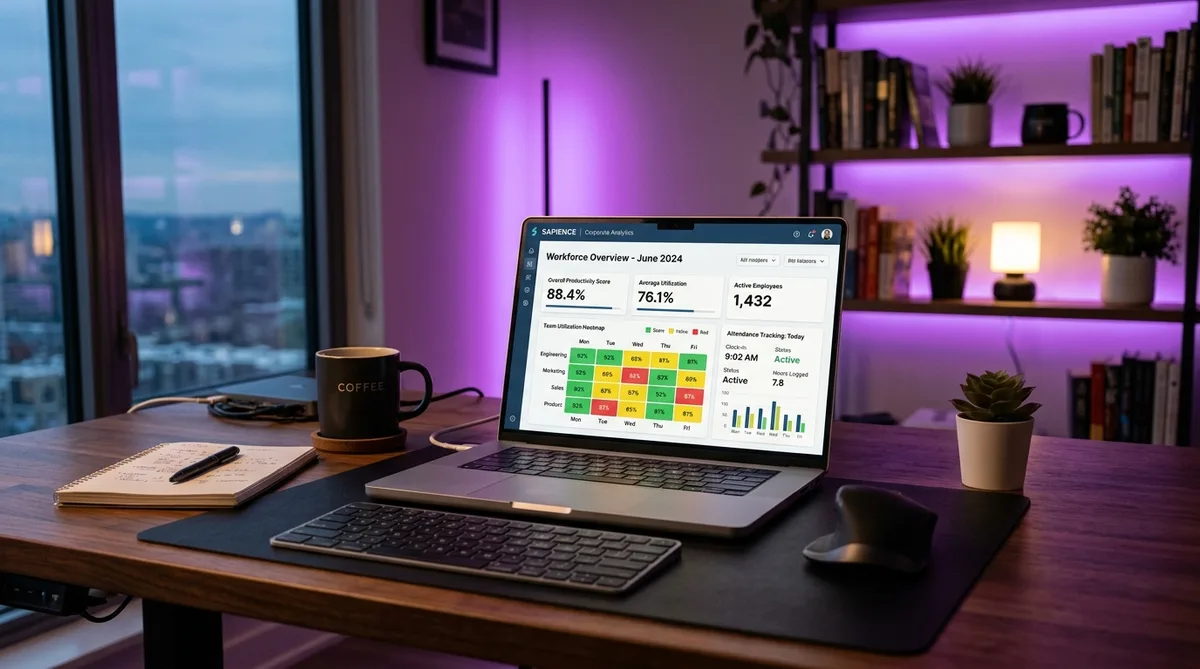
Sapience Pro is the modern, enterprise-grade evolution of the older Sapience platform. It runs silently, samples your activity constantly, and builds a detailed picture of how you spend your day — which apps you use, how long you stay focused, and when your machine goes idle. Unlike screenshot-heavy trackers, Sapience leans on a privacy-first model, which sounds gentler but in practice means it is watching patterns rather than pixels.
The trouble is that knowledge work rarely produces a clean, continuous activity trail. You step away to think. You read a printed spec. You take a call on your phone. None of that registers, and the gaps it leaves can make a productive day look like a slow one. That mismatch between how work actually happens and how Sapience records it is exactly why people look for a Sapience Pro hack.
This guide breaks down precisely how Sapience Pro monitors you, how it differs from the older Sapience Buddy, what it costs, and how to keep your activity reports consistent during legitimate breaks. For a wider view of the whole category, start with our hub guide on how to cheat time tracking software. If your team uses the classic desktop edition, we also cover Sapience Buddy and ProHance separately.
How Sapience Pro Tracks Activity
Sapience Pro does not rely on a single signal. It layers several monitoring mechanisms together so that the analytics it produces are accurate enough for managers to make staffing and performance decisions. Understanding each layer is the key to keeping your reports consistent. Let us walk through them.
Automatic, Always-On Collection
Like other enterprise trackers, Sapience Pro is fully automatic. There is no timer to start and no timesheet to fill in. Once the agent is installed, it begins capturing time-use data from your device the moment you log in and keeps going until you shut down. The collection happens in the background, so most employees barely notice it is there.
What sets Sapience apart is the sampling frequency. In enterprise deployments, the data collector polls activity extremely often — as frequently as every 15 seconds — to build a fine-grained, time-based dataset. That high resolution is the whole point: it lets Sapience reconstruct your day in detail rather than in rough hourly blocks. The practical consequence is that short gaps and sudden changes in behavior are far more visible than they would be on a coarser tracker.
Work Pattern Analysis
Sapience Pro's signature capability is work pattern analysis. Rather than just totaling hours, it studies the shape of your day: when you start, when you wind down, how long your focused stretches last, how often you context-switch, and how your activity compares to your own historical baseline and to your team. Over time it builds a profile of what a "normal" day looks like for you.
This is a double-edged sword. Because Sapience knows your typical rhythm, a day that suddenly looks very different — long quiet periods, an unusual cluster of activity at odd hours, or a flat unchanging pattern — can stand out. The tool is effectively looking for deviations from your own norm, which is more sophisticated than a simple "active versus idle" meter used by tools like Insightful or ActivTrak.
The flip side is that work-pattern analysis rewards consistency. If your activity stays steady and human-looking across the day, you blend into your own baseline and nothing flags. The goal is not a wall of frantic activity — it is a believable, even rhythm.
Productivity Scoring
On top of raw time data, Sapience Pro classifies the applications and websites you use and rolls them into productivity metrics. Business tools, email, and collaboration apps register differently than social media or streaming, and managers can see how your active time breaks down across those categories. The platform also correlates effort with outcomes, so leadership can compare hours logged against work actually delivered.
Like most foreground-aware trackers, Sapience measures the application that is actually in focus, not merely the ones that happen to be open. A reporting tool sitting behind your browser does not count while a personal tab is on top. This is the same focus-based logic that makes tools like DeskTime hard to fool with a static screen — what matters is which window is in front and for how long.
Idle and Attendance Detection
Sapience Pro tracks idle time by watching for mouse and keyboard input. After roughly five minutes of no input, it marks you as idle and your active-time clock stops accumulating. The exact threshold can be tuned by your organization, but a few minutes of stillness is generally enough to register a gap on your timeline.
Because the collector samples so frequently, those idle gaps are recorded precisely and are easy to spot. Idle time is not scored as "bad" so much as simply absent — but a day full of small absences still adds up to a lower active total than your peers, which is its own kind of red flag.
Sapience has also pushed into attendance and presence validation, including return-to-office reporting that confirms whether and where employees are actually working. For remote and hybrid staff, that means the platform is not only measuring how active you are, but increasingly whether you are present at all during your scheduled hours.
The Privacy-First Data Model
One genuinely distinctive thing about Sapience is its privacy-first stance. The platform deliberately avoids the most invasive monitoring tactics: it does not capture periodic screenshots, it does not log keystrokes, and it does not record your screen. It is SOC-2 compliant and even offers options to anonymize employee identities in the data.
This matters for two reasons. First, it means Sapience cannot "see" the content of what you are doing — only the metadata of which app is active and how long. Second, it means the entire weight of monitoring rests on activity signals and foreground tracking. There is no screenshot to contradict your timeline, so a consistent, realistic activity pattern is what defines a normal-looking report. That is precisely why an activity tool that mimics genuine human input is well matched to how Sapience actually measures work.
Sapience Pro vs Sapience Buddy
It is easy to confuse the two products, but they serve very different purposes. Sapience Buddy is the older, self-monitoring desktop tool. Its whole pitch was personal: it discovered your daily work patterns, nudged you with break and wellness reminders, and even included a "Work Yoga" feature to encourage healthier habits. The free Buddy Lite edition was aimed at individuals, and it was widely noted for relatively loose, imprecise data collection.
Sapience Pro represents the upgraded, accuracy-focused version of the platform. Where Buddy gently coaches you about your own habits, Pro produces the precise, manager-facing analytics that organizations rely on to score productivity, balance workloads, and validate presence. The difference in data quality is the headline: the older Buddy experience was forgiving, while the Pro-grade collection is granular and far harder to wave away.
The practical takeaway is simple. If your employer is making decisions based on Sapience reports, you are almost certainly being measured by Pro-grade data collection, not the friendly Buddy nudges. That means the casual tricks that might have slipped past old Buddy — leaving an app open, occasional mouse wiggling — are far less convincing against Pro's frequent sampling and work-pattern baselines. For a deeper look at the classic editions, see our dedicated guide to Sapience Buddy and ProHance.
Sapience Pro Pricing in 2026
Sapience pricing falls into two very different worlds, and it helps to know which one your organization is in.
The Personal Edition
The consumer-facing Sapience Buddy Pro edition has historically been priced at around $24 per year for an individual user, compared to the free Buddy Lite tier. This is the self-monitoring product aimed at people who want to understand their own time use, and its low price reflects that personal-productivity focus rather than enterprise reporting.
The Enterprise Platform
The Sapience Pro platform that most employees actually encounter — the one their employer deploys across an entire workforce — uses custom enterprise pricing that is not published publicly. Like most workforce-analytics vendors, Sapience negotiates per-seat pricing directly with each organization based on headcount, deployment scope, and the analytics modules required. There is no public price list, and figures are only available by contacting their sales team for a demo and quote.
This is typical of the enterprise monitoring space. Tools positioned for large organizations almost always hide pricing behind a sales conversation, because deals are sized to the customer. If you are an employee, the cost is irrelevant to you anyway — what matters is what the platform measures, which we have covered above.
How to Maintain Consistent Activity
By now the picture is clear. Sapience Pro does not rely on screenshots or keystroke logs — it relies on activity signals, foreground app tracking, idle detection, and work-pattern baselines. To keep your reports consistent during legitimate breaks, you need activity that looks like genuine human work across all of those dimensions, not a single repetitive trick.
This is exactly what TrickTack is built for. TrickTack is a lightweight desktop app that simulates natural human activity while you are away from your desk. Unlike a crude mouse jiggler, it is designed around the specific signals that modern trackers like Sapience actually measure.
Why TrickTack Fits How Sapience Works
Because Sapience leans on activity patterns rather than screen content, the quality of your simulated activity is what matters. Here is how TrickTack maps onto each layer of Sapience's monitoring:
- Mouse movement simulation — TrickTack generates natural, randomized mouse motion rather than robotic straight lines. This keeps Sapience's activity signal alive and prevents the five-minute idle threshold from triggering during a break.
- Keyboard input simulation — Sapience watches keyboard activity alongside the mouse. Movement with zero typing looks unnatural, so TrickTack simulates realistic keyboard input to keep both signals present and balanced.
- App and tab switching — Because Sapience tracks the foreground application and analyzes your work patterns, having productive tools cycle into focus matters. TrickTack can switch between open applications so your active-time mix reflects real work rather than one frozen window.
- Scrolling simulation — Genuine work involves scrolling through documents, code, and pages. TrickTack adds scroll activity so your behavior profile looks human across the board, not just at the cursor.
Together these signals produce the kind of steady, varied, human-looking pattern that Sapience's work-pattern analysis expects to see. Crucially, because the activity is randomized and continuous rather than a single repeated motion, it blends into your own baseline instead of creating the flat, robotic signature that makes a basic jiggler stand out over time.
Getting Started
Setting up TrickTack to work alongside Sapience Pro takes only a few minutes:
- Start a free 7-day trial — cancel anytime during the trial period.
- Install TrickTack on your Windows PC, or run the portable build with no installation.
- Open your real work apps before you step away — since Sapience tracks foreground applications, giving TrickTack productive windows to cycle through keeps your category mix realistic.
- Activate TrickTack whenever you need to step away, and let it maintain a believable activity pattern until you return.
The advantage over improvised hacks is that TrickTack was built specifically to match how monitoring software measures activity. For more on applying this across different platforms, see our broader guide to tricking employee monitoring software, and our reference page in the documentation.
Keep Your Sapience Pro Reports Consistent
TrickTack simulates mouse, keyboard, scrolling, and app switching — the core activity signals Sapience Pro monitors. Try it free for 7 days.
DownloadFrequently Asked Questions
Does Sapience Pro take screenshots or log keystrokes?
No. Sapience deliberately positions itself as a privacy-first platform and does not capture periodic screenshots, log keystrokes, or record your screen. Instead, it measures which applications and websites are in the foreground, how long you spend in each, and whether your machine is active or idle. This means Sapience Pro cares about the shape of your activity over time rather than the literal content of your screen. Because it relies on activity and foreground-app signals rather than screenshots, consistent input and realistic app usage are what keep your work-pattern reports looking normal.
How quickly does Sapience Pro detect that I am idle?
Sapience marks you as idle after roughly five minutes with no mouse or keyboard input, at which point your tracked active time stops accumulating. The exact threshold can vary slightly depending on how your organization has configured the platform, but a few minutes of stillness is typically enough to register a gap. Because Sapience's data collector samples activity very frequently — as often as every 15 seconds in enterprise deployments — those idle gaps are recorded with fine granularity and show up clearly on your work-pattern timeline. Maintaining light, continuous activity is what prevents these gaps from appearing.
What is the difference between Sapience Pro and Sapience Buddy?
Sapience Buddy is the older, self-monitoring desktop tool focused on personal time awareness, break reminders, and work-life balance, and its free edition was known for relatively loose data collection. Sapience Pro is the upgraded, more accurate version of the platform, with tighter tracking, richer work-pattern analytics, and reporting that managers can actually rely on. In short, Buddy nudges you about your own habits, while Pro produces the precise activity data organizations use to score productivity. If your employer relies on the reports, you are almost certainly being measured by the Pro-grade data collection rather than the gentle Buddy experience.
Can Sapience Pro detect a mouse jiggler?
Sapience Pro has no dedicated mouse-jiggler detector, but a basic jiggler still will not produce convincing data. Sapience records which application is in the foreground and how your activity is distributed across the day, so endless mouse wiggle inside a single idle window looks unnatural over time. A flat pattern of identical micro-movements with no keyboard input, no scrolling, and no app changes stands out against genuine human work. Tools like TrickTack that combine mouse movement with keyboard input, scrolling, and application switching match far more of the signals Sapience actually measures.
Does Sapience Pro track me after working hours?
Sapience is designed to capture activity during defined working hours and emphasizes privacy outside of them, so most deployments focus analytics on your scheduled work window. However, what counts as a working hour depends entirely on how your organization configures the platform, and some setups continue collecting background activity whenever the machine is on. Sapience also avoids storing personally invasive data like screenshots, which keeps the focus on time and application patterns rather than screen content. If you are unsure about your company's configuration, assume any activity while the agent is running may be recorded and plan accordingly.
Conclusion
Sapience Pro is one of the more thoughtful enterprise monitoring platforms in 2026. By avoiding screenshots and keystroke logging in favor of high-frequency activity sampling and work-pattern analysis, it builds a detailed, privacy-conscious picture of how you spend your day — which paradoxically makes it harder to fool with crude tricks than a screenshot-heavy tracker would be.
That sophistication is exactly why a static screen or a single repeated mouse motion will not hold up. Sapience looks at the whole rhythm of your day: which apps are in focus, how your activity is distributed, when you go idle, and how all of it compares to your own baseline. A convincing report needs varied, human-looking activity across every one of those signals.
TrickTack was designed for precisely this kind of multi-layered, pattern-based monitoring. By simulating natural mouse movement, keyboard input, scrolling, and app switching, it maintains the steady, believable activity profile Sapience Pro expects to see — so a lunch break, an offline meeting, or a stretch of focused thinking away from the keyboard does not quietly dent your work-pattern score.
For more strategies across specific platforms, see our guides on how to cheat Insightful and how to cheat ActivTrak, our coverage of Sapience Buddy and ProHance, and the full hub on cheating time tracking software.
Try TrickTack Free for 7 Days
Simulate natural mouse, keyboard, scrolling, and app-switching activity to keep your Sapience Pro reports consistent. Cancel anytime during your trial.
Download

