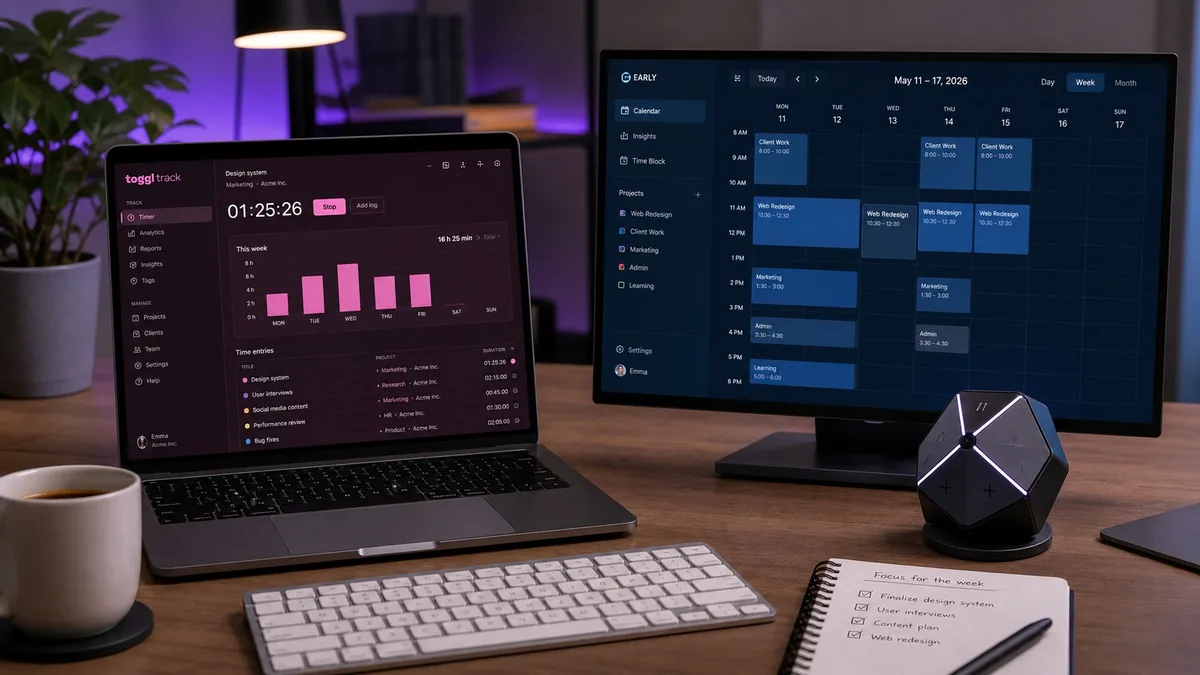
Toggl Track and Timeular are often grouped together because both record time against projects. That description misses the choice that matters in an actual workday. Toggl is a polished software timer that tries to stay out of your way. Timeular, now branded as EARLY, is a software platform built around making time tracking feel tangible, including an optional eight-sided Tracker you flip when you change tasks.
For an employee, freelancer, or consultant, the better product is not the one with the longest feature list. It is the one you will remember to use without breaking concentration. If you already start timers reliably and want a capable free plan, Toggl is the sensible default. If your timesheet is full of gaps because clicking a timer never becomes automatic, EARLY's physical cue can solve a real behavioral problem.
Quick verdict
Choose Toggl Track if you want the lowest-cost entry point, easy timers across devices, broad browser-extension integrations, and straightforward client reporting. It is especially strong for solo workers and small teams that do not need surveillance.
Choose Timeular/EARLY if consistent time capture matters more than price, you like calendar-based editing, or physically flipping a device will help you switch tasks deliberately. Its local automatic-tracking context and midnight delay on shared time data also reflect a worker-conscious privacy model.
| Decision point | Toggl Track | Timeular / EARLY |
|---|---|---|
| Best for | Software-first tracking and client work | Building a reliable tracking habit |
| Free plan | Yes | No permanent free plan listed |
| Physical tracker | No | Optional 8-sided Tracker |
| Automatic context | Private Timeline on desktop | Local app and website context |
| Screenshots / keylogging | Neither | Neither |
| Core platforms | Web, desktop, mobile, extensions | Web, desktop, mobile |
| Annual individual entry price | Free; Starter from $9/license/month | Personal $90/year |
| Strongest habit cue | Reminders, idle prompts, Pomodoro | Flip the physical Tracker |
First, Timeular Is Now EARLY
Timeular officially changed its name to EARLY in March 2025. The company said the account, workflows, product, pricing, and physical Tracker continued through the rebrand. That is why current product pages live at early.app while older reviews, customer conversations, and search queries still use “Timeular.” It is one product, not a discontinued app and a replacement.
This comparison uses Timeular/EARLY where the old name helps orientation and EARLY when describing the current service. Our standalone Timeular review goes deeper into the rebrand and the Tracker itself.
The Daily Workflow: Click a Timer or Flip an Object
Toggl Track: fast, familiar software
Toggl's main loop is intentionally ordinary: choose a project, add a description, and press play. You can start time in the web app, desktop app, mobile app, or from buttons embedded in supported web tools through the browser extension. If you forget, you can enter time later in a list, calendar, or timesheet view.
The desktop app can also record a private Timeline of apps and websites used for more than a short interval. That history helps you reconstruct the afternoon without turning every app switch into a submitted time entry. You choose what becomes part of the official timesheet. Idle detection asks what to do when a running timer and computer activity no longer match, which is useful when you walk away and forget to stop.
This is a strong workflow for workers who live in browser-based project tools. The extension connects time capture with more than 100 tools, so starting the timer can happen beside the task instead of in a separate app. The tradeoff is behavioral: every software timer eventually becomes another button you can ignore.
EARLY: make the task switch physical
EARLY offers conventional desktop, web, and mobile timers, plus Quicktrack keyboard shortcuts and a calendar where entries can be created, dragged, copied, and corrected. You do not need the hardware. The distinctive option is the eight-sided Bluetooth Tracker: assign an activity to a side, then turn that side upward to start tracking it.
That small gesture changes the psychology. A task switch is no longer “remember to find a timer”; it is “flip the object already sitting beside the keyboard.” For someone who moves among a predictable set of activities—client work, email, meetings, research, admin, learning—the Tracker can make time boundaries visible and deliberate.
Eight faces do not limit you to eight activities. EARLY's Quicktrack can open from an unassigned side, and the software can hold far more activities than the device displays at once. The device requires Bluetooth to begin a tracked session, but EARLY says the app continues tracking if the connection drops after the session starts.
The practical test: If you forget timers because the interface is inconvenient, both products are easy enough. If you forget because task switching is unconscious, EARLY's physical cue offers something Toggl cannot reproduce with another notification.
Privacy: What Is Captured and What Can a Manager See?
Neither product is designed like employee-monitoring software. Toggl Track does not take screenshots, log keystrokes, or expose its private Timeline to managers. The Timeline is a personal memory aid: it records app and website use only when enabled, and the user decides which context becomes a time entry.
EARLY's automatic tracking can list the apps and websites used and, for supported contexts, show document or page titles. Its help center says this automatic context is encrypted and stored only on the user's machine. You can block individual apps or websites or disable the feature. That local context helps reconstruct time; it is different from the time entries you deliberately submit to a shared workspace.
In shared EARLY folders, members with full access can see other members' time-entry data in Insights, but current-day entries are delayed until after midnight in the entry creator's time zone. That does not make a submitted timesheet private, but it reduces live micromanagement. Managers see the work record after the day, not a minute-by-minute live feed of the current session.
There is still an important employee-side distinction: privacy-friendly does not mean invisible. If your employer owns the workspace, project labels, durations, notes, and submitted entries can be part of team reporting. Accurate descriptions and a clear timesheet policy matter. Neither app is meant to disguise how long work took, and neither is a substitute for understanding workplace monitoring rules.
If your workplace separately runs software that scores keyboard or mouse activity, that is a different layer from Toggl or EARLY. Our employee monitoring guide explains what those tools can collect. For Toggl-specific questions about idle prompts and reported time, see how Toggl tracking works from the employee side.
Features, Reports, and Where Each Product Pulls Ahead
Toggl is stronger as a flexible software ecosystem
Toggl covers real-time, manual, and duration-only entries; calendar, list, and timesheet views; desktop and mobile apps; browser extensions; reminders; idle detection; Pomodoro sessions; and automatic context. Its reporting grows with the plan, from time and productivity summaries to billing, revenue, utilization, labor cost, profit, and profitability.
For freelancers and agencies, the paid plans add the commercial layer: billable rates, project estimates, revenue analysis, fixed-fee projects, scheduled reports, timesheet approvals, and data-accuracy controls. Toggl also lists CSV import, PDF and spreadsheet exports, APIs, and webhooks. If the timer must connect to many different client systems, that breadth matters.
EARLY is stronger as a time-awareness system
EARLY combines timers with a calendar, automatic suggestions, project budgets, billable rates, work-hour tracking, overtime, leave management, saved reports, productivity insights, and exports on the appropriate plans. Personal Pro adds calendar connections and wider integration options; Team adds shared activities, analytics, permissions, and seat management.
The physical Tracker remains the clearest differentiator, but EARLY is not merely a gadget companion. Its desktop Quicktrack shortcut is useful when hands are already on the keyboard, and its calendar is designed for correcting the record after the day. Automatic app context provides evidence for gaps without automatically publishing that browsing history into a team report.
Toggl wins if “more places to start a timer” is the priority. EARLY wins if “make time visible while I am working” is the priority. Both can produce credible project records; they simply attack forgetfulness from different directions.
Toggl vs Timeular Pricing in 2026
Pricing is where Toggl has the clearest advantage for a solo worker. Its Free plan covers core tracking across web, desktop, and mobile, calendar integrations, browser-extension integrations, and productivity reports. Toggl lists Starter at $9 per license per month billed annually and Premium at $18 per license per month billed annually. Current monthly rates are higher, and paid organizations are billed by licenses rather than only by people who happened to log time that month.
EARLY's help center lists Personal at $9 per month or $90 per year, Personal Pro at $14 per month or $140 per year, and Team at $19 per seat per month or $190 per seat per year. EARLY's pricing page says the physical Tracker and subscription are sold separately. Because the current public Tracker price can vary by market and offer, check the official shop rather than relying on an older review figure.
| Plan | Current listed price | Who it fits |
|---|---|---|
| Toggl Free | $0 | Solo users and small, simple workflows |
| Toggl Starter | $9/license/month, annual | Client billing and project estimates |
| Toggl Premium | $18/license/month, annual | Approvals, profitability, and data controls |
| EARLY Personal | $9/month or $90/year | Individual tracking and basic reports |
| EARLY Personal Pro | $14/month or $140/year | Exports, calendars, and integrations |
| EARLY Team | $19/seat/month or $190/seat/year | Shared activities and team analytics |
Do not compare Toggl Starter only with EARLY Personal by number. Compare the features you actually need. A freelancer who needs billable rates and project estimates may justify Toggl Starter. A worker buying EARLY mainly to use the physical Tracker should include both subscription and hardware in the first-year cost. If the hardware does not change tracking behavior, the premium has not bought much.
Which One Fits Your Work?
Choose Toggl if you are a freelancer who bills several clients
Toggl's free entry point makes it easy to test your project structure before paying. Starter then adds billing and estimate features without changing the familiar timer. Browser-extension buttons also reduce friction when work lives across task-management and development tools. If clients want clean reports rather than a picture of your whole day, Toggl is usually the direct route.
Choose EARLY if ADHD, context switching, or timer amnesia is the real problem
A physical cue can be disproportionately useful when working memory is already overloaded. Flipping a Tracker makes the transition explicit without opening an app or choosing from a long list. This is not a medical claim or a universal solution; it is a workflow advantage for people who respond well to tactile prompts and a small set of recurring activity categories.
Choose Toggl if you need a free personal tracker
This decision is simple. Toggl has a permanent Free plan; EARLY currently sells paid subscriptions. If you are learning what to track or only need a personal record, start free and see whether the habit survives. Our broader time tracking software comparison includes other free and paid alternatives.
Choose EARLY if calendar reconstruction is part of your routine
EARLY's daily and weekly calendar, automatic context, calendar-event suggestions, and drag-to-edit workflow make it comfortable to clean up a day visually. The local automatic-tracking history can help fill gaps without turning that raw context into a manager-facing surveillance feed.
Choose either if your team rejects screenshots and keylogging
Both products support accountability without screen capture. Toggl leans toward flexible reporting and billing; EARLY leans toward time awareness, privacy controls, and deliberate task switching. A team should choose based on workflow and reporting rather than trying to maximize the amount of worker data collected.
How to Switch Without Losing Your Tracking Habit
Changing tools can briefly make time data worse because familiar triggers disappear. Treat the first week as a workflow migration, not merely a data import.
- Export before changing. Download the reports or raw entries your current plan provides and keep the old workspace readable until invoices and project totals are reconciled.
- Simplify categories. Bring over active clients and projects, not years of abandoned tags. Too many choices make any timer easier to skip.
- Rebuild your triggers. In Toggl, add extension buttons, reminders, and favorite entries. In EARLY, assign the physical faces or Quicktrack shortcuts to the activities you actually switch among.
- Run both for only a short overlap. Use a day or two to compare totals, then select one authoritative record. Parallel timers create duplicate and contradictory entries.
- Review gaps after five working days. If entries are still missing, the problem is probably the tracking habit or project taxonomy rather than the report screen.
If Toggl's software-only approach already works, moving to EARLY just for novelty adds cost and another object to manage. If the physical action materially improves capture, the change can pay for itself in more complete billing or a more honest picture of the day. Conversely, if the Tracker spends the week untouched, Toggl's simpler setup is the better answer.
Frequently Asked Questions
Is Timeular now called EARLY?
Yes. Timeular officially became EARLY in March 2025. The account, product, physical Tracker, and existing user data continued through the rebrand. People still search for Timeular, so this comparison uses both names, but EARLY is the current brand.
Is Toggl or Timeular better for freelancers?
Toggl Track is the better default for most freelancers because its Free plan covers core tracking and its paid Starter plan adds billable rates and project estimates. EARLY is the better fit when forgetting to start and switch timers is the main problem and a physical cue would improve consistency.
Does Toggl or Timeular take screenshots?
No. Neither Toggl Track nor EARLY takes screenshots as part of its time-tracking product. Toggl's optional Timeline records apps and websites privately to help the user reconstruct time. EARLY can collect local app and website context when automatic tracking is enabled, and its help center says that context is encrypted and stored only on the user's machine.
Can you use Timeular without the physical Tracker?
Yes. EARLY works on desktop, web, and mobile without the physical Tracker. You can run timers, use Quicktrack keyboard shortcuts, add time manually, and edit entries in the calendar. The Tracker is an optional habit device, not a requirement.
Which is cheaper, Toggl or Timeular?
Toggl is cheaper for a solo user because it has a Free plan. Its Starter and Premium plans begin at $9 and $18 per license per month with annual billing. EARLY lists Personal at $9 per month or $90 per year and Personal Pro at $14 per month or $140 per year; its physical Tracker is sold separately.
Sources and Method
This comparison was checked on August 14, 2026 against current primary product documentation: Toggl Track pricing and feature matrix, Toggl's screenshot and Timeline policy, EARLY pricing and plan comparison, EARLY's plan details, EARLY automatic-tracking privacy documentation, and EARLY's shared-data delay explanation. Prices and plan contents can change; verify the checkout relevant to your region before purchasing.
Final Recommendation
Toggl Track wins for most workers because the free plan, wide integration surface, and familiar timer make it easy to adopt without committing money or desk space. It is the better first choice when you already have a reasonable tracking habit and mainly need accurate project records, billable reports, or a lightweight team timesheet.
Timeular/EARLY wins for a specific but important group: people whose real obstacle is remembering to track during frequent context switches. The physical Tracker is not a decorative extra when flipping it becomes the task-change ritual. EARLY also gives workers useful local context and avoids turning its automatic history into a live surveillance feed.
Start with the behavior you need to change. If the answer is “make reporting simpler,” pick Toggl. If it is “make task switching visible,” try EARLY and the Tracker. If neither problem exists, keep the tool you already use and spend the migration time on the work itself.
Need Consistent Activity Between Timers?
Trick Tack is separate from your timesheet. It keeps your computer active during short breaks across Windows, macOS, and Linux, with a 7-day free trial.
Try Trick Tack Free

