The Core Difference
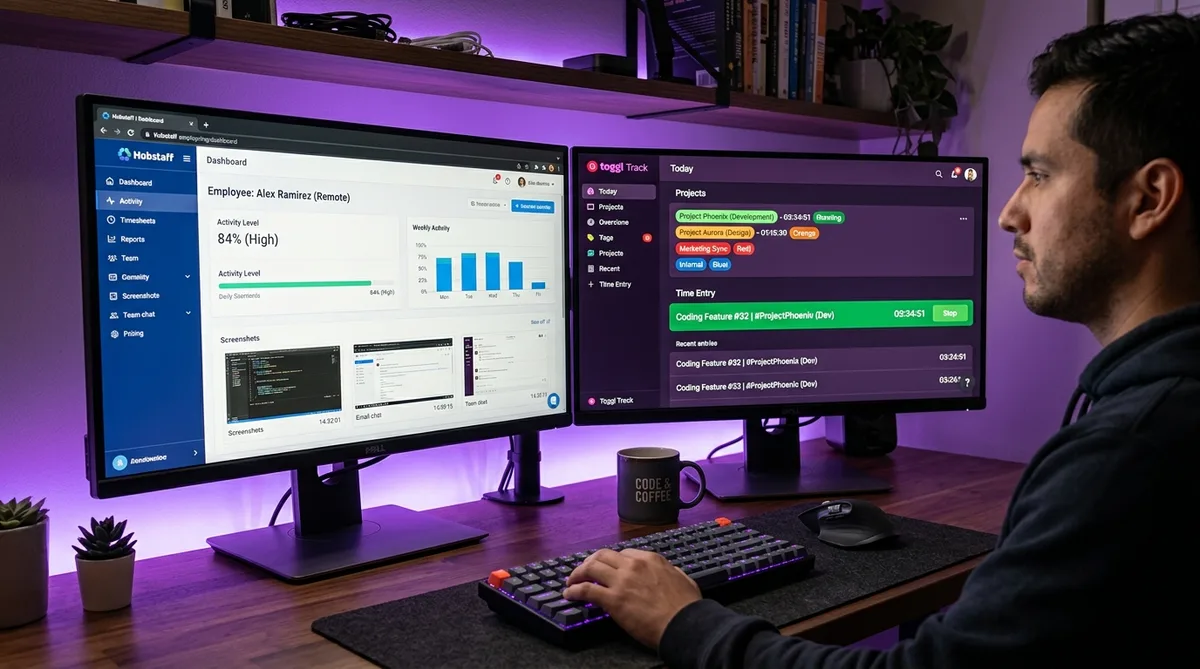
Hubstaff and Toggl Track are both popular time tracking tools, but they are built on fundamentally different philosophies. Hubstaff is a workforce management platform that tracks time alongside screenshots, activity levels, GPS location, and app usage. Toggl Track is a time tracking tool that deliberately avoids all forms of employee monitoring.
That philosophical divide shapes every aspect of both products — from the features they offer to the teams that adopt them. If you need to verify how remote workers spend their time, Hubstaff gives you the evidence. If you trust your team and just need accurate time data for billing and project management, Toggl gets out of the way and lets people work.
This comparison covers pricing, features, integrations, and real-world use cases to help you choose the right tool. For context on how Hubstaff's monitoring works in practice, see our guide on how Hubstaff tracks activity. For a broader view, check our top time tracking software roundup.
Pricing Comparison
| Plan | Hubstaff | Toggl Track |
|---|---|---|
| Free | 1 user, 100 screenshots/mo, 3 clients | 5 users, unlimited tracking & projects |
| Tier 1 | Starter: $4.99/user/mo (annual) $7/user/mo (monthly). 2-seat min. |
Starter: $9/user/mo (annual) $10/user/mo (monthly) |
| Tier 2 | Grow: $7.50/user/mo (annual) $9/user/mo (monthly). 2-seat min. |
Premium: $18/user/mo (annual) $20/user/mo (monthly) |
| Tier 3 | Team: $10/user/mo (annual) $12/user/mo (monthly). 2-seat min. |
— |
| Enterprise | $25/user/mo (annual only) | Custom pricing |
| Free trial | 14 days + 30-day money-back | 30 days of Premium |
The pricing takeaway: Hubstaff has a lower per-user starting price, but Toggl's free plan is far more generous. A team of five people can use Toggl Track for free indefinitely. That same team on Hubstaff's cheapest paid plan would cost at least $24.95/month. Hubstaff also requires a 2-seat minimum on all paid plans and charges extra for add-ons like GPS ($3.33/user/mo) and advanced analytics ($2.50/user/mo).
Feature-by-Feature Breakdown
| Feature | Hubstaff | Toggl Track |
|---|---|---|
| Screenshots | Yes (3-10 per 10 min) | No (anti-surveillance policy) |
| GPS / Geofencing | Yes (add-on) | No |
| Activity monitoring | Yes (keyboard/mouse levels) | No |
| App/URL tracking | Yes (visible to managers) | Auto-tracker (private to user only) |
| Built-in payroll | Yes (Team+ plans) | No |
| Invoicing | Yes | Yes (beta) |
| Scheduling | Yes (Team+ plans) | No |
| Pomodoro timer | No | Yes |
| Calendar integration | No | Yes (Google, Outlook) |
| Timesheet approvals | Team+ plans | Premium+ |
| Idle detection | Yes | Yes |
| Offline tracking | Yes (mobile) | Yes (all platforms) |
| Native integrations | 35+ | 100+ |
| Profitability reports | Basic | Advanced (Premium) |
| Compliance | SOC 2, HIPAA (Enterprise) | ISO 27001, SOC 2 Type 1 |
| Linux app | Yes (native) | Discontinued (2024) |
| Free plan users | 1 | 5 |
Hubstaff Overview
Hubstaff is a workforce management platform that combines time tracking with employee monitoring, project budgeting, payroll, scheduling, and GPS tracking. It is designed for managers who need visibility into how their teams spend their working hours.
The desktop app runs on Windows, macOS, Linux, and ChromeOS. Mobile apps are available for iOS and Android with GPS-enabled tracking and geofenced auto clock-in/out. The app uses under 50 MB of RAM and less than 1% CPU, making it lightweight enough to run alongside demanding workflows.
Hubstaff restructured its pricing in late 2025, introducing the Starter tier and bundling previously separate products (Hubstaff Insights and Tasks) into the Team plan. The restructuring simplified the lineup but also changed prices for existing customers.
What Hubstaff Does Well
- All-in-one workforce management — Time tracking, monitoring, payroll, invoicing, scheduling, and attendance in a single platform. No need to stitch together multiple tools.
- GPS and geofencing — Real-time location tracking with automatic clock-in/out when workers enter or leave job sites. Essential for construction, delivery, and field service teams.
- Built-in payroll — Process payments directly from approved timesheets via Wise, PayPal, Deel, Gusto, or Payoneer. Supports multiple currencies for distributed teams.
- Unusual activity detection — AI-powered anomaly detection flags suspicious behavioral patterns, helping managers identify issues without manually reviewing every screenshot.
Where Hubstaff Falls Short
- Employee pushback — Monitoring features like screenshots and activity levels can create a culture of distrust. User reviews consistently cite privacy concerns as the top complaint.
- Add-on costs — GPS, advanced analytics, extra screenshots, and silent tracking each cost $2.50-3.33/user/month extra on lower tiers, pushing the effective price significantly higher.
- Fewer integrations — 35+ native integrations vs Toggl's 100+. Hubstaff relies more on Zapier for connecting to tools outside its core ecosystem.
Toggl Track Overview
Toggl Track is a pure time tracking tool designed for simplicity. It records how you spend your time across projects and clients, generates reports for billing and analysis, and stays out of the way while you work. For a deeper look at its features and tiers, read our full Toggl Track review.
The tool runs on web, desktop (Windows, macOS), mobile (iOS, Android), and browser extensions for Chrome, Firefox, and Edge. The browser extension adds a timer button directly inside 100+ web tools like Asana, Jira, Trello, and GitHub, letting you track time without leaving your current context. Note that Toggl discontinued its Linux desktop app in early 2024.
Toggl has remained bootstrapped since its founding, with no outside investment. Its reported annual recurring revenue is around $32.8 million, and its client list includes Amazon, Uber, Ogilvy, and LinkedIn.
What Toggl Does Well
- Ease of use — Toggl consistently earns the highest usability ratings across review platforms. The one-click timer, drag-and-drop timeline, and clean interface make onboarding nearly frictionless.
- Reporting depth — Custom dashboards with 6 chart types, 11+ filter properties with AND/OR logic, profitability analysis, and scheduled email delivery. On Premium, reports are genuinely powerful.
- Integration breadth — 100+ integrations via the browser extension, plus native connections to Asana, Jira, Slack, QuickBooks, and Salesforce. Toggl embeds into your existing workflow rather than replacing it.
- Privacy-first philosophy — Toggl has a published anti-surveillance statement and will never add screenshots, keystroke logging, or GPS tracking. This makes it easier for teams to adopt without employee resistance.
Where Toggl Falls Short
- No workforce management — No GPS, no scheduling, no attendance tracking, no native payroll. If you need these, you will need separate tools.
- Manual timer discipline — Toggl requires users to remember to start and stop timers. Without the auto-tracker (desktop only), gaps in tracked time are easy to accumulate.
- Key features paywalled — Billable rates, project tasks, and advanced reporting all require paid plans. The free tier, while generous on users, is limited in functionality.
Monitoring — The Biggest Divide
The single most important difference between these two tools is their stance on employee monitoring. This is not a feature gap — it is an intentional design decision on both sides.
Hubstaff monitors actively. It captures screenshots at regular intervals, tracks keyboard and mouse activity levels, logs which applications and websites employees use, and can detect unusual activity patterns. Managers see all of this data on a real-time dashboard. For teams that need proof-of-work for client billing or compliance, this level of visibility is valuable.
But monitoring has a cost. Research consistently shows that surveillance-style monitoring correlates with higher turnover and lower employee satisfaction. In user reviews, monitoring is both Hubstaff's most praised feature (by managers) and its most criticized (by employees). For a deeper look at how these monitoring features work, see our guide on employee monitoring software.
Toggl refuses to monitor. Their auto-tracker records which apps and websites you use, but this data is visible only to you — managers never see it. Toggl's published anti-surveillance statement makes their position clear: they believe surveillance data is noise, and they will never add screenshots, keystroke logging, or location tracking.
This philosophical divide means there is no "better" tool — only the right tool for your team's culture and management style.
Integrations
Toggl wins this category decisively. With 100+ integrations via its browser extension and native connections, Toggl embeds into virtually any workflow. The extension adds a timer button inside Asana, Jira, Trello, GitHub, GitLab, Notion, Todoist, Zendesk, and dozens more. Native integrations include QuickBooks, Slack, Salesforce, and Google Calendar.
Hubstaff offers 35+ native integrations covering project management (Asana, Jira, ClickUp, Trello, Monday), payments (QuickBooks, FreshBooks, PayPal, Wise, Gusto, Deel), and communication (Slack). For anything else, Hubstaff relies on Zapier.
If your team uses a variety of SaaS tools and you want time tracking woven into all of them, Toggl's integration ecosystem is significantly deeper. If your workflow centers on a few core PM tools plus payroll, Hubstaff covers the essentials. See our Toggl vs Clockify comparison for how Toggl's integrations compare to another popular alternative.
Who Should Use Which?
Choose Hubstaff If You…
- Manage field teams — GPS, geofencing, and route tracking are Hubstaff exclusives. Construction, delivery, cleaning, and field service teams need these features.
- Need built-in payroll — Process payments directly from tracked hours via Wise, PayPal, Deel, or Gusto without a separate payroll tool.
- Require proof-of-work — Screenshots and activity logs provide evidence for client billing, compliance audits, or contractor management.
- Need shift scheduling and attendance — Hubstaff handles scheduling, PTO, and attendance tracking natively.
- Require enterprise compliance — SOC 2 Type II and optional HIPAA compliance for regulated industries.
Choose Toggl Track If You…
- Value employee privacy and trust — Toggl's anti-surveillance approach leads to higher adoption rates and less pushback from team members.
- Need deep reporting and analytics — Custom dashboards, profitability analysis, utilization tracking, and scheduled reports outperform Hubstaff's reporting.
- Have a small team on a budget — Five users track time for free, with unlimited projects and clients.
- Use many SaaS tools — 100+ integrations embed time tracking directly into your existing workflow.
- Run an agency billing clients — Billable rates, project budgets, and profitability reports are built for agency workflows.
Quick Decision Matrix
| Scenario | Winner |
|---|---|
| Solo freelancer | Toggl — best free plan |
| Small team (2-5 people) | Toggl — free for up to 5 |
| Remote team (trust-based) | Toggl — privacy-first |
| Remote team (oversight needed) | Hubstaff — screenshots + activity |
| Field workers / mobile teams | Hubstaff — GPS + geofencing |
| Agency billing clients | Toggl — profitability reports |
| Team needing payroll | Hubstaff — built-in payments |
| Enterprise compliance | Hubstaff — SOC 2, HIPAA |
Frequently Asked Questions
Is Hubstaff better than Toggl?
It depends on what you need. Hubstaff is better for teams that require employee monitoring (screenshots, activity tracking, GPS), built-in payroll, and shift scheduling. Toggl is better for teams that prefer trust-based time tracking with superior reporting, 100+ integrations, and a more generous free plan (5 users vs 1). Toggl consistently scores higher in user reviews for ease of use and value, while Hubstaff wins on workforce management features.
Can Hubstaff take screenshots?
Yes. Hubstaff captures screenshots at configurable intervals — up to 3 per 10 minutes on standard plans, or up to 10 per 10 minutes with the More Screenshots add-on. Screenshots can be blurred for privacy, and employees can delete their own screenshots before managers review them. This is one of the biggest differences from Toggl, which has a published anti-surveillance statement and will never add screenshot capabilities.
Does Toggl Track monitor employees?
No. Toggl Track explicitly does not offer screenshots, keystroke logging, screen recording, webcam monitoring, GPS tracking, or any form of employee surveillance. They have a published anti-surveillance statement on their website. The auto-tracking feature records which apps and websites you use, but this data is visible only to the individual user — managers cannot see it. Toggl's philosophy is trust-based tracking, not verification.
Which is cheaper — Hubstaff or Toggl?
Hubstaff has a lower per-user starting price at $4.99/user/month (annual) vs Toggl's $9/user/month. However, Toggl's free plan supports 5 users while Hubstaff's free plan is limited to 1 user. For a team of 5, Toggl is free while Hubstaff would cost at least $24.95/month. Hubstaff's paid plans also have a 2-seat minimum and paid add-ons for features like GPS ($3.33/user) and advanced analytics ($2.50/user), which can push the effective price higher.
Can I use Hubstaff and Toggl together?
While there is no native integration between them, some teams use both tools for different purposes — Toggl for client-facing time tracking and reporting, and Hubstaff for internal team monitoring and payroll. However, running two time trackers simultaneously creates overhead and potential confusion. Most teams are better off choosing one tool that covers their primary needs and using integrations to fill any gaps.
Conclusion
The Hubstaff vs Toggl decision comes down to one question: do you need to verify how your team works, or do you trust them and just need to track where time goes?
If the answer is verification — screenshots, activity levels, GPS, proof-of-work for clients — Hubstaff is the right tool. It bundles monitoring, payroll, scheduling, and invoicing into a single platform that covers the full workforce management lifecycle. The trade-off is employee friction, add-on costs, and fewer integrations.
If the answer is trust — you want accurate time data for billing, project management, and team visibility without surveillance — Toggl Track is the stronger choice. Its reporting is deeper, its integrations are broader, its free tier is more generous, and its privacy-first approach means employees actually want to use it.
For more tool comparisons, see our guides on Harvest vs Toggl, Toggl vs Clockify, and Hubstaff vs Time Doctor.
Keep Your Activity Reports Consistent
Whether you use Hubstaff, Toggl, or any other tracker, Trick Tack simulates natural mouse, keyboard, and app-switching activity while you step away. Try it free for 7 days.
Download

