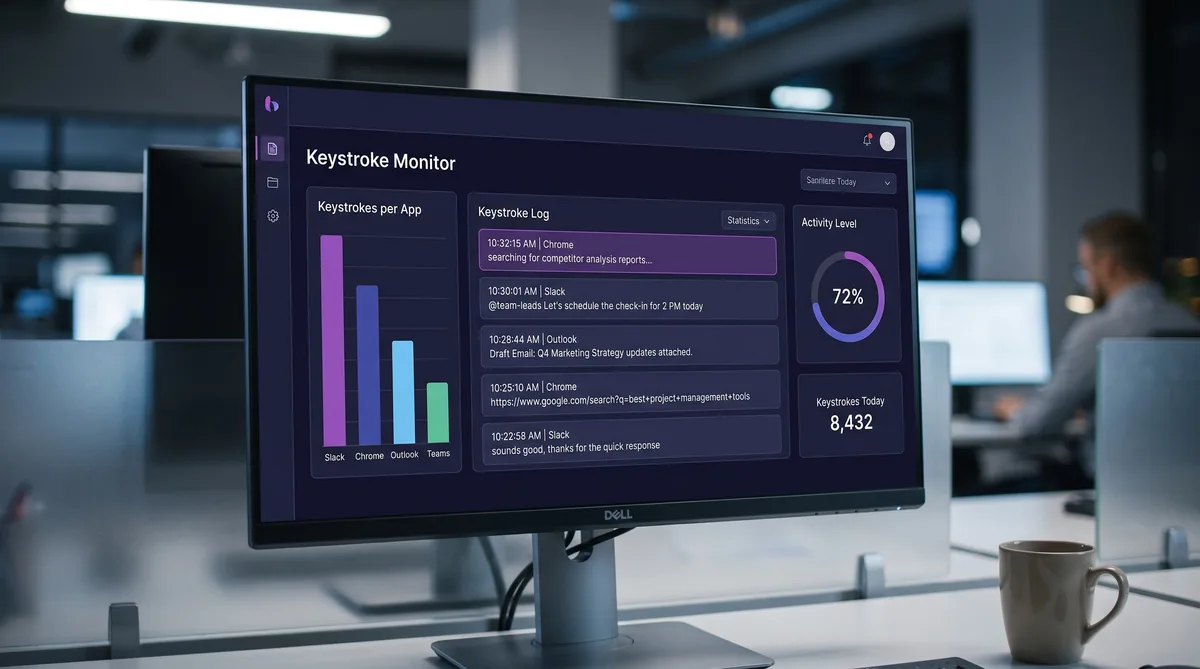
The Two Kinds of Keystroke Monitoring
Before you try to beat keystroke monitoring, find out which kind you have, because there are two and they behave very differently. Some tools count how much you type. Others log what you type. A counting tool measures keyboard activity to decide whether you were working. A logging tool records the actual characters and ties them to the app, so a manager can read your messages, emails, and searches. What you can do about monitoring depends entirely on which one is running.
People search for this because typing is a terrible proxy for work. You read a long document, think through a problem, join a call, or sketch on paper, and the keyboard goes quiet. A counting tool reads that quiet as low activity. A logging tool, on the other hand, is not measuring your effort at all, it is capturing your content, and no amount of "looking busy" changes what it already recorded while you were genuinely typing.
This guide is honest about both. We will separate counting from logging, explain how keystroke loggers actually work, name which common tools do which, show you how to check your own machine, and lay out what genuinely helps against each type. For the wider picture, see our guide on how to cheat time tracking software, or the ranking of which time trackers are easiest and hardest to trick — the same counting-versus-capturing split decides both.
Counting vs Logging: The Distinction That Changes Everything
Keystroke counting measures how much you type. Keystroke logging records what you type. That one difference decides everything else on this page, so it is worth being precise about.
Counting is the common one. The tool watches for keyboard and mouse input and turns it into a number: an activity percentage, a keypresses-per-minute figure, or in the simplest case a binary active-or-inactive flag for each moment. It never stores the letters. Your manager sees that you were "78% active" from 2 to 3 pm, not the sentence you wrote. Most mainstream productivity trackers work this way, because counting is cheaper to store, easier to defend legally, and enough for the question they actually care about: were you at the keyboard.
Logging is the invasive one. A keystroke logger, or keylogger, records the actual characters you press and attaches them to the application or website you typed them in. The reviewer can read the message you sent, the email you drafted, the password field you filled, the thing you searched. This captures the content of your work and your communication, not just the fact that you were busy. It is a different category of surveillance, and a smaller set of tools do it.
Why does this matter for beating monitoring? Because the two react to the same trick in opposite ways. Simulated keyboard activity is exactly the thing a counting tool measures, so it keeps those numbers healthy while you step away. That same simulation does nothing to a logger's record of the real characters you typed while working, because those keystrokes were genuinely yours. Know which one you are dealing with and you know what is possible.
How Keystroke Loggers Actually Work
A keystroke logger sits between your keyboard and your applications and saves every key to a file or a cloud dashboard. According to CrowdStrike's breakdown of keyloggers, they come in two broad families, and the software family has a few distinct methods.
Hardware vs Software Loggers
Hardware loggers are physical devices, often disguised as a USB adapter or hidden inside a cable, that sit between the keyboard and the machine. They need physical access to install, which makes them rare in a normal office and mostly a concern for shared or public computers. Software loggers are programs installed on the machine, and every corporate monitoring suite that logs keystrokes falls into this group.
The Software Methods
- API and hook-based logging — the most common. The logger uses the operating system's own input interfaces to receive a copy of every keystroke as applications do, recording each key with the app it went to.
- Form-grabbing — captures data entered into a specific field, such as a login or checkout form, at the moment you submit it, rather than watching the whole keyboard.
- JavaScript injection — code embedded in a web page that captures what a visitor types into that page. This is a website-side technique more than a workplace one, but it is why typing sensitive data into an untrusted site is risky.
The practical point for an employee is that hook-based logging is invisible in normal use. It does not slow anything down in a way you would notice, it does not pop up a window, and on a managed corporate build it is installed and configured before the laptop ever reaches you. You cannot out-type it, and you cannot feed it fake characters that overwrite the real ones, because it records both.
Which Monitoring Tools Log Keystrokes?
This is the question most searches are really asking, so here is a straight answer for the major tools. The dividing line is content: does the tool store the characters you type, or only how much you typed?
| Tool | What it does with keystrokes | Reads your content? |
|---|---|---|
| Insightful | Counts activity and measures outcomes; states it does not log keystrokes | No |
| Hubstaff | Records a binary active/inactive signal from keyboard and mouse frequency | No |
| ActivTrak | Activity and app tracking, privacy-first; no core keystroke logging | No |
| Time Doctor | Activity levels and screenshots, not the content of keystrokes | No |
| EmpMonitor | Full keystroke logging tied to each app, plus screenshots and screen recording | Yes |
| Teramind | Full keystroke logging across apps, web forms, instant messages, and emails, with keyword alerts | Yes |
Insightful is explicit that it does not log keystrokes or mine personal communications; it focuses on app and website categories, focus time, and outcomes. Hubstaff does not store individual keystrokes at all, it records only whether keyboard or mouse activity was happening and turns that into an activity percentage. ActivTrak positions itself as privacy-first and does not make content keystroke logging its core, and Time Doctor leans on activity levels and screenshots rather than capturing what you type.
The two that do read your content are the heavy suites. EmpMonitor logs keystrokes as a core feature and pairs it with frequent screenshots and screen recording. Teramind goes furthest, logging keystrokes across applications, web forms, instant messages, and emails, and firing alerts on specific keywords. If either of those is on your machine, treat everything you type as recorded. If it is one of the counting tools, only your activity level is in play, not your words.
How to Tell If You're Being Keystroke Logged
You cannot always tell, but you can check the obvious places. On Windows, open the installed programs list and Task Manager and look for processes you do not recognize. On a Mac, check Activity Monitor and your login items. Run a reputable antivirus or anti-malware scan, which flags many consumer keyloggers. Physical warning signs exist too: noticeable lag between pressing a key and seeing it, a browser that feels heavier than the hardware should allow, or a cursor that stutters.
Here is the catch, and it is a big one. Corporate monitoring tools are built to defeat exactly this inspection. EmpMonitor's stealth mode, for example, hides the agent from both the installed programs list and Task Manager, so the usual checks come up empty even though everything is being recorded. Not finding a keylogger on a company-owned machine does not mean there isn't one. It means it is doing its job.
So the honest rule for a work device is simple: assume the machine can log keystrokes, and behave accordingly. Do your personal messaging, banking, and job hunting on your own phone or laptop, never on the company laptop. That single habit removes more risk than any software trick, because it takes your private content off the monitored machine entirely.
Keep Your Activity Metrics Consistent
Trick Tack simulates mouse, keyboard, scroll, and app-switching activity — the exact signals that counting tools use to score whether you were working. Try it free for 7 days.
DownloadWhat Actually Works Against Keystroke Monitoring
Now the useful part, split by which type you are facing, because the honest answers are different.
Against Counting Tools
If your tool only counts activity, the problem is narrow: your keyboard and mouse go quiet when you read, think, or step away, and that shows up as low activity even though you were working. The fix that matches the measurement is simulated input that keeps a natural level of keyboard and mouse activity going. Because counting tools measure how much you type, not what, feeding them steady, human-looking activity addresses the exact signal they score. This is the case where activity simulation genuinely solves the problem rather than papering over it.
What does not work well even here is a crude approach. A bare mouse jiggler that only nudges the cursor leaves your keyboard count at zero, and a mismatch between mouse activity and no typing is its own tell. Simple macros that fire the same key on a fixed timer produce mechanical, perfectly regular patterns that do not read as a person. Natural variation across mouse, keyboard, and scrolling is what looks like real work.
Against Content Loggers
Be clear-eyed here. If the tool logs keystroke content, there is no software trick that hides the real characters you type while working, because those keystrokes are yours and the logger records them as you press them. The myths do not hold up:
- On-screen or virtual keyboards — often suggested as a keylogger dodge, but hook-based loggers and the screenshots or screen recording that heavy suites run alongside them still capture the input or the screen, so this is unreliable at work.
- Clipboard paste instead of typing — many monitoring suites log clipboard activity too, and the content still lands on screen where recording captures it.
- "Undetectable" tools — anyone claiming a product makes a content logger fully undetectable is selling you a story. It cannot un-record what you actually typed.
What genuinely reduces risk against a content logger is behavioral, not technical. Keep personal communication off the monitored device. Assume anything typed on the work machine can be read. And use activity simulation for the one thing it can still do here: keep your idle and activity metrics consistent while you are away from the desk, so a legitimate break does not read as a productivity gap. It will not conceal your content, and it does not pretend to.
How Trick Tack Helps (and What It Can't Do)
Here is the honest version. Trick Tack is built to keep your activity signals consistent, the ones that drive idle detection and productivity scoring: mouse movement, keyboard input, scrolling, and which app is in focus. Against a counting tool, that is the whole game, and Trick Tack covers all of those signals together instead of just nudging the mouse.
- Keyboard input — simulated typing keeps your keystroke count and activity level from flatlining while you are away, the exact number a counting tool scores.
- Mouse movement — natural, randomized cursor motion instead of the mechanical circles a hardware jiggler makes, so idle detection never trips.
- Scrolling — scroll activity through documents and pages so screenshots and activity reports show movement, not a frozen frame.
- App switching — rotating focus between the applications your employer marks as productive, so your productivity category reflects a normal working pattern.
- Idle and scheduling control — idle detection starts activity when you step away and stops when you return, keeping your active-time totals steady across the day.
Now the part other pages will not tell you: against a content logger like EmpMonitor or Teramind, no activity tool can hide what you actually type. When you are at the keyboard, the keystrokes those tools log are the real ones you pressed. Trick Tack keeps your idle, active, and productivity metrics looking like a normal day while you are away from the desk. It does not, and cannot, conceal the content a keystroke logger captures while you work. That honest scope is the difference between a tool that helps with a real problem and a claim that gets you caught.
Used with that understanding, activity simulation is the right tool for the job it actually does. For the broader approach across every tracker, our guide to cheating time tracking software compares the major platforms, and if your real concern is running more than one job, see how employers detect overemployment.
Try Trick Tack Free for 7 Days
Simulate natural activity across mouse, keyboard, scrolling, and app switching. Keep your activity and idle metrics consistent. Cancel anytime.
DownloadFrequently Asked Questions
Does Insightful track keystrokes?
No. Insightful states that it does not log keystrokes or mine personal communications. It measures app and website categories, focus time versus fragmentation, task completion, and productivity trends, which is an outcome-based approach rather than a record of what you type. Any keyboard signal it uses is a count of how much activity happened, not a log of the characters you pressed. So Insightful does not capture keystroke content.
What is the difference between keystroke counting and keystroke logging?
Keystroke counting measures how much keyboard activity happens, often as a simple active-or-inactive signal or a keypress count, to gauge whether you were working. It does not store the characters. Keystroke logging records the actual characters you type and ties them to the app or website, so a reviewer can read your messages, emails, and searches. Counting protects the content of your work; logging exposes it.
Can my employer read what I type?
Only if the monitoring tool logs keystroke content. Teramind and EmpMonitor do; they capture what you type in messages, emails, and forms. Activity-based tools like Hubstaff, Time Doctor, and Insightful count keyboard activity without storing the characters, so they know how much you typed but not what. Our Teramind vs Insightful comparison shows that split clearly: a content logger on one side, an activity tracker on the other. On a company-owned machine, assume a content logger is possible unless your handbook or IT team tells you otherwise.
Does Hubstaff log keystrokes?
No. Hubstaff does not store individual keystrokes or your actual mouse movement. It records a binary active-or-inactive signal based on keyboard and mouse frequency, including mouse moves, clicks, the scroll wheel, and keypresses, and uses that to calculate an activity percentage. It counts activity; it does not log the content of what you type.
Can a keystroke logger be detected?
Sometimes. Check your installed programs, look in Task Manager or Activity Monitor for unfamiliar processes, and run a reputable antivirus scan. Warning signs of a keylogger include lag while typing, a sluggish browser, or a cursor that stutters or disappears. But corporate stealth-mode tools like EmpMonitor hide from the installed programs list and Task Manager, so not seeing a process does not prove you are unmonitored. On a work device, assume you might be.
Can a mouse jiggler or typing simulator beat keystroke monitoring?
It depends on the type. Against a counting tool, simulated keyboard input keeps your keystroke count and activity level from flatlining while you step away, which is exactly the signal those tools measure. Against a content logger, nothing conceals the real characters you type while you are actually working, because those keystrokes are yours. Simulation only keeps your idle and activity metrics consistent while you are away from the desk.
Is keystroke logging legal?
In the US, keystroke logging is generally legal on company-owned equipment for legitimate business reasons, and most employers are expected to disclose that monitoring, though the rules vary by state. The EU and several other regions apply stricter limits on covert monitoring under privacy law. Check your employee handbook and the rules where you work, and treat anything typed on a company device as potentially recorded.
Conclusion
Beating keystroke monitoring starts with one question: is it counting or logging? A counting tool measures how much you type and turns it into an activity score, and that score is exactly what natural, simulated activity keeps consistent while you step away. A content logger records the actual characters, and no software hides real typing from it, because those keystrokes are genuinely yours.
So the honest playbook has two halves. Against counting tools, activity simulation solves the real problem directly. Against content loggers, keep personal work off the machine entirely, assume everything typed is recorded, and use simulation only to keep your idle and activity metrics steady during breaks. Anyone promising more than that against a keylogger is not being straight with you.
Within that scope, Trick Tack does its job well, simulating natural mouse movement, keyboard input, scrolling, and app switching so your activity looks like a normal working day. For the tools that log content, see our guides on EmpMonitor and Teramind; for a counting-based tracker, see Hubstaff; or read the full time tracking cheat guide.
Try Trick Tack Free for 7 Days
Simulate natural activity across mouse, keyboard, scrolling, and app switching. Keep your activity and idle metrics consistent. Cancel anytime.
Download

