Introduction
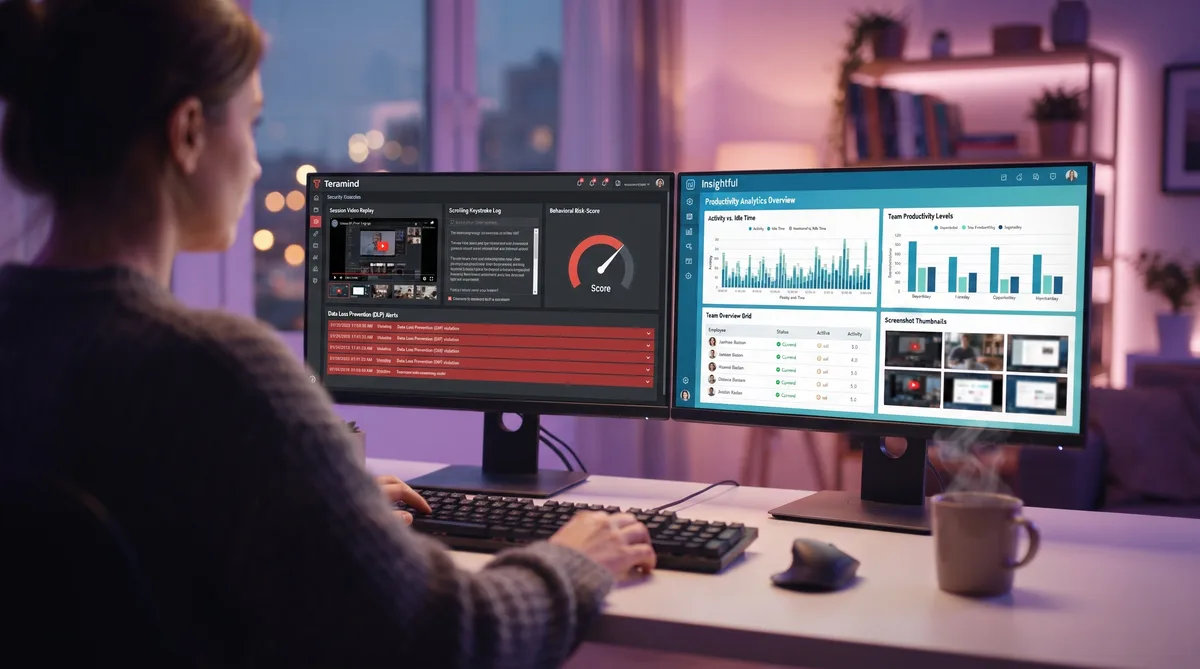
Search for a comparison of Teramind and Insightful and almost every page you find was written by one of the two vendors. That is a problem, because the honest version of this matchup is not close, and it is not really about features and price. It is about surveillance versus analytics.
Teramind is built to watch. It logs the actual keys you type, records continuous video of your screen, monitors email and messaging, and runs data loss prevention that inspects and blocks what leaves the company. Insightful is built to measure. It tracks how active you are, categorizes your apps and sites, takes screenshots, and turns it into productivity charts, without reading what you type or send by default.
Both get lumped together as "employee monitoring," but they answer different questions. Teramind asks "is this person a security risk?" Insightful asks "how is this team spending its time?" This guide breaks down exactly what each captures, compares pricing honestly, and explains which one watches you more closely. For the wider category, start with our complete guide to employee monitoring software.
Teramind Overview
Teramind launched in 2014 as a security-first monitoring platform, and it remains the most aggressive tool in the category. Its roots are in insider-threat detection and data loss prevention, not timesheets, which is why it captures far more than a typical productivity tracker. For the full breakdown, see our Teramind review.
Key Features
- Keystroke logging — Records the actual characters you type, including in documents, emails, and chats. This is content logging, not just activity counting.
- Screen video recording — Continuous video capture of the employee's screen on higher tiers, plus OCR-searchable session replay that lets managers search on-screen text.
- Email, IM, and web monitoring — Logs messages, sites, and app usage, with content visible to admins.
- Data loss prevention (DLP) — 200+ policy templates that inspect content and can block files, uploads, or messages that violate a rule.
- Behavioral analytics and risk scoring — Flags anomalies and assigns each user a risk score for insider-threat detection.
- Screenshots — Automatic captures alongside the video and keystroke record.
- Productivity tracking — Active/idle time and productivity classification, layered on top of the security features.
- Flexible deployment — Cloud or on-premise, with stealth (hidden) or visible agents.
Who Uses It
Teramind is common in regulated and security-sensitive industries: finance, healthcare, legal, government contractors, and any organization worried about data theft or compliance. It is built for companies that treat monitoring as a security control, not a productivity nudge, and that need forensic detail when something goes wrong.
Monitoring Philosophy
Teramind is unapologetically about control. It assumes the risk it is watching for is real, so it records everything, inspects content, and scores behavior. That power comes with weight: it needs more setup, carries a 5-seat minimum, and can feel oppressive to employees who know it is running. To see exactly what it captures and how, read our Teramind monitoring guide.
Insightful Overview
Insightful, founded in 2016 and formerly known as Workpuls, sits at the productivity-analytics end of the market. It watches how time is spent and turns that into workforce insight, without the content logging and DLP machinery Teramind is built around. For the full breakdown, see our Insightful review.
Key Features
- Second-by-second activity tracking — Measures keyboard and mouse activity to separate active time from idle time. It counts input; it does not log the keys you press.
- App and URL tracking — Logs applications and websites and categorizes them as productive, unproductive, or neutral.
- Productivity analytics — Rolls the data into clear team and individual productivity dashboards and trends.
- Screenshots — Triggered or scheduled captures, up to 30 per hour on the top bundle.
- Automatic Time Mapping — Attributes tracked time to projects and tasks automatically.
- Stealth or visible mode — Can run hidden or openly, at the admin's choice.
- 50+ integrations — Connects with HRIS, payroll, and project tools.
- Optional add-ons — Screen Recording, Workspace Security, and On-Demand Screenshots each add roughly $4 per seat if you want them.
Who Uses It
Insightful is popular with operations, HR, and team leads who want visibility into productivity and capacity without running a security operation. It appeals to distributed and hybrid teams that care about workload balance and where time goes, and its lack of a seat minimum makes it friendly to smaller companies.
Monitoring Philosophy
Insightful leans toward visibility over control. Its core product measures activity and produces analytics rather than reading content, and the heavier capabilities like screen recording and security monitoring are opt-in add-ons rather than defaults. That said, it does offer stealth mode and screenshots, so it is still monitoring software, just a lighter, analytics-first kind. To see how it measures activity, read our Insightful monitoring guide.
Feature Comparison
Here is where the two split. The table compares every major capability so you can see exactly what each platform records.
| Tracking Feature | Teramind | Insightful |
|---|---|---|
| Core focus | Security, DLP, insider-threat surveillance | Productivity analytics and workforce visibility |
| Keystroke logging (content) | Yes — logs the actual keys you type | No — counts activity only, not content |
| Screen video recording | Built in on higher tiers; OCR session replay | Add-on only (~$4/seat); screenshots by default |
| Screenshots | Yes, alongside video | Yes; up to 30/hour on top bundle |
| Email and IM monitoring | Yes — content visible to admins | Not a core feature |
| Data loss prevention | Yes — 200+ templates, inspects and blocks | No native DLP (lighter Workspace Security add-on) |
| Behavioral / risk analytics | Anomaly detection and per-user risk scores | Productivity analytics, no insider-threat scoring |
| Automatic Time Mapping | Not a focus | Yes — auto-attributes time to projects |
| Seat minimum | 5-seat minimum | No seat minimum |
| Deployment | Cloud or on-premise | Cloud |
The split is stark. Teramind captures content — the keys you press, the screen you look at, the messages you send, the files you move. Insightful captures behavior — how active you are, which apps you use, how productive that looks. One reads your work; the other measures it.
That content-versus-activity line is the single most important thing to understand here, and it is exactly what our guide to beating keystroke monitoring is about: counting how much you type is a completely different thing from logging what you type, and Teramind and Insightful land on opposite sides of it.
Pricing Comparison
Pricing only makes sense next to capability, because these two are not really selling the same thing. Here is what each plan costs and what it unlocks.
Teramind Pricing (per seat/month, billed annually, 5-seat minimum)
| Plan | Price | What It Adds |
|---|---|---|
| Starter | $14 | Core monitoring: activity, screenshots, basic productivity, limited rules |
| UAM | $28 | User activity monitoring: keystrokes, unlimited behavior rules, anomaly detection, SIEM |
| DLP | $32 | Everything in UAM + full data loss prevention with 200+ policy templates |
| Enterprise | Custom | On-premise options, advanced compliance, dedicated support |
Insightful Pricing (per user/month, no seat minimum)
| Plan | Price | What It Adds |
|---|---|---|
| Workforce Analytics | $10 | Activity tracking, screenshots, real-time monitoring, stealth mode |
| Workflow Optimization | $15 | Everything above + project management and deeper app/website usage |
| Work Intelligence Bundle | $20 | Everything above + automatic time mapping and up to 30 screenshots/hour |
| Add-ons | +$4 each | Screen Recording, Workspace Security, or On-Demand Screenshots per seat |
The value gap is real. Insightful's Workforce Analytics starts at $10/user with no seat minimum, so a small team can start immediately. Teramind's 5-seat minimum and its climb to UAM at $28 and DLP at $32 reflect that you are buying a security platform, not a productivity tracker. Teramind's $14 Starter looks close to Insightful on paper, but the keystroke logging and DLP that define Teramind live on the pricier tiers.
Both offer a free trial, and pricing shifts over time, so confirm current rates before committing. For a wider set of options, see our roundup of the top time tracking tools.
Which Watches You More?
There is no contest: Teramind watches far more, and far more deeply.
Both tools track your activity, take screenshots, and score productivity. But Teramind goes into territory Insightful's core product never touches:
- It logs your keystrokes — the actual content you type, not just how much. Insightful counts activity and stops there.
- It records your screen as video — continuous, searchable session replay on higher tiers. Insightful only does this if you buy the add-on.
- It reads your messages — email and IM content is visible to admins. Insightful does not monitor message content.
- It inspects and blocks your data — DLP rules can stop a file or upload in real time. Insightful has no native DLP.
Insightful is monitoring software, make no mistake. Stealth mode and 30-screenshots-per-hour are not nothing. But it stays at the level of measuring behavior, while Teramind crosses into recording content. For an employee, that is the difference between a manager knowing you were 60% active this afternoon and a manager being able to read the email you drafted and watch the video of you writing it.
If you want to see how each stacks up against other tools, our Hubstaff vs Insightful comparison weighs Insightful's analytics against a time-and-payroll tracker, our Hubstaff vs Time Doctor comparison covers two mid-weight monitors, and DeskTime vs Time Doctor looks at the analytics-versus-policing split from a different angle. Our Teramind vs ActivTrak comparison pits the same surveillance suite against a privacy-first analytics tool.
Stay Active Under Any Monitor
Trick Tack simulates natural mouse movement, keyboard input, and app-switching to keep your activity and productivity metrics consistent while you step away from your desk.
DownloadPros and Cons
Teramind Pros
- Deepest monitoring available — Keystrokes, screen video, email, and DLP in one platform.
- Strong compliance fit — SOC 2, HIPAA, GDPR, and PCI DSS support for regulated industries.
- Insider-threat detection — Behavioral risk scoring and anomaly alerts.
- On-premise option — Keep all data inside your own infrastructure.
- 200+ DLP templates — Content inspection and blocking out of the box.
Teramind Cons
- Highly invasive — The keystroke and content logging can devastate employee trust.
- 5-seat minimum — Not friendly to very small teams.
- Gets expensive — The tiers people actually want (UAM, DLP) run $28 to $32 per seat.
- Heavier setup — More configuration than an analytics tool.
Insightful Pros
- Clean productivity analytics — Clear dashboards for activity, apps, and capacity.
- No content logging by default — Measures activity rather than reading what you type.
- No seat minimum — Small teams can start at a single user.
- Lower cost — Workforce Analytics from about $10/user.
- Automatic Time Mapping — Attributes time to projects without manual entry.
Insightful Cons
- Still has stealth mode — Can run hidden, which surprises some employees.
- Screen recording costs extra — A $4/seat add-on rather than included.
- Not a security tool — No native DLP, email monitoring, or insider-threat scoring.
- Screenshots can be frequent — Up to 30 per hour on the top bundle.
Managing Your Activity Under Either Tool
Whichever tool your employer runs, both Teramind and Insightful judge you partly on the same basics: keyboard and mouse activity, idle time, and productivity percentages. Step away for a meeting or a break and those numbers dip, which is where Trick Tack helps. Trick Tack is a lightweight desktop app that simulates natural human activity, so your active time and productivity metrics stay consistent while you are away from the keyboard. See exactly what it produces in our documentation.
Here is the honest part, because it matters. Activity simulation directly addresses what Insightful measures: activity levels, idle time, and the productivity score built on them. Against Teramind, it keeps those same activity and idle numbers steady, but it cannot hide the content Teramind records. If Teramind is logging your keystrokes and recording your screen, the answer is to keep your activity metrics consistent, not to pretend you typed something you did not. Our guide to beating keystroke monitoring explains where activity simulation helps and where it does not.
How Trick Tack Works
- Mouse simulation — Natural, randomized cursor movement that mimics real browsing.
- Keyboard simulation — Keystroke activity at human-like intervals.
- App switching — Cycles between open applications to simulate multitasking.
- Scrolling — Page scrolling inside active windows.
The randomized, varied nature of that input matters. A basic hardware mouse jiggler repeats one identical motion, exactly the kind of pattern Teramind's anomaly detection is built to flag. Natural, varied movement reads as ordinary work instead. For tool-specific tips, see our guides on staying consistent under Teramind and staying consistent under Insightful, plus our umbrella guide on cheating time tracking software.
Frequently Asked Questions
Does Insightful log keystrokes like Teramind?
No. This is the biggest difference between the two. Teramind logs actual keystroke content, recording the real characters you type, including in emails and chats. Insightful only counts keyboard and mouse activity to measure how active you are; it does not record what you type. If keystroke logging is your concern, Teramind is the one that captures the content, while Insightful stays at the activity-level measurement most productivity tools use.
Does Insightful record your screen?
Insightful takes screenshots on all plans, and its top bundle can capture up to 30 per hour, but continuous screen video is not built in. Screen Recording is a paid add-on at about $4 per seat per month. Teramind includes continuous screen video recording on its higher tiers, plus OCR-searchable session replay that lets managers search the text that appeared on screen. So Teramind records video by default at the tiers most buyers use, while Insightful only does so if you pay extra.
Which is more invasive, Teramind or Insightful?
Teramind, clearly. It logs keystrokes, records screen video, monitors email and messaging, and runs data loss prevention that inspects and blocks content, all tied to behavioral risk scores. Insightful focuses on activity analytics and screenshots and does not read what you type or send by default. Teramind is built for security, compliance, and insider-threat detection; Insightful is built for productivity visibility. For most employees, Teramind watches far more closely.
Which is cheaper, Teramind or Insightful?
Insightful, and by a wide margin once you match real capability. Insightful's Workforce Analytics starts around $10 per user per month with no seat minimum. Teramind requires a 5-seat minimum, and while its Starter tier is about $14 per seat, the plans most buyers actually want, UAM at $28 and DLP at $32, cost far more. Insightful is the lower-commitment, lower-cost option; Teramind's price reflects its security and DLP depth.
Can activity simulation help under Teramind or Insightful?
It depends on what the tool measures. Both judge you partly on keyboard and mouse activity, idle time, and productivity percentages, and a tool like Trick Tack keeps those metrics steady while you step away. Against Insightful, which measures activity and takes screenshots, that covers most of what it records. Against Teramind, activity simulation keeps your active and idle numbers consistent, but it cannot hide the content of what you actually type or what appears in a recorded session, because Teramind logs and records real work. See our guide on beating keystroke monitoring for the full distinction.
Conclusion
Teramind and Insightful get filed under the same heading, but they are different species. Teramind is surveillance — keystroke logging, screen video, email monitoring, and DLP built for security, compliance, and catching insider threats. Insightful is analytics — activity tracking, screenshots, and productivity dashboards built to show how a team spends its time.
For employers, the choice is really about intent. If you are in a regulated industry or genuinely worried about data theft, Teramind's depth is hard to match, and you should expect the cost and the trust hit that come with it. If you want workforce visibility and productivity insight without running a security operation, Insightful does that for less money and with a lighter footprint. If even Insightful feels like too much, our Harvest vs Toggl comparison covers trust-based trackers with no surveillance at all.
If you are the employee working under one of these tools, know which one you are dealing with. Under Insightful, the game is activity and productivity metrics, and Trick Tack keeps those consistent while you step away. Under Teramind, those same metrics still matter, but the tool is also recording content, so keep your expectations honest: activity simulation steadies your numbers, it does not rewrite what Teramind records. Either way, understanding exactly what each captures is the first step, and that is what this comparison is for.
Try Trick Tack Free for 7 Days
Keep your activity and productivity metrics consistent under Teramind, Insightful, or any monitoring tool. Cancel anytime during your trial.
Download

