How Employers Actually Catch Overemployed Workers
Employers detect overemployment through six overlapping signals: activity-monitoring software, meeting and availability patterns, output and performance dips, background checks and payroll databases like The Work Number, LinkedIn and social profiles, and shared tax, benefits, or IT footprints. Almost nobody is caught by a single one of these. People get caught when two or three line up at the same time and a manager, an HR system, or a jealous acquaintance connects the dots.
Search "how employers detect overemployment" and nearly every result is written for the boss. Time Doctor, EmpMonitor, Teramind, SHRM, and a stack of law firms all publish the same checklist of red flags so managers can hunt for a second job. This guide flips that around. It reads the exact same detection surface from your side of the desk, so you can see where you are actually exposed and where you are not.
If you are new to running two roles, start with our overemployment guide for the tech setup and daily discipline, then use this page as the detection map. We will go through each of the six signals, how it works, how likely it is to catch you, and what actually reduces the risk.
1. Activity Monitoring Software
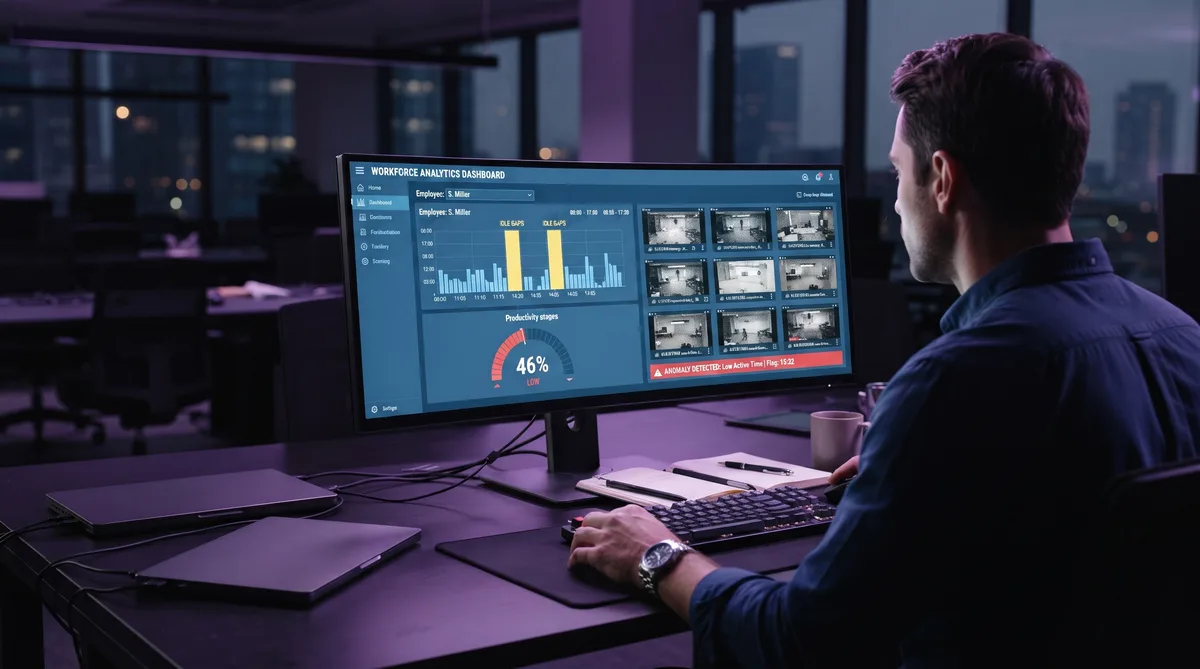
This is the signal you generate every single working hour, so it is the one most people worry about first. If either job installs a monitoring agent, your day is measured against a baseline. Tools like DeskTrack, Sapience, Insightful, and Time Doctor record which application is in the foreground, take timestamped screenshots, measure your idle time, and turn all of it into a daily activity or productivity percentage.
What actually triggers suspicion here is not a single low day. It is a shape. A worker splitting attention across two jobs tends to produce a recognizable profile: long idle gaps in the middle of the day, an activity percentage that sits well below the team, screenshots that show the same static screen for stretches, and bursts of catch-up work at odd hours. When a manager pulls the report and sees that shape week after week, they start asking questions.
This is also where the most common self-inflicted mistake lives: the basic mouse jiggler. A hardware dongle or a cheap app that only nudges the cursor keeps you off the idle timer, but it does nothing about the other two layers. The foreground app never changes, the screenshots stay frozen, and you generate zero keyboard input. That combination reads as artificial faster than doing nothing at all. We break down exactly why in why mouse jigglers get you caught.
The monitoring vector is the one piece of this whole picture that software can genuinely help with, because it is a technical signal rather than a human one. The fix is to make your activity report look like a real working session instead of a machine holding the mouse still.
Make Your Activity Report Look Human
Trick Tack simulates natural mouse movement, keyboard input, scrolling, and app switching — the exact signals monitoring tools use for idle detection and productivity scoring. Try it free for 7 days.
DownloadTo understand which tool your employer runs and what it captures, our guide to cheating time tracking software covers every major platform, and our best mouse mover software comparison explains why single-signal movers fall short of full activity simulation.
2. Meeting Behavior and Availability Patterns
Monitoring software is optional. Meetings are not. Availability is the signal every manager reads without any tooling at all, and it is where a surprising number of people slip.
The tells are consistent across every employer-facing article on the subject. A camera that is always off. A microphone that stays muted a beat too long. Frequent declines or reschedules of meeting invites. Slow replies during core hours followed by a flurry of messages after five. And the big one: a rigid hard stop at the exact same time every day, with no flexibility, because that is when the other job's standup starts. Any one of these is normal. All of them together, on a repeating schedule, is a profile.
Chat presence belongs here too. If your Slack or Teams dot goes yellow whenever you step over to the other laptop, a manager who glances at the sidebar sees you "away" during working hours. Keeping a steady presence matters, which is why we wrote up how to keep your Microsoft Teams status active and how to stay active on Slack without sitting on the keyboard.
The mitigation is behavioral, not technical. Turn your camera on sometimes. Vary your response times. Do not defend the same hard stop every day like your life depends on it. Predictability is what gets read as a schedule conflict.
3. Output, Deadlines, and Vague Time
Performance is the slowest signal to build and the hardest to argue with once it does. Managers do not need software to notice that work that used to land on time now slips, that quality dipped, or that a task you would have finished without thinking now takes days.
There is a subtler version that catches careful people. When a manager or a monitoring report asks what you worked on during a specific block of time, an overemployed worker often cannot give a crisp answer, because they were in the other job. Vague replies like "research" or "planning" to cover several tracked hours are a documented red flag. The gap between tracked time and describable output is exactly what a suspicious manager probes.
The defense is boring but effective: protect your deliverables above everything else. Overemployment survives on output. As long as both jobs get what they expect on time, the other signals have far less to attach to. The moment your work slips, every other flag suddenly has a story to support it.
4. Background Checks and The Work Number
This is the vector the employer-side articles almost never mention, and it is the one that catches people who did everything else right. It has nothing to do with your daily behavior. It lives in payroll data.
The Work Number is a database operated by Equifax that holds detailed payroll records contributed by millions of employers. Many payroll and HR providers report your income and employment automatically, often every pay cycle. When a lender, a new employer, or a verifier pulls your employment report, your history, and in the right circumstances a concurrent job, can appear on it. The database is large enough that the Equifax Work Number covers a huge share of US W-2 workers — 823 million payroll records from roughly 5 million employers, updated every pay period.
It is not a hypothetical. In 2024, Equifax itself fired 24 employees it found holding second jobs, using the very payroll data it collects from other companies. Overemployed communities regularly report cases where a suspicious first employer purchased a worker's payroll report and found the second job on it. The database does not care how well you managed your calendar.
Two things blunt this vector. First, you can place a freeze or lock on your Work Number record, which limits who can pull it without your say-so; Overemployed's community maintains a step-by-step freeze guide. Second, income paid as a B2B contractor or through your own entity is usually not reported to The Work Number at all, which is a large part of why many overemployed workers keep at least one role on a 1099 or corp-to-corp basis. The trade-off is fewer benefits and self-managed taxes, but the payroll footprint mostly disappears.
5. LinkedIn and Your Social Footprint
The most-cited way people get caught is also the most avoidable. It is not software and it is not payroll. It is you, online.
LinkedIn is the obvious one. Listing a second current employer puts both jobs on a single public profile, and adding a new role can push a notification straight to your network, including colleagues from the other company. Recruiters and managers do check. Just as revealing is the profile you do not update: a hiring manager who onboards you and then never sees the new job appear on your LinkedIn may read the silence as a signal in itself. Many overemployed workers respond by hibernating their profile entirely and locking down who can see their connections and activity.
The quieter risk is human, and Overemployed's own writing on how employees get caught makes the point well: most people are exposed through shared connections, not HR. A coworker at job two mentions a detail to a friend, who happens to know someone at job one, and a specific detail lines up: the restaurant you went to, your partner's name, the conference you attended. Individually those data points are harmless. In aggregate they pinpoint you.
The mitigation the community recommends is deliberate vagueness. Do not volunteer identifying metadata in casual conversation. Keep your hometown a region, your school "a small college," your hobbies generic. You are not lying, you are declining to hand strangers the data points that let them connect two profiles. Use a separate phone number and email for the second job so the paper trail does not cross.
6. Tax, Benefits, and IT Footprints
This last category is where a lot of anxiety lives and where a lot of it is misplaced, so it is worth being precise.
Start with taxes, because the fear is usually overblown. The IRS receives a W-2 from each employer, but the IRS does not tell your employers about each other, and each company only ever sees the wages it paid you. Two W-2s do not, by themselves, put your jobs in contact. What does create a footprint is a shared back office. If both employers happen to use the same payroll provider or PEO, or the same benefits broker, your records can sit in one system where an administrator could notice the overlap. It is uncommon, but it is the real mechanism behind most "my taxes gave me away" stories.
Retirement accounts add a hard number. Your personal 401(k) contribution limit is a single cap across every employer combined, not one per job. For 2026 the employee elective deferral limit is $24,500 total. Max out two plans and you will over-contribute, which forces a corrective distribution at tax time and creates a paperwork trail. The fix is simple: track your combined contributions and stay under the shared limit, or steer the excess into one plan only.
The IT footprint is the one people forget. Two corporate VPNs fighting over the same home network, one personal laptop enrolled in two device-management systems, overlapping calendar invites that leak a second company's meeting names, or logging into a work system at an hour that only makes sense if you were busy elsewhere. None of these is conclusive alone. Each is a thread a suspicious admin can pull. Separate hardware, separate networks where you can manage it, and disciplined calendar hygiene keep the threads from crossing.
How to Reduce Your Risk
Put the six signals together and a clear priority order falls out. Some of these you control with habits, one you control with software, and one you control with a decision about how you get paid.
- Protect your output first. Deliver on time at both jobs. Strong output starves every other signal of a story.
- Normalize your availability. Camera on sometimes, varied response times, no rigid identical hard stop every day. Keep your chat presence steady with tools that hold your Teams and Slack status active.
- Handle the monitoring vector properly. Skip the bare mouse jiggler. Full activity simulation across mouse, keyboard, scroll, and app switching is what keeps a monitored report looking like real work.
- Shrink your payroll footprint. Freeze your Work Number record, and keep at least one role on 1099 or corp-to-corp if you can, so it never hits the database.
- Lock down your online profile. Do not list a second current employer, hibernate LinkedIn, restrict connection visibility, and keep casual conversation vague on identifying details.
- Separate your infrastructure. Different devices, networks, phone numbers, and emails per job. Track your combined 401(k) contributions against the single annual limit.
Be honest with yourself about what each fix covers. Software solves exactly one of these six signals, the activity-monitoring one, and it solves that one well. It does nothing for The Work Number, your LinkedIn, or a coworker's loose talk. Anyone promising a single product that makes you undetectable is selling you something. The activity signal is simply the piece that happens to be automatable.
On that piece, Trick Tack is built to cover all three layers a monitoring tool measures at once:
- Mouse movement — natural, randomized cursor motion instead of the mechanical circles a hardware jiggler makes, so idle detection never trips and the movement looks human in screenshots.
- Keyboard input — realistic typing activity alongside the mouse, so you are not moving a cursor over a screen with zero keystrokes, which is a giveaway on its own.
- App switching — rotating focus between the applications your employer marks as productive, so your productivity category reflects a normal working pattern rather than eight hours frozen in one window.
- Scrolling — movement through documents and pages so the screenshots and activity log show change instead of a static frame.
- Idle detection and scheduling — activity starts when you step away and stops when you return, and scheduling keeps your active-time totals steady so nothing spikes or flatlines.
Frequently Asked Questions
How do employers detect overemployment?
Employers rarely catch overemployed workers with a single smoking gun. They catch a pattern built from several signals: activity-monitoring software that flags low activity or idle screenshots, meeting and availability habits like a camera that is always off and a hard stop at the same time daily, dips in output and vague answers about how time was spent, background checks and payroll databases such as The Work Number, LinkedIn and social profiles that show a second current employer, and overlapping tax, benefits, or IT footprints. Most people who get caught are exposed by two or three of these at once.
Can employers see my second job on The Work Number?
They can in the right circumstances. The Work Number is a database operated by Equifax that holds payroll records from millions of employers, and many payroll providers report your pay to it automatically. When a new employer or a verifier pulls your employment report, a concurrent job can appear on it. Equifax itself fired 24 workers it found holding second jobs using this data. You can place a freeze or lock on your Work Number record to limit who can pull it. Income paid as a B2B contractor is usually not reported to The Work Number.
Can my employer detect a mouse jiggler?
Basic mouse jigglers keep your activity percentage up, but monitoring tools capture more than movement. They log the foreground application, take timestamped screenshots, and record keyboard input, so a moving cursor over a frozen screen with no typing is a recognizable pattern. Simulating several input types at once — mouse movement, keyboard input, scrolling, and application switching — holds up far better because the resulting activity report looks like a normal working session rather than a machine nudging the mouse.
Will a second job show up on a background check?
It can. Employment-verification background checks often pull from The Work Number or similar payroll databases, and a current concurrent job can surface there. Overlapping references, a LinkedIn profile that lists two active employers, and shared payroll providers are other ways a second job appears during a check. Contractor income paid outside standard W-2 payroll is less likely to show up, which is one reason many overemployed workers keep at least one role on a 1099 or corp-to-corp basis.
Can two employers find out about each other through my taxes?
Your taxes do not usually tip off your employer. The IRS receives a W-2 from each job, but the IRS does not share that with your employers, and each employer only sees the wages it paid you. The real footprint risks are indirect: two jobs using the same payroll provider or PEO, benefits and 401(k) enrollment that cross a shared broker, or a 401(k) that exceeds the single combined employee contribution limit and needs a corrective distribution. For 2026 that combined employee deferral limit is $24,500 across all your plans, not per job.
Does LinkedIn tell my employer I have a second job?
Only if you let it. Listing a second current employer on LinkedIn is one of the most common ways overemployed workers expose themselves, and profile changes can push notifications to your network. The safer approach is passive: keep your profile static, avoid adding a new current role, limit who can see your connections and activity, and be careful about shared connections who work at both companies. Many overemployed workers hibernate their LinkedIn presence entirely while holding multiple roles.
Is it illegal to work two remote jobs at once?
Working two jobs is not illegal in itself for most at-will employees in the United States. The risk is contractual, not criminal. Many employment agreements include exclusivity, moonlighting, or conflict-of-interest clauses, and breaching one is grounds for termination even where no law is broken. Non-compete terms, use of one employer's equipment or data for another, and government or clearance roles raise the stakes considerably. This is general information, not legal advice; read your own contract and handbook, and consult an employment lawyer if the terms are unclear.
Conclusion
Overemployment gets people caught the same way most things do: not through one dramatic reveal, but through a stack of small, boring signals that eventually line up. A low activity report. A camera that is never on. A slipped deadline. A payroll record. A LinkedIn slip. A coworker's offhand comment. Handled one at a time, each is survivable. Ignored together, they become a case.
So work the whole surface, not just the part that feels most visible. Protect your output, normalize how you show up, keep your online footprint quiet, mind your payroll and benefits trail, and separate your infrastructure. On the one signal that software can genuinely handle, the activity report, make it look like a real working day rather than a machine holding the mouse still.
That is the narrow, honest job Trick Tack does: natural mouse, keyboard, scroll, and app-switching activity that keeps a monitored session consistent. For the rest of the setup, start with our overemployment guide, and for the tools most likely to be watching you, see how to cheat time tracking software and why mouse jigglers get you caught.
Keep the One Signal You Can Control Consistent
Trick Tack simulates natural activity across mouse, keyboard, scrolling, and app switching, so your monitored activity report holds steady while you focus elsewhere. Try it free for 7 days.
Download

