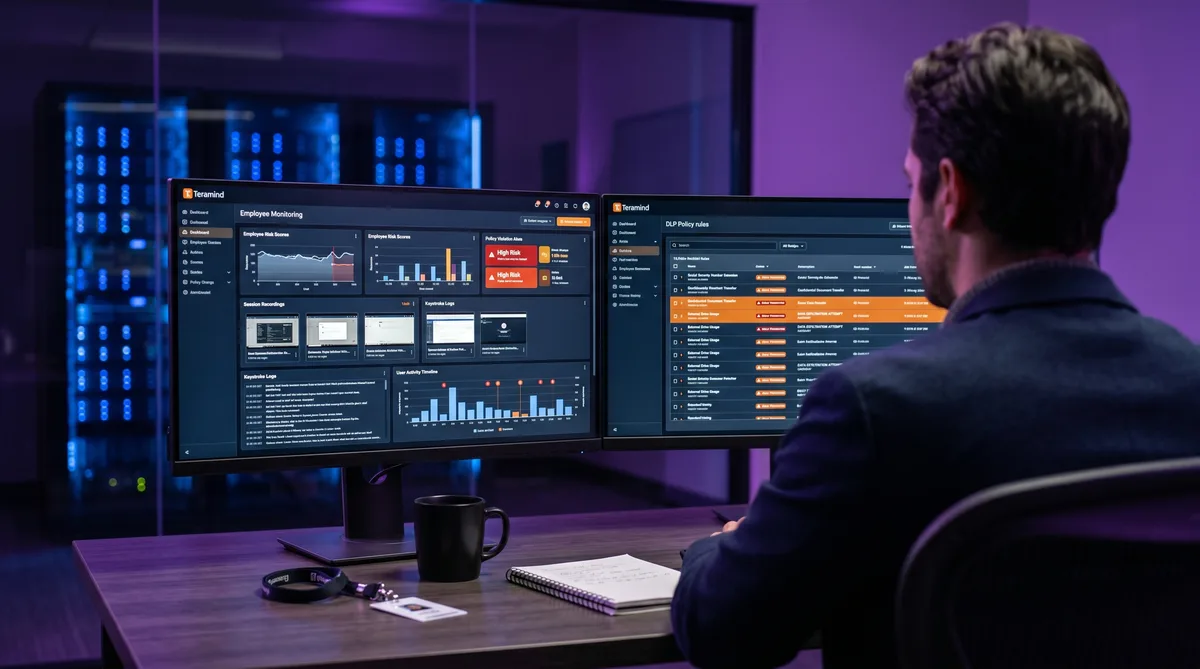
What Is Teramind?
Teramind is an employee monitoring, insider threat detection, and data loss prevention platform headquartered in Aventura, Florida. Founded in 2014 by Isaac Kohen, it has grown to serve over 10,000 organizations and earned recognition from Gartner and Forrester in the insider risk management category. Unlike most tools in the employee monitoring space, Teramind was built security-first — productivity tracking is just one layer of a platform designed primarily to prevent data breaches and insider threats.
What sets Teramind apart from competitors like Hubstaff, Time Doctor, and ActivTrak is the depth of its surveillance. Teramind can record continuous screen video, log every keystroke, monitor email and chat content, track file transfers, inspect clipboard data, and analyze behavioral patterns using AI — all from a single agent. It is, by a wide margin, the most aggressive monitoring tool we have reviewed on this site.
This review covers Teramind's features tier by tier, its 2026 pricing, the trade-offs for both employers and employees, and the strongest alternatives. For a detailed breakdown of each monitoring mechanism and how to keep your reports consistent, see our companion article on how Teramind tracks activity. For the broader landscape, our guide to cheating time tracking software compares all major monitoring tools.
Key Teramind Features
Screen Recording and Keystroke Logging
Teramind's Starter plan includes periodic screenshots at configurable intervals. The UAM and DLP plans take this to another level with continuous screen video recording that captures your entire desktop session as a DVR-style stream. Managers can play back your workday, scrubbing through hours of footage to see exactly what was on your screen at any moment.
On the Enterprise plan, recorded sessions are searchable via OCR (optical character recognition) — administrators can search for specific text that appeared anywhere on your screen. Combined with video playback, this makes Teramind's visual monitoring the most comprehensive in the category. Tools like Time Doctor offer screenshots on all plans and video on Standard, but neither approaches Teramind's OCR-searchable session replay.
The UAM and DLP plans also include full keystroke logging. Every key pressed is recorded with contextual metadata: what you typed, which application you were in, and when. This covers emails, chat messages, browser searches, code editors, and everything else. Keyword-based alerts can flag specific terms automatically. The Starter plan does not include keystroke logging.
Behavioral Analytics and Insider Threat Detection
Teramind's behavioral analytics engine — branded brAIn — uses machine learning to build a baseline of each employee's normal activity patterns and flag deviations. Instead of relying solely on static rules ("block this website"), it learns what normal looks like for each user and surfaces anomalies:
- Unusual login times or locations
- Sudden changes in application usage patterns
- Shifts in communication behavior
- Anomalous data access or file handling
- Spikes or drops in activity relative to the user's baseline
Each employee receives a dynamic risk score that updates in real time based on their behavior. Higher scores trigger more detailed monitoring and manager alerts. This approach is similar to Veriato's behavioral analytics, though Teramind pairs it with DLP enforcement rather than just detection.
Teramind also offers a Smart Rules engine with if-then automation: if an employee triggers a policy violation (copying sensitive files to USB, accessing a blocked website, typing a flagged keyword), the system can automatically alert a manager, block the action, lock the user's session, or escalate the incident.
Data Loss Prevention
The DLP plan is where Teramind separates itself from every other tool in this review series. It monitors data movement across the organization:
- Content inspection — Scans files, emails, and clipboard data for sensitive patterns (credit card numbers, SSNs, proprietary code, health records)
- Data fingerprinting — Tracks specific sensitive files and alerts when they are copied, moved, or shared
- Clipboard monitoring — Records what is copied and pasted between applications
- File transfer tracking — Monitors uploads to cloud storage (Dropbox, Google Drive, OneDrive), USB devices, FTP servers, and email attachments
- USB device control — Can block unauthorized USB storage devices entirely
- Automated enforcement — Rules can block actions in real time, not just alert after the fact
Teramind ships with 200+ pre-built DLP policy templates covering HIPAA, GDPR, PCI DSS, SOC 2, and FERPA compliance. Custom rules support regex patterns and the visual Smart Rules builder. For organizations in finance, healthcare, government, or any industry handling sensitive data, the DLP tier is Teramind's core value proposition.
Deployment Options and Platform Support
Teramind offers three deployment models: cloud (SaaS) hosted on Teramind's infrastructure with US and EU data centers, on-premise self-hosted on the organization's own servers, and private cloud on the customer's chosen provider. On-premise deployment offers full data sovereignty but requires significant infrastructure investment.
The desktop agent supports Windows, macOS (including Apple Silicon), and Linux (Ubuntu, CentOS, RHEL, Debian) with partial feature coverage. Virtual desktop environments are well supported — Citrix, VMware Horizon, Microsoft RDS, Amazon WorkSpaces, and Azure Virtual Desktop all work. There is no mobile agent and no Chrome OS support.
The Full Monitoring Scope
The table below shows what each Teramind tier monitors compared to lighter alternatives:
| Capability | Teramind Starter | Teramind UAM/DLP | Hubstaff | ActivTrak |
|---|---|---|---|---|
| App & URL tracking | Yes | Yes | Starter+ | All plans |
| Screenshots | Yes | Yes | All plans (capped) | Add-on |
| Screen video recording | No | Yes | No | No |
| Keystroke logging | No | Yes | No | No |
| Email & chat monitoring | No | Yes | No | No |
| Clipboard monitoring | No | DLP only | No | No |
| File transfer tracking | No | DLP only | No | No |
| USB device control | No | DLP only | No | No |
| Live screen viewing | No | Yes | No | No |
| Behavioral analytics | Limited | Full (AI/ML) | No | Professional |
| Stealth mode | Yes | Yes | No | Yes |
| GPS tracking | No | No | Team plan | No |
Teramind's UAM and DLP tiers monitor more channels than any other tool in this review series. The trade-off is cost, complexity, and the impact on employee trust.
Teramind Pricing in 2026
Teramind uses per-user, per-month pricing with a 5-seat minimum on all plans. Annual billing saves roughly 8% (one month free). A 7-day free trial is available for cloud deployments with no credit card required.
| Plan | Monthly | Annual (per user/mo) | Best For |
|---|---|---|---|
| Starter | $15/user/mo | $14/user/mo | Basic productivity monitoring |
| UAM | $30/user/mo | $28/user/mo | Full surveillance, insider threat |
| DLP | $35/user/mo | $32/user/mo | Data protection, compliance |
| Enterprise | Custom | Custom | On-prem, OCR, premium support |
Starter — $15/user/month ($14 annual)
- App and website monitoring with productivity categorization
- Periodic screenshots at configurable intervals
- Active vs. idle time tracking
- Basic policy and rules engine
- Customizable BI dashboard and reports
UAM — $30/user/month ($28 annual)
- Everything in Starter
- Keystroke logging across all applications
- Continuous screen video recording
- Email, chat, and social media monitoring
- Live screen viewing and remote control
- Full behavioral analytics and anomaly detection
- Dynamic risk scoring per user
- SIEM integration (Splunk, QRadar, Sentinel)
DLP — $35/user/month ($32 annual)
- Everything in UAM
- Content inspection with 200+ pre-built policy templates
- Data fingerprinting and classification
- Clipboard monitoring and control
- File transfer monitoring and blocking
- USB device control
- Automated real-time enforcement (block, lockout, escalate)
- Compliance reporting for HIPAA, GDPR, PCI DSS, SOC 2
Enterprise — Custom pricing
- Everything in DLP
- On-premise and private cloud deployment
- OCR engine for searchable session replay
- Scriptable behavior rules and business process analytics
- GovCloud support (AWS GovCloud, Azure Government)
- Premium support with SLA guarantees
Teramind is significantly more expensive than productivity-focused competitors. DeskTime starts at $7/user/month, Hubstaff at $4.99, and ActivTrak at $10. But those tools are time trackers with monitoring features bolted on. Teramind is a security platform with time tracking included — and the DLP capabilities have no equivalent in the productivity-tracker market.
Pros and Cons
What Teramind Does Well
- Unmatched monitoring depth — Screen video, keystrokes, email, chat, clipboard, file transfers, and USB — no other tool in this price tier covers as many channels.
- DLP with real-time enforcement — 200+ policy templates with automated blocking, not just detection. This is genuine data loss prevention, not just monitoring.
- AI behavioral analytics — Per-user baselines, anomaly detection, and dynamic risk scoring catch threats that static rules miss.
- OCR-searchable session replay — On Enterprise, every word that appeared on screen is searchable. Invaluable for forensic investigations.
- Flexible deployment — Cloud, on-premise, and private cloud cover every security and data sovereignty requirement.
- Compliance certifications — SOC 2 Type II, HIPAA (BAA available), GDPR, PCI DSS, FERPA, CCPA. Recognized by Gartner in insider risk management.
Where Teramind Falls Short
- Heavy resource consumption — The agent with full recording enabled is CPU- and RAM-intensive, slowing older machines noticeably.
- Complex setup — Policy configuration takes weeks, not hours. The learning curve is steep, especially for DLP rules. G2 rates ease of setup at 4.1/5 — lower than competitors.
- Expensive at scale — DLP for 500 users at $32/user/month (annual) is $16,000/month before infrastructure costs.
- Trust erosion — Keystroke logging, stealth mode, and video recording can seriously damage employee morale if rolled out without transparent communication.
- macOS gaps — The Mac agent still lacks feature parity with Windows, particularly around email monitoring and USB control.
- No mobile monitoring — No iOS or Android agent exists. Teams needing mobile tracking must look elsewhere.
- False positive tuning — DLP rules and behavioral alerts need significant tuning out of the box to reduce noise.
Teramind Alternatives
ActivTrak
ActivTrak is the analytics-first alternative for teams that want workforce insights without deep surveillance. It offers productivity scoring, focus metrics, workload balance, and burnout detection — all without keystroke logging, video recording, or email monitoring. Starting at $10/user/month, it costs a third of Teramind's UAM tier and is far less invasive.
Hubstaff
Hubstaff is the better choice for teams that need GPS and payroll. It offers time tracking, screenshots, activity levels, geofencing, and built-in payments — capabilities Teramind lacks entirely. Starting at $4.99/user/month, it is the most affordable option for field and mobile teams.
Time Doctor
Time Doctor provides a middle ground between productivity tracking and monitoring. Screenshots on every plan, video recording on Standard, and compliance certifications on Premium give it enough surveillance for most use cases at $6.70/user/month — far cheaper than Teramind and without the setup complexity.
Veriato
Veriato is the closest competitor in the insider threat space. It offers behavioral analytics, keystroke logging, and triggered screenshots at $15/user/month. It lacks Teramind's real-time DLP enforcement and video recording depth, but it is a lighter-weight option for organizations focused on insider risk rather than full data protection.
TrickTack
If you are tracked by Teramind and need your activity to reflect work that does not involve constant typing — phone calls, offline meetings, reading, or focused thinking — TrickTack simulates natural mouse movement, keyboard input, scrolling, and app switching with randomized patterns designed to resist behavioral analysis. Free 7-day trial.
Frequently Asked Questions
How much does Teramind cost?
Teramind has three fixed-price tiers plus Enterprise, all with a 5-seat minimum. Starter costs $15/user/month ($14 billed annually) and covers app monitoring, screenshots, and productivity tracking. UAM costs $30/user/month ($28 annually) and adds keystroke logging, screen video recording, email and chat monitoring, and behavioral analytics. DLP costs $35/user/month ($32 annually) and adds content inspection, data fingerprinting, clipboard monitoring, file transfer tracking, and compliance reporting. Enterprise pricing is custom. A 7-day free trial is available for cloud plans.
Does Teramind record keystrokes?
Yes, but only on the UAM and DLP plans. The Starter plan does not include keystroke logging. On UAM and DLP, Teramind records every key pressed across all applications, including emails, chat messages, browser searches, and documents. Keystroke data is stored with contextual metadata showing what you typed, which application you were in, and when. Administrators can configure keyword-based alerts, and some organizations exclude password fields from capture.
Can Teramind record my screen as video?
Yes. On the UAM and DLP plans, Teramind can record your entire desktop session as continuous video, not just periodic screenshots. Managers can play back your workday like a DVR, scrubbing through hours of footage. On the Enterprise plan, recordings are searchable via OCR, meaning administrators can find specific text that appeared on your screen at any point. The Starter plan includes periodic screenshots but not continuous video.
Is Teramind better than ActivTrak?
They serve fundamentally different purposes. Teramind is a security-first platform built for insider threat detection and data loss prevention, with deep surveillance including keystroke logging, screen video, email monitoring, and DLP rules. ActivTrak is an analytics-first platform focused on workforce productivity insights like focus time, workload balance, and burnout detection, with no keystroke logging and screenshots only as an add-on. Teramind is the right choice for regulated industries and insider risk. ActivTrak is the right choice for productivity analytics without invasive surveillance.
Can Teramind run in stealth mode?
Yes. Teramind can be deployed in either visible or hidden (stealth) mode on all plans. In stealth mode, the agent does not appear in the system tray, Start menu, or Add/Remove Programs. It runs as background processes with generic names designed to avoid detection. Many jurisdictions require employers to disclose monitoring, so stealth deployment may have legal implications depending on your location.
Conclusion
Teramind is the most powerful monitoring tool we have reviewed. Its combination of screen video recording, keystroke logging, behavioral analytics, and data loss prevention puts it in a category of its own — closer to enterprise security software than to a time tracker. The DLP tier with 200+ policy templates and real-time enforcement is genuinely useful for organizations handling sensitive data under regulatory pressure.
The catches are equally significant: high cost, complex setup, heavy agent resource use, no mobile monitoring, and the very real risk of trust erosion if deployed without transparency. Most teams do not need this level of surveillance. For straightforward productivity monitoring, ActivTrak or DeskTime do the job at a fraction of the price. For field teams, Hubstaff covers GPS and payroll that Teramind cannot.
But for regulated industries, insider threat programs, and organizations where data protection is a legal requirement rather than a nice-to-have, Teramind is the most complete platform available. And if you work under Teramind and need your activity to reflect the real work you do during calls, reading, and thinking, TrickTack was built with exactly this level of monitoring in mind.
Keep Your Teramind Reports Consistent
TrickTack simulates mouse movement, keyboard input, scrolling, and app switching with randomized patterns — designed to address the multi-layered monitoring Teramind uses. Try it free for 7 days.
Download

