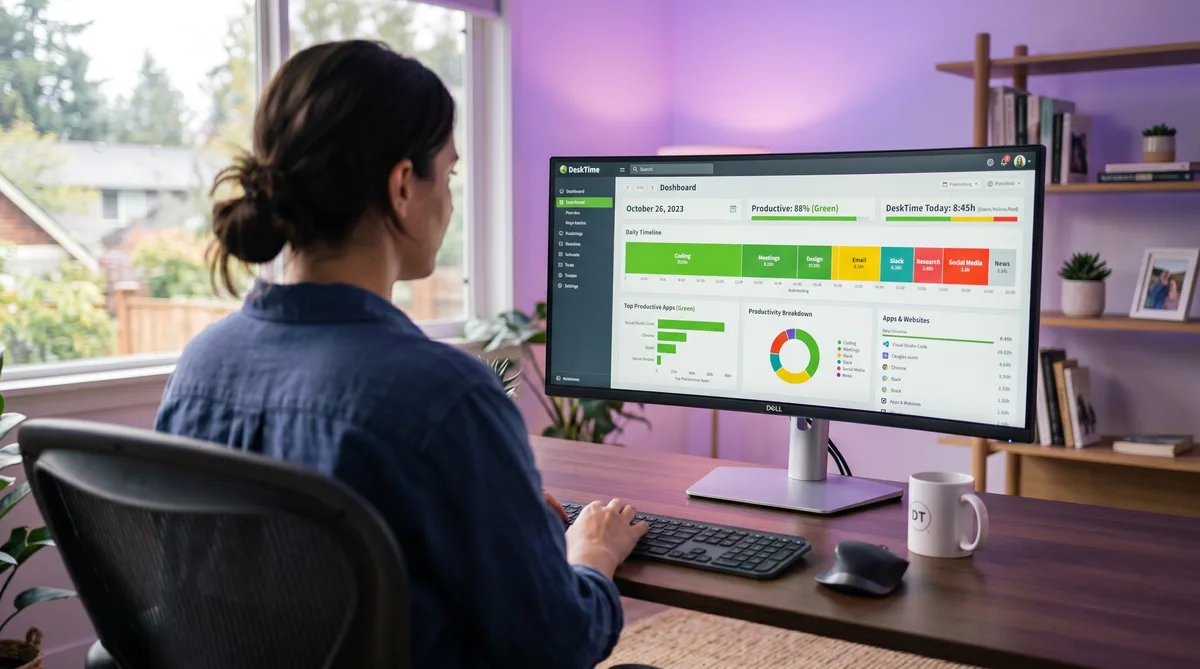
What Is DeskTime?
DeskTime is a fully automatic time tracking and productivity analytics platform built in Riga, Latvia, by Draugiem Group. Founded in 2011, it was originally an internal tool to help the company's own remote teams log honest eight-hour days without the friction of manual timers. That origin shows in the product: DeskTime starts tracking the moment your computer turns on and stops when it shuts down. There is nothing to start, nothing to clock in to, and no timesheet to fill at the end of the day.
What sets DeskTime apart from most competitors is its productivity scoring system. Instead of simply measuring whether your mouse is moving, DeskTime categorizes every application and website as productive, unproductive, or neutral and calculates a real-time productivity percentage. Two employees can both log eight active hours, but if one spent six hours in an IDE and the other spent four hours on YouTube, their scores will look very different.
This review covers DeskTime's core features, its 2026 pricing, the trade-offs to weigh before committing, and the strongest alternatives. If you want a deep dive into exactly how DeskTime monitors activity and how to keep your reports consistent, see our companion article on how DeskTime tracks activity. For a head-to-head comparison with its closest monitoring rival, read our DeskTime vs Time Doctor breakdown. For a broader comparison of monitoring approaches, see our guide to cheating time tracking software.
Key DeskTime Features
Automatic Time Tracking
DeskTime's headline feature is zero-effort time logging. Once the desktop app is installed, it starts recording as soon as your computer powers on and runs silently in the background until shutdown. There is no timer button, no project selector, and no manual entry required for the tracking itself.
This is a fundamentally different model from timer-based tools like Hubstaff or Toggl Track, where employees must start a session manually. The automatic approach removes a common source of data gaps — forgotten timers — and gives managers a complete picture of the workday without any employee action.
DeskTime detects idle time after three minutes of no mouse, keyboard, or scroll input. When idle triggers, the clock stops and that time simply does not count toward your active hours. There is no "unproductive" penalty for being idle — the time just disappears from your total, which can be a problem if managers track total active hours alongside productivity percentages.
Productivity Categorization
This is where DeskTime truly stands apart. Every application, website, and document title you interact with is classified into one of three buckets:
- Productive — Apps directly related to work. VS Code, Figma, Google Docs, Jira, and similar tools land here by default.
- Unproductive — Social media, streaming, shopping, news, and gaming sites.
- Neutral — Apps that could go either way. Email clients, Slack, Google Search, and browsers before a specific URL is loaded are typically neutral.
DeskTime ships with default classifications for thousands of popular apps and websites. Managers can customize these to match their team's workflow — for instance, reclassifying Facebook as productive for a social media marketing team. Your productivity score is the percentage of active time spent on productive apps, and it appears on the team dashboard in real time.
Crucially, DeskTime tracks the foreground application, not everything running in the background. If you have VS Code open but Chrome with YouTube is in focus, DeskTime logs that time as Chrome/YouTube time. This foreground-focus approach makes the categorization fairly accurate but also means the tool is sensitive to which window sits on top at any given moment.
DeskTime also includes a built-in Pomodoro timer that reminds you to take breaks at configurable intervals (52, 60, or 90 minutes). It is a small touch, but it signals the product's angle: DeskTime is more interested in sustainable productivity than surveillance.
Screenshots and Private Time
DeskTime offers periodic screenshots on the Premium and Enterprise plans. When enabled by a manager, screenshots are captured at set intervals and can be auto-blurred to protect sensitive content like passwords or personal messages. Screenshots are not available on the Pro plan or the free Lite tier.
Employees can see when screenshots are active, review what was captured, and — importantly — use Private Time mode to pause all tracking, including screenshots, whenever they need privacy for personal tasks like banking, medical appointments, or job searching. Private Time is available on all plans, and the paused time is simply not counted — it does not show up as idle or unproductive.
This approach is notably gentler than tools like Time Doctor, which takes screenshots on every plan and offers video screen recording on Standard, or Teramind, which captures continuous screen video, live viewing, and keystroke logs. DeskTime's stance is closer to "trust but verify" than full surveillance.
Reporting, Projects, and Integrations
DeskTime generates productivity reports that break down active time by application, website, and productivity category. Managers can filter by team, date range, or individual employee, and export data as CSV or Excel. In early 2026, DeskTime added an AI Summary feature that highlights daily patterns, focus areas, and workload distribution automatically.
Built-in project and task tracking lets employees assign time to specific projects, combining with the automatic tracking data to show how team resources are allocated. An absence calendar handles vacation days, sick leave, and other time off without requiring a separate HR tool.
DeskTime's integration list is narrower than most competitors — about 10 native connections including Jira, Asana, Trello, Basecamp, GitLab, Google Calendar, and Outlook. For anything beyond those, Zapier fills the gap, connecting DeskTime to thousands of apps. By comparison, Hubstaff has 30+ native integrations and Time Doctor has 60+, so teams that rely on deep tool integration may find DeskTime limiting.
What DeskTime Does Not Monitor
One of DeskTime's strongest selling points is what it deliberately leaves out. The table below shows how it compares to heavier monitoring tools:
| Monitoring Capability | DeskTime | Hubstaff | Time Doctor | Teramind |
|---|---|---|---|---|
| App & URL tracking | All paid plans | Starter+ | All plans | All plans |
| Productivity scoring | All paid plans | No | No | Yes |
| Screenshots | Premium only | All plans (capped) | All plans | All plans |
| Screen video recording | No | No | Standard+ | Yes |
| Keystroke logging | No | No | No | Yes |
| Webcam capture | No | No | No | Yes |
| GPS / location tracking | No | Team plan | No | No |
| Live screen viewing | No | No | No | Yes |
| Stealth / hidden mode | No | No | Optional | Optional |
DeskTime does not record keystrokes, capture screen video, monitor your webcam, track your GPS location, or run in stealth mode. It counts mouse and keyboard events to determine whether you are active, but it does not log what you type. This makes DeskTime one of the least invasive monitoring tools in the category — closer to Harvest in philosophy than to full-surveillance platforms like Teramind or Veriato.
DeskTime Pricing in 2026
DeskTime uses per-user, per-month pricing with no seat minimums on paid plans. The rates below reflect the monthly billing price; annual billing saves roughly one month per year.
| Plan | Monthly Price | Annual Price (per user/mo) | Best For |
|---|---|---|---|
| Lite | Free (1 user) | Free | Solo freelancers, basic app tracking |
| Pro | $7/user/mo | $6.42/user/mo | Small teams needing productivity scoring |
| Premium | $10/user/mo | $9.17/user/mo | Screenshots, scheduling, integrations |
| Enterprise | Custom | Custom | Large orgs, unlimited history, API |
Lite — Free (single user)
- Automatic time tracking
- App tracking and productivity categorization
- One user only, no URL tracking, no team features
Pro — $7/user/month
- Everything in Lite, for teams
- URL and document title tracking
- Idle detection (3-minute default threshold)
- Project and task tracking
- Pomodoro timer and break reminders
- Custom reports and CSV/Excel export
- Private Time mode
Premium — $10/user/month
- Everything in Pro
- Automatic screenshots with optional auto-blur
- Shift scheduling and attendance
- Absence calendar and leave management
- Project management integrations (Jira, Asana, Trello, GitLab, Basecamp)
- Calendar integrations (Google Calendar, Outlook)
- IP-based access restrictions
- Dedicated Account Manager and personalized onboarding
Enterprise — Custom pricing
- Everything in Premium
- Unlimited data history and unlimited projects
- Custom API access
- Employee training and VIP support
All paid plans include a 14-day free trial. Compared with rivals: Hubstaff Starter begins at $4.99/user/month (billed annually) with screenshots but no productivity scoring, Time Doctor Basic starts at $6.70/user/month with screenshots on every plan, and Clockify offers a generous free tier with optional paid monitoring add-ons. DeskTime sits in the mid-range on price but is one of the few tools that includes productivity categorization on every paid plan.
Pros and Cons
What DeskTime Does Well
- Fully automatic tracking — Nothing to start or stop. The app just runs, removing timer gaps and manual-entry errors that plague tools like Hubstaff and Toggl.
- Productivity categorization — The productive/unproductive/neutral scoring system gives managers qualitative insight, not just raw activity percentages. No other tool in this price range does this as cleanly.
- Private Time mode — Employees can pause tracking for personal tasks, which reduces resentment and respects boundaries. Not every competitor offers this.
- Cross-platform, including Linux — Native apps for Windows, macOS, Linux, iOS, Android, and web. Linux support is rare in this category.
- Lightweight surveillance — No keylogging, no video recording, no webcam, no GPS, no stealth mode. DeskTime is transparent and relatively gentle.
- ISO 27001 and 27701 certified — Earned in late 2024, these certifications cover information security and privacy management — meaningful for compliance-conscious teams.
Where DeskTime Falls Short
- Limited integrations — About 10 native connections compared with 30+ for Hubstaff and 60+ for Time Doctor. Teams that live in multiple PM or accounting tools will lean on Zapier heavily.
- No GPS or location tracking — DeskTime is purely desk-focused. Field teams, delivery drivers, and construction crews need Hubstaff or a standalone GPS solution.
- No payroll — Unlike Hubstaff, DeskTime does not calculate pay from tracked hours or process payments. You need a separate payroll provider.
- Mobile app is limited — The iOS and Android apps offer manual time tracking but lack the full automatic monitoring of the desktop client.
- Idle detection punishes offline work — Whiteboard sessions, phone calls, and focused reading all register as idle time. The 3-minute threshold is strict enough that short breaks visibly dent your totals.
- Categorization requires upkeep — Default classifications cover common apps, but niche or industry-specific tools often land as neutral until a manager manually reclassifies them.
DeskTime Alternatives
Hubstaff
Hubstaff is the better choice for field and mobile teams thanks to GPS tracking, geofencing, and built-in payroll. It lacks productivity categorization — it measures raw activity levels only — but its broader integration library and location features make it the stronger all-around workforce management tool. See our DeskTime vs Time Doctor comparison for how it stacks up against the other monitoring heavyweight.
Time Doctor
Time Doctor sits between DeskTime and full-surveillance tools. It offers screenshots on every plan, video screen recording on Standard, and compliance certifications (SOC 2, HIPAA, GDPR) on Premium. It does not do productivity categorization, but its deeper monitoring and enterprise features suit regulated industries where audit trails matter.
Toggl Track
Toggl Track is the opposite of DeskTime — a lightweight, privacy-first timer with no screenshots, no activity scores, and no surveillance. If your team needs accurate time tracking and reporting without the monitoring overhead, Toggl is the gentler alternative.
Clockify
Clockify offers a generous free plan for unlimited users with optional paid add-ons for screenshots, GPS, and idle detection. It is a budget-friendly alternative that lets teams scale monitoring features as needed. It does not do automatic tracking or productivity scoring, so it trades insight for flexibility.
TrickTack
If you are tracked by DeskTime and need your activity to reflect the real work you do — including phone calls, reading, and thinking time that does not register as active — TrickTack simulates natural mouse movement, keyboard input, scrolling, and app switching, the exact signals DeskTime measures. It works alongside any tracker with a free 7-day trial.
Frequently Asked Questions
How much does DeskTime cost?
DeskTime has three paid plans plus a limited free tier. The Lite plan is free for a single user with basic app tracking. Pro costs $7/user/month ($6.42 billed annually) and covers automatic time tracking, productivity categorization, URL logging, project tracking, idle detection, and the Pomodoro timer. Premium costs $10/user/month ($9.17 billed annually) and adds screenshots, shift scheduling, absence calendar, and integrations with Jira, Asana, and other project tools. Enterprise pricing is custom and includes unlimited data history, API access, and a dedicated account manager. All paid plans include a 14-day free trial.
Does DeskTime take screenshots?
DeskTime takes screenshots only on the Premium and Enterprise plans, and only if your employer has enabled the feature. Screenshots are captured at periodic intervals and can be auto-blurred to protect sensitive content. They are not available on the Pro plan or the free Lite tier. If screenshots are active, DeskTime notifies you, and you can review what was captured. You can also use Private Time mode to pause all tracking, including screenshots, for personal tasks.
Does DeskTime record keystrokes or screen video?
No. DeskTime does not record keystrokes, capture screen video, monitor your webcam, or track GPS location. It counts mouse and keyboard events to determine whether you are active, but it does not log what you type or where you click. This makes DeskTime significantly less invasive than full-surveillance tools like Teramind, Veriato, or ActivTrak, which can record everything from keystrokes to clipboard contents and live screen feeds.
Is DeskTime better than Hubstaff?
It depends on what you need. DeskTime is fully automatic and scores your productivity by categorizing apps as productive, unproductive, or neutral, which Hubstaff does not do. Hubstaff requires starting a timer but offers GPS tracking and geofencing for mobile and field teams, payroll, and more integrations. DeskTime is the better fit for desk-based teams that want passive productivity insight without manual timers. Hubstaff is the better fit for field teams or any workforce that needs location tracking. On price, both start at $7/user/month on their core paid plans.
What platforms does DeskTime support?
DeskTime has native desktop applications for Windows, macOS, and Linux, mobile apps for iOS and Android, and a web-based timer accessible from any browser. The desktop apps provide the fullest tracking including automatic time logging, app and URL monitoring, productivity categorization, and screenshots on Premium. The mobile apps offer manual time tracking for on-the-go work. Linux support is notable because many competitors only support Windows and Mac.
Conclusion
DeskTime occupies a distinctive position in the time tracking market. Its fully automatic tracking and productivity categorization give managers more actionable insight than raw activity percentages, while its deliberate omission of keylogging, video recording, and GPS keeps it from crossing into invasive surveillance territory. The Private Time feature is a genuine trust signal that few competitors match.
The trade-offs are real: limited integrations, no GPS for field teams, no payroll, and a mobile app that cannot match the desktop experience. Teams that need deep monitoring, location tracking, or built-in payments will find Hubstaff or Time Doctor more complete. Teams that want lightweight tracking without surveillance should consider Toggl or Clockify.
But for desk-based teams that want an honest, automatic picture of how work hours are spent — without turning the office into a panopticon — DeskTime is one of the strongest options available. And if you work under DeskTime and need your activity to reflect phone calls, reading, and thinking time that does not involve constant mouse clicks, TrickTack was built for exactly that.
Keep Your DeskTime Reports Consistent
TrickTack simulates mouse movement, keyboard input, scrolling, and app switching — every signal DeskTime measures for productivity scoring. Try it free for 7 days.
Download

