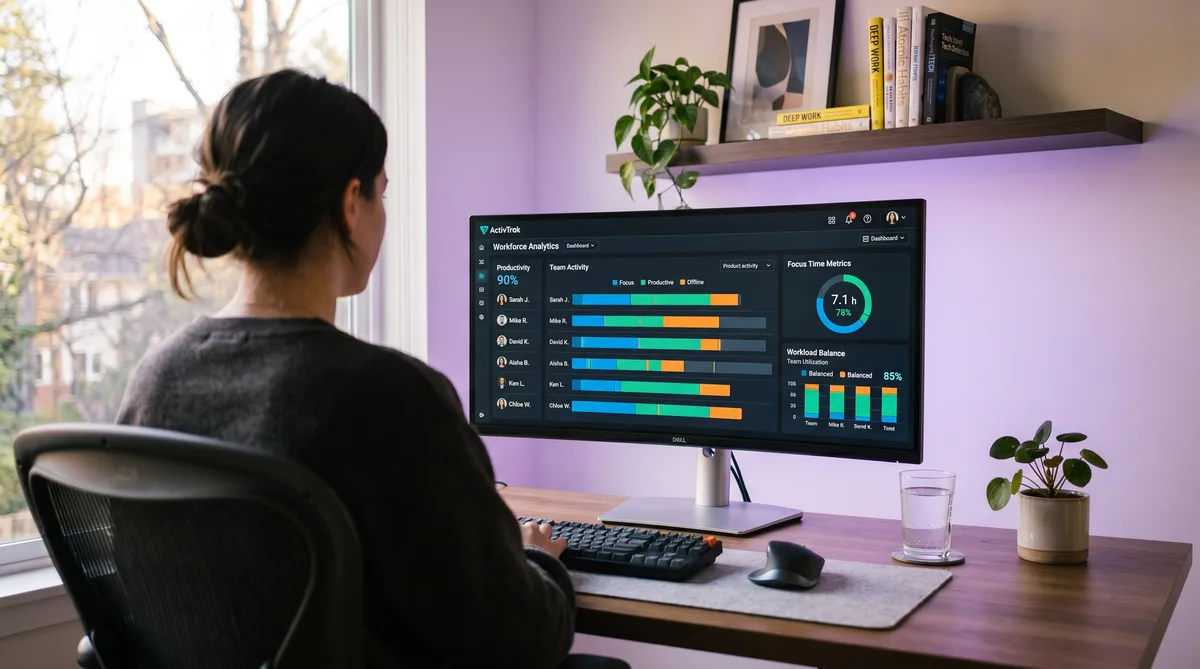
What Is ActivTrak?
ActivTrak is a workforce analytics and productivity management platform headquartered in Austin, Texas. Founded in 2009 and backed by $77.5 million in funding from Sapphire Ventures and Elsewhere Partners, it has grown to over one million users across roughly 4,500 companies. Unlike traditional employee monitoring tools that focus on surveillance, ActivTrak positions itself as an analytics-first platform — its core pitch is insight into how teams work, not catching people slacking off.
What sets ActivTrak apart from competitors like Hubstaff and Time Doctor is its emphasis on behavioral analytics. Beyond tracking which apps and websites you use, ActivTrak builds behavioral baselines for each employee, measures focus patterns and context-switching rates, detects burnout risk, and provides AI-powered coaching recommendations. It sits in an unusual space: more analytical than simple time trackers, but less invasive than full-surveillance tools.
This review covers ActivTrak's features, its 2026 pricing (including the often-overlooked add-on costs), the trade-offs to weigh, and the strongest alternatives. For a detailed breakdown of how ActivTrak monitors activity and how to keep your reports consistent, see our companion article on how ActivTrak tracks activity. For the broader landscape, our guide to cheating time tracking software compares all major monitoring tools.
Key ActivTrak Features
Activity Tracking and Productivity Scoring
ActivTrak installs a lightweight desktop agent that runs in the background on Windows, macOS, or Chrome OS. Once active, it records the foreground application, the specific URL in your browser, and the title of the document or file you have open. This happens continuously and automatically — no timers to start, no manual logging required.
Every application and website is classified as productive, unproductive, or undefined using a mix of default rules and manager-customized categorizations. Your productivity score — the percentage of active time spent on productive apps — appears on the team dashboard alongside historical trends and team averages. The approach is similar to DeskTime, which also scores productivity by app category, though ActivTrak layers richer analytics on top.
ActivTrak also tracks idle time by monitoring mouse and keyboard input. When no activity is detected for a configurable period, the time is marked as idle and excluded from active totals. Unlike Time Doctor, which pops up alerts when idle is detected, ActivTrak records the gap silently and surfaces it in the analytics.
Focus Time, Workload Balance, and Burnout Detection
This is where ActivTrak moves beyond basic monitoring into genuine workforce analytics. Starting on the Essentials Plus plan, managers get access to:
- Focus time metrics — ActivTrak defines a focus session as 20+ minutes of sustained work in a single productive app without switching. The dashboard shows how much deep work each team member achieves per day and how it trends over time.
- Context-switching analysis — How frequently employees jump between applications. High context-switching is flagged as a potential productivity drain, and managers can see which tools cause the most fragmentation.
- Workload balance — A view of whether team members are over- or under-utilized based on active hours and focus patterns. This is designed for managers who want to redistribute work before someone burns out.
On the Professional plan, ActivTrak adds burnout risk detection that analyzes patterns like consistently long hours, weekend activity, declining focus, and increasing idle time. It also provides location insights comparing productivity between remote, in-office, and hybrid workers — a feature that resonated strongly with companies navigating return-to-office decisions.
Screenshots and the Screen Details Add-On
Screenshots are not included in any standard ActivTrak plan. They require the Screen Details add-on at an additional $2/user/month. This add-on unlocks:
- Periodic screenshots with optional auto-blur
- Screen views (broader than individual screenshots)
- Full URL tracking (the base plan captures domain-level data only)
- Website blocking during work hours
- Activity alarms (email notifications when thresholds are breached)
This modular approach means many ActivTrak deployments run without any visual monitoring. The add-on structure is notably different from tools like Hubstaff and Time Doctor, where screenshots are included on all or most plans. The upside is privacy; the downside is that organizations expecting screenshots in the base price may be surprised by the additional cost.
Reporting, AI Coaching, and Integrations
ActivTrak generates auto-populated productivity summaries with daily, weekly, and custom-range reports. Managers can filter by team, role, or individual and schedule reports for automatic email delivery. Dashboards are customizable with drag-and-drop KPI widgets.
On the Professional plan, ActivTrak offers AI-powered coaching recommendations that suggest specific actions managers can take to improve team productivity — like adjusting meeting loads for employees with low focus time or flagging overworked team members before burnout sets in. It also includes productivity goal setting with tracking against targets.
ActivTrak's integration library is modest but targeted: Power BI for advanced analytics, Workday for HRIS data, Jira and Salesforce for project context, Slack and Microsoft 365 for collaboration, and Azure AD for SSO. Teams needing broader connectivity can use the ActivConnect API add-on ($3/user/month) for data export to BI tools. The native integration count is smaller than Hubstaff (30+) or Time Doctor (60+), but the Workday and Power BI connections serve the enterprise HR analytics use case well.
What ActivTrak Does Not Monitor
ActivTrak's privacy-first branding is backed by concrete limitations on what it collects:
| Monitoring Capability | ActivTrak | Hubstaff | Time Doctor | Teramind |
|---|---|---|---|---|
| App & URL tracking | All plans | Starter+ | All plans | All plans |
| Productivity scoring | All paid plans | No | No | Yes |
| Focus & workload analytics | Essentials Plus+ | No | No | Limited |
| Screenshots | Add-on ($2/user/mo) | All plans (capped) | All plans | All plans |
| Screen video recording | No | No | Standard+ | Yes |
| Keystroke logging | No | No | No | Yes |
| Webcam capture | No | No | No | Yes |
| GPS / location tracking | No | Team plan | No | No |
| Email / chat content | No | No | No | Yes |
| AI coaching / burnout detection | Professional | No | No | No |
ActivTrak does not record keystrokes, capture screen video, access your webcam, read your emails or chat messages, or track GPS. It detects mouse and keyboard events to measure whether you are active, but it never logs what you type. This puts ActivTrak closer to DeskTime and Harvest in monitoring intensity than to full-surveillance platforms like Teramind or Veriato.
ActivTrak Pricing in 2026
ActivTrak uses per-user, per-month pricing billed annually. There is no monthly billing option, and paid plans require a 5-user minimum — important to note if you are a small team.
| Plan | Price (per user/mo, annual) | Best For |
|---|---|---|
| Free | $0 (up to 3 users) | Testing basic activity tracking |
| Essentials | $10 | Core productivity scoring for small teams |
| Essentials Plus | $15 | Focus metrics, workload balance, team analytics |
| Professional | $19 | Burnout detection, AI coaching, workforce planning |
| Enterprise | Custom | Large orgs, dedicated support, custom deployments |
Free — $0 (up to 3 users)
- App and website tracking with basic productivity classification
- Limited reports and 30-day data retention
- No screenshots, no advanced analytics, no add-ons
Essentials — $10/user/month
- Everything in Free, for unlimited users (5-user minimum)
- Productivity classification and scoring
- Idle detection and active time tracking
- Custom reports and data export
- 6 months of data history
Essentials Plus — $15/user/month
- Everything in Essentials
- Team productivity comparisons
- Workload balance analysis
- Focus time and context-switching metrics
- Advanced reporting with scheduled delivery
Professional — $19/user/month
- Everything in Essentials Plus
- Burnout risk detection
- AI-powered coaching recommendations
- Productivity goal setting and tracking
- Location insights (remote vs. in-office productivity)
- Organizational health dashboard
Add-Ons (any paid plan)
- Screen Details — $2/user/month — Screenshots, screen views, full URLs, website blocking, alarms
- ActivConnect API — $3/user/month — Data export to BI tools, detailed activity data feeds
The real cost of ActivTrak is often higher than the headline price suggests. Adding Screen Details and ActivConnect to a Professional plan brings the per-user cost to $24/month — significantly above entry-level competitors. By comparison, DeskTime includes productivity scoring on its $7/month Pro plan, and Hubstaff includes screenshots on all plans starting at $4.99/month. ActivTrak's value lies in the analytics depth, not the price.
Pros and Cons
What ActivTrak Does Well
- Workforce analytics depth — Focus metrics, workload balance, burnout detection, and AI coaching go far beyond what any time tracker offers. These features make ActivTrak a management tool, not just a monitoring tool.
- Privacy-first approach — No keylogging, no video, no webcam, no email content. Screenshots are opt-in via a paid add-on. This makes it one of the least invasive platforms that still provides meaningful visibility.
- Free plan for 3 users — A functional free tier is rare in this category. It is limited, but it lets small teams try the platform without commitment.
- Easy setup and clean UI — G2 reviewers rate ease of setup at 9.3/10. The dashboard is intuitive and even non-technical managers can navigate it quickly.
- Behavioral baselines — ActivTrak learns each employee's normal patterns and surfaces deviations, which is more nuanced than static activity thresholds used by most competitors.
Where ActivTrak Falls Short
- Annual-only billing, 5-user minimum — No monthly option means a significant upfront commitment, and the 5-user minimum prices out solo freelancers and very small teams.
- Screenshots cost extra — The Screen Details add-on at $2/user/month surprises teams that expect visual monitoring in the base price. Competitors like Hubstaff and Time Doctor include screenshots without an add-on.
- No mobile monitoring — ActivTrak has no employee-facing mobile agent. The mobile app is manager-only for viewing dashboards. Teams with mobile or field workers need Hubstaff instead.
- No native Linux agent — Linux users get browser-only tracking through the Chrome extension, missing desktop app monitoring entirely.
- Data accuracy concerns — User reviews on G2 and Capterra mention occasional inaccuracies in tracked time and productivity data, particularly around idle detection edge cases.
- Limited integrations — The native integration count is smaller than most competitors. The ActivConnect API fills the gap but adds another $3/user/month.
ActivTrak Alternatives
DeskTime
DeskTime is the closest alternative for teams that want productivity scoring without the analytics overhead. It is fully automatic (no timer needed), categorizes apps as productive/unproductive/neutral, and starts at $7/user/month — cheaper than ActivTrak with similar core monitoring. It lacks ActivTrak's focus metrics, workload balance, and AI coaching, but for straightforward productivity tracking it does the job at a lower price.
Hubstaff
Hubstaff is the better choice for field and mobile teams. It offers GPS tracking, geofencing, screenshots on all plans, payroll, and 30+ integrations. It does not do productivity scoring or behavioral analytics, but its broader feature set and location capabilities make it the more versatile workforce management platform.
Time Doctor
Time Doctor provides deeper desk monitoring with screenshots on every plan, video screen recording on Standard, and compliance certifications (SOC 2, HIPAA, GDPR) on Premium. It lacks ActivTrak's analytics depth but offers stronger audit trails for regulated industries.
Teramind
Teramind is the full-surveillance alternative for security-focused organizations. It records keystrokes, captures continuous screen video, monitors email and chat content, and includes DLP capabilities. If compliance and insider threat detection are the priority rather than productivity analytics, Teramind fills that gap — but it is significantly more invasive.
TrickTack
If you are tracked by ActivTrak and need your activity to reflect work that does not involve constant typing — phone calls, reading, whiteboard sessions, or focused thinking — TrickTack simulates natural mouse movement, keyboard input, scrolling, and app switching, maintaining the behavioral baseline ActivTrak expects. Free 7-day trial.
Frequently Asked Questions
How much does ActivTrak cost?
ActivTrak offers a free plan for up to 3 users with basic activity tracking. Paid plans are billed annually only, with a 5-user minimum. Essentials costs $10/user/month and includes productivity classification, idle detection, and basic reports. Essentials Plus costs $15/user/month and adds workload balance analysis, focus metrics, and team comparisons. Professional costs $19/user/month and adds burnout detection, AI coaching, and workforce planning. Enterprise pricing is custom. Screenshots require the Screen Details add-on at $2/user/month on top of any paid plan.
Does ActivTrak take screenshots?
Not by default. Screenshots are only available through the Screen Details add-on, which costs an extra $2/user/month on top of any paid plan. This add-on also unlocks full URL tracking, screen views, website blocking, and activity alarms. Many companies run ActivTrak without the add-on, meaning no screenshots are captured. If your employer has purchased Screen Details, screenshots are taken at periodic intervals and can include auto-blur to protect sensitive content.
Does ActivTrak record keystrokes?
No. ActivTrak explicitly does not log keystrokes, and this is one of its core privacy commitments. It counts mouse and keyboard events to determine whether you are active, but it never records what you type, what you copy to your clipboard, or the content of your emails and chat messages. This makes ActivTrak less invasive than tools like Teramind and Veriato, which can capture every keystroke and clipboard action.
Is ActivTrak better than DeskTime?
They serve different needs. ActivTrak is stronger on workforce analytics with features like workload balance, burnout detection, AI coaching, and team comparisons that DeskTime does not offer. DeskTime is stronger on automatic time tracking with zero manual effort, a built-in Pomodoro timer, and lower pricing starting at $7/user/month versus ActivTrak at $10. For desk-based teams that want deep analytics and behavioral insights, ActivTrak is the better fit. For teams that want straightforward automatic tracking with productivity scoring at a lower price, DeskTime is the simpler choice.
What platforms does ActivTrak support?
ActivTrak has native desktop agents for Windows and macOS, plus a ChromeOS agent for Chromebook users. There is no native Linux agent, but Linux users can get browser-level tracking through the Chrome extension. ActivTrak does not have a mobile monitoring agent for iOS or Android — the mobile app is manager-only, for viewing dashboards and reports on the go but not for tracking employee activity on phones.
Conclusion
ActivTrak occupies a distinctive position in the monitoring market. It is more analytical than any pure time tracker — focus metrics, workload balance, burnout detection, and AI coaching give managers actionable workforce insights rather than just surveillance data. At the same time, its privacy-first approach (no keylogging, no video, no webcam, screenshots only as a paid add-on) keeps it from crossing into invasive territory.
The trade-offs are the annual-only billing with a 5-user minimum, the add-on costs that push real spending above the headline price, and the lack of mobile monitoring and native Linux support. Teams that need GPS tracking should look at Hubstaff. Teams that want simpler automatic tracking at a lower price should consider DeskTime. Teams in regulated industries needing audit trails should evaluate Time Doctor.
But for organizations that want to understand how their teams work — not just whether they are working — ActivTrak delivers insights that most monitoring tools simply cannot match. And if you work under ActivTrak and need your activity to reflect the real work you do during calls, reading, and thinking time, TrickTack was built for exactly that.
Keep Your ActivTrak Reports Consistent
TrickTack simulates mouse movement, keyboard input, scrolling, and app switching — maintaining the behavioral baseline ActivTrak expects. Try it free for 7 days.
Download

