Why People Search for This
Most employee monitoring tools capture periodic screenshots and track which websites you visit. Controlio does all of that and records continuous screen video, logs every keystroke, and gives managers a live feed of your desktop. It is one of the most surveillance-heavy tools in the category, sitting alongside Teramind and Veriato at the deep end of the monitoring spectrum.
Employees encountering Controlio for the first time often do not realize how much it captures until they see the features listed. The gap between “I thought they could see my screen sometimes” and “they are recording a continuous video of everything I do plus logging my keystrokes” is significant. This article breaks down each layer of monitoring so you know exactly what is visible and how to keep your reports looking consistent. For a broader overview of monitoring tools and strategies, start with our guide to cheating time tracking software.
What Is Controlio?
Controlio (formerly Work Examiner) is a cloud-first employee monitoring platform built for real-time oversight. The product is developed by EfficientLab and has been on the market since the mid-2000s under its original Work Examiner name before rebranding to Controlio with a cloud-native redesign.
Unlike on-premises tools like CurrentWare that store data on your company’s servers, Controlio stores everything — screen recordings, keystroke logs, activity data — in the cloud by default. Administrators access it all through a web dashboard from any browser, anywhere. On-premises and private cloud deployment options exist for organizations that need data sovereignty.
A lightweight agent is installed on each monitored computer (Windows and macOS). The agent can run in stealth mode, invisible in the system tray and task manager, or in transparent mode where employees know it is present. The cloud architecture means the agent works for remote employees automatically — no VPN or port forwarding required.
How Controlio Tracks Activity
Continuous Screen Recording
This is Controlio’s most aggressive feature. Instead of capturing a screenshot every few minutes like Hubstaff or Time Doctor, Controlio records continuous MPEG-4 video of your screen while the agent is running. Administrators can play back any segment of your workday as a video timeline, scrubbing through hours of footage to see exactly what you were doing at any moment.
The video recordings are compressed and uploaded to the cloud, where they are stored according to the company’s retention policy. For managers investigating a specific incident, this means they do not need to rely on periodic snapshots — they have a complete visual record of every action you took on screen.
Live Desktop Viewing
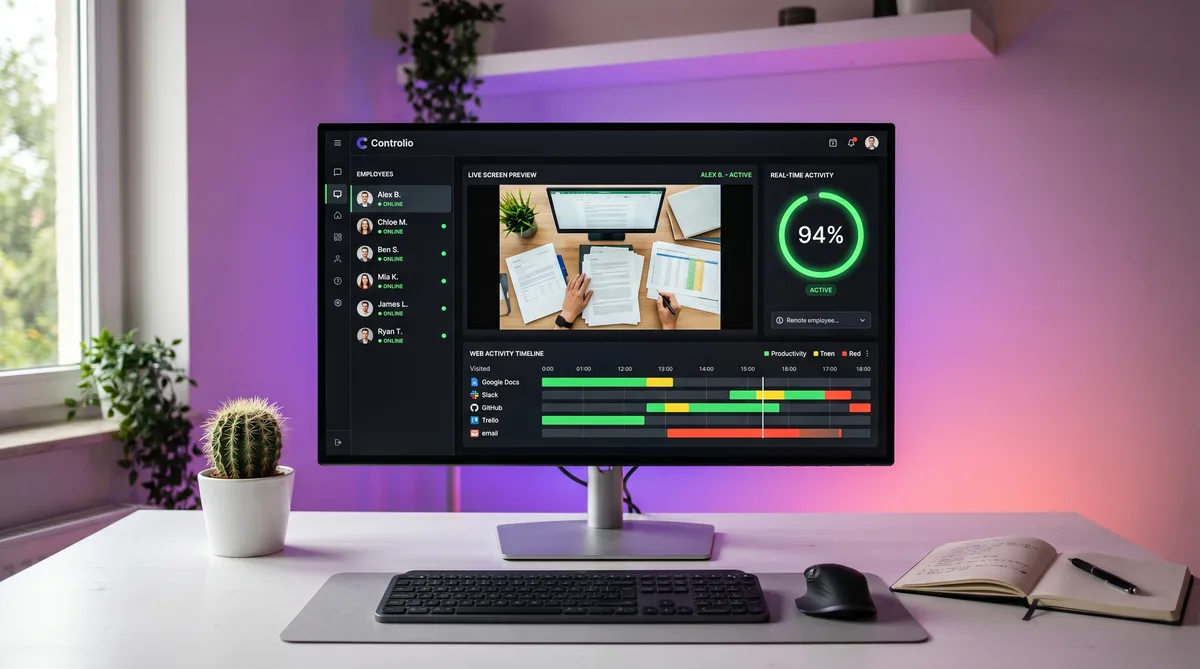
Beyond recorded video, Controlio offers real-time desktop streaming. An administrator can open the cloud dashboard, select an employee from the monitored list, and watch their screen live. There is no notification sent to the employee when live viewing is activated — it happens silently.
This feature works for both in-office and remote employees as long as the agent has internet connectivity. Combined with the employee list showing online/offline status, managers can check on any team member at any time.
Keystroke Logging
Controlio records every keystroke typed across all applications. Chat messages, emails, documents, search queries, URLs typed into the address bar — all of it is captured, timestamped, and stored. The keystroke data is searchable, so administrators can search for specific words or phrases across all employees.
This puts Controlio in the heavy-surveillance category alongside Teramind and Veriato. Tools like Hubstaff, Toggl, CurrentWare, and Time Doctor explicitly do not log keystrokes. If your employer uses Controlio, assume that anything you type on the monitored computer is recorded.
Web & Application Monitoring
Controlio tracks the standard activity data that most monitoring tools collect:
- Website history — Every URL visited, with timestamps and duration. Sites are categorized as productive, neutral, or unproductive.
- Application usage — Which apps are open, how long each is in focus, and when you switch between them.
- Active vs. idle time — Periods of keyboard and mouse inactivity are flagged as idle and shown in timeline reports.
- Productivity scoring — A real-time activity percentage is calculated based on how much time is spent in productive vs. unproductive categories.
- Web activity timeline — A visual Gantt-style chart showing which sites and apps were active throughout the day, color-coded by productivity category.
Controlio can also enforce web restrictions by blocking access to specific sites or categories, similar to CurrentWare’s BrowseControl.
Screenshots with OCR
On top of continuous video, Controlio captures periodic screenshots at configurable intervals (default: every five minutes while the user is active). These screenshots serve as quick-reference snapshots within the longer video timeline.
Controlio applies OCR (optical character recognition) to screenshots, extracting visible text from the screen. This means even if you are working in a desktop application that Controlio cannot directly intercept (like a local-only tool), the text displayed on your screen is extracted and becomes searchable. Administrators can search for a specific word and find screenshots where that word appeared on screen.
Controlio Pricing
| Plan | Price | Details |
|---|---|---|
| Cloud | $7.99 /user/month | 5–10,000 users, all features, cloud storage for recordings and data |
| On-Premises | Contact sales | 10–10,000 users, data stays on your servers |
| Private Cloud | Contact sales | Dedicated cloud instance for your organization |
Volume discounts are available for 100+ licenses. There is no free plan — Controlio offers a 14-day free trial of the cloud plan. At $7.99/user/month, it is surprisingly affordable for the depth of monitoring it provides. Teramind, which offers comparable surveillance depth, starts at $14+/user/month.
How to Maintain Consistent Activity
Controlio is one of the hardest tools to work around because it combines three layers of surveillance simultaneously: continuous video recording, keystroke logging, and live viewing. Most monitoring tools rely on one or two of these; Controlio stacks all three. That means your approach needs to address each layer.
Keep Work Applications in the Foreground
Since Controlio records continuous video, what is on your screen matters at all times — not just during screenshot intervals. If you step away for a break, leave a work application (your IDE, a spreadsheet, a document) in the foreground and visible. An idle screen showing a code editor looks very different on video playback than an idle screen showing a social media feed or a blank desktop.
Manage Idle Detection
Controlio flags idle periods when there is no keyboard or mouse input. TrickTack addresses this directly by simulating natural mouse movements and keyboard input at randomized intervals during breaks, keeping your session registering as active. The simulated input appears in Controlio’s activity timeline as normal desktop activity. See the documentation for configuration details.
Be Aware of Keystroke Logging
Every character you type on a Controlio-monitored machine is logged. Do not use the work computer for personal messaging, password entry for personal accounts, or any communication you would not want your employer to read. Use your personal phone on mobile data for anything personal.
Assume Live Viewing Is Possible at Any Time
Unlike scheduled screenshots where you might have a rough sense of timing, Controlio’s live viewing can happen at any moment without notification. Treat the monitored computer as a workspace that is always visible to management.
Personal Browsing Belongs on Personal Devices
With continuous video, keystroke logging, web history tracking, and OCR on screenshots, there is effectively no way to browse personal content on a Controlio-monitored machine without it being recorded. Keep personal browsing on your phone using mobile data, not the company network.
Frequently Asked Questions
Does Controlio take screenshots?
Yes, Controlio goes beyond periodic screenshots by recording continuous screen video with live viewing from the cloud dashboard. Managers can watch your desktop in real time or play back recordings of any past session. This makes Controlio one of the most visually intensive monitoring tools on the market. TrickTack helps by keeping realistic app switching and input activity running during short breaks so both the live feed and recorded video show natural work behavior.
Does Controlio record my screen on video?
Yes. Controlio records continuous screen video in MPEG-4 format, not just static screenshots. The recordings are stored in the cloud and can be played back by administrators at any time. This is one of Controlio’s most aggressive monitoring features and goes well beyond the periodic screenshots that tools like Hubstaff or Time Doctor capture. Every action you take on screen is recorded as a video timeline.
Does Controlio log keystrokes?
Yes. Controlio includes full keystroke logging across all applications. Everything you type — chat messages, documents, emails, search queries — is captured and stored. This data is searchable by administrators. This puts Controlio in the same category as Teramind and Veriato in terms of surveillance depth, well beyond tools like Hubstaff, Toggl, or CurrentWare which do not log keystrokes.
Can my manager watch my screen in real time?
Yes. Controlio includes a live desktop view feature that lets administrators watch any monitored employee’s screen in real time through the cloud dashboard. They can see exactly what is on your screen at any moment without you receiving any notification. This works for both in-office and remote employees as long as the Controlio agent is running and has internet connectivity.
Is Controlio cloud-based or installed locally?
Controlio is primarily cloud-based. A lightweight agent is installed on the monitored computer, but all data — screen recordings, keystroke logs, activity reports — is stored and accessed through Controlio’s cloud dashboard. On-premises and private cloud deployment options are also available for organizations that need to keep data on their own infrastructure. The agent runs on Windows and macOS.
Can TrickTack help with Controlio monitoring?
TrickTack simulates natural mouse movements and keyboard input at randomized intervals. Since Controlio tracks active versus idle time, records screen video, and logs keystrokes, TrickTack keeps your session registering activity during short breaks. The simulated input appears as normal desktop activity in Controlio’s timeline. However, because Controlio records continuous video, your screen content during breaks still needs to show a work application in the foreground to look consistent on playback.
Conclusion
Controlio is one of the most surveillance-intensive monitoring tools on the market. Continuous screen video recording, full keystroke logging, live desktop viewing, OCR on screenshots, and standard web/app tracking — it combines every major monitoring method into a single cloud-based platform at a price ($7.99/user/month) that makes it accessible even to small teams.
The practical takeaway is straightforward: treat a Controlio-monitored computer as a fully visible workspace at all times. Keep personal activity on personal devices, leave work applications in the foreground during breaks, and let TrickTack handle idle detection so your activity timeline stays consistent.
For comparisons with tools at similar surveillance depth, see our guides on Teramind, Kickidler, and CleverControl. For the full landscape, our complete guide to employee monitoring software covers every major platform.
Try TrickTack Free for 7 Days
Keep your activity timeline consistent while Controlio records. Simulates natural input so idle detection stays clean. Cancel anytime during your trial.
Download

