Introduction
Everhour and Toggl Track both fall into the “lightweight time tracker” category — neither is a full employee-monitoring suite like Hubstaff or Time Doctor. They are tools built primarily for teams that need to know how long work takes, not whether someone is working. That shared starting point is exactly why choosing between them is hard.
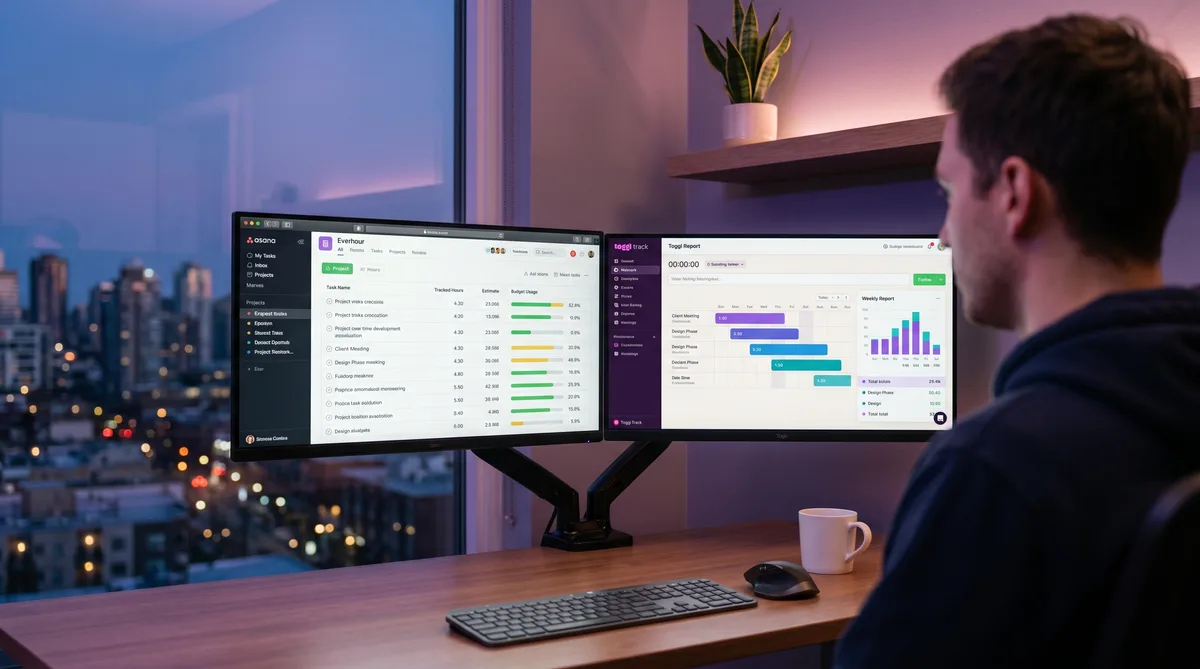
The difference becomes clear once you watch how each tool fits into your day. Everhour was designed to live inside the project management app you already use — it adds timer buttons and budget columns directly into Asana, Jira, ClickUp, and a dozen others. You never open a separate window. Toggl Track is the opposite: a standalone timer with its own polished desktop app, browser extension, and mobile apps that overlay a start button on 100+ web tools without ever modifying them.
If your team already orbits one PM tool, that distinction alone may settle the question. If not, this comparison covers pricing, features, monitoring, and integrations so you can decide which approach fits. For a broader look at the time-tracking landscape, our best time tracking software roundup puts both in context alongside monitoring-heavy alternatives.
Everhour Overview
Everhour was founded in 2013 by two developers running an IT consulting company who needed time data closer to their task boards. The tool they built reflects that origin: Everhour is less of a standalone product and more of a time-tracking layer that attaches to your existing workflow.
Install the browser extension and Everhour injects timer controls, tracked-hours columns, and real-time budget bars directly into Asana, Jira, Trello, ClickUp, Monday.com, Basecamp, Linear, Notion, and several other PM tools. You start a timer from the task you are working on, and hours roll up into project budgets without switching tabs.
Beyond tracking, Everhour includes project budgeting (set dollar or hour caps per project, get alerts at thresholds), invoicing (generate invoices from tracked time, sync with QuickBooks or Xero), and optional screenshot monitoring on the Team plan. It also recently added PTO tracking and payroll-related features, signaling a gradual move toward lightweight workforce management.
The company is fully bootstrapped, profitable, and has kept its pricing stable for years — a detail that matters when SaaS tools funded by growth-stage capital tend to raise prices after you are locked in. For a deeper dive, see our Everhour review.
Toggl Track Overview
Toggl Track launched in 2006 in Estonia and has spent nearly two decades refining one thing: the timer. The result is arguably the cleanest, most intuitive time-tracking interface on the market. One click starts a timer; one click stops it. The design is so streamlined that onboarding friction barely exists — new users are productive within minutes, not days.
Toggl's integration model is breadth over depth. Rather than embedding inside a few PM tools, its browser extension adds a timer button to 100+ web apps — from Jira and Asana to GitHub, Salesforce, and Notion. Desktop apps for Windows, Mac, and Linux provide idle detection, Pomodoro timers, and offline tracking. Mobile apps cover iOS and Android.
Where Toggl excels is reporting. Starter unlocks billable rates, time estimates, and saved reports. Premium ($18/user/month) adds profitability analysis, project forecasting, timesheet approvals, and audit logs — features that make it a serious tool for agencies tracking margins. Toggl has no screenshots, no activity scoring, and no surveillance features on any plan, a deliberate product philosophy they have publicly committed to maintaining.
For the full picture on features and pricing, see our Toggl Track review.
Feature-by-Feature Comparison
| Feature | Everhour | Toggl Track |
|---|---|---|
| Timer | One-click inside PM tools + browser extension | One-click standalone app + browser extension on 100+ apps |
| Manual entry | Yes (+ bulk time entry) | Yes |
| Project budgets | Hours or dollars, with threshold alerts | Time estimates (Starter); fixed-fee projects (Premium) |
| Billable rates | Per user, project, or task (Team plan) | Per user, project, or workspace (Starter+) |
| Invoicing | Built-in + QuickBooks/Xero sync | Beta only — no tax config or branding |
| Reporting | Time, budget, and billing reports | Summary, detailed, weekly; profitability on Premium |
| Timesheet approvals | Yes (Team plan) | Yes (Premium plan) |
| Screenshots | Optional, ~6/hour, blurrable (Team plan) | None — no surveillance by design |
| Idle detection | Auto-stop timers when idle | Detects idle time, prompts to keep or discard |
| PTO / time off | Built-in with automated accrual | Not included |
| Desktop apps | Mac and Windows (for screenshots) | Mac, Windows, and Linux |
| Mobile apps | iOS only | iOS and Android |
| Free plan | Up to 5 users, no integrations | Up to 5 users, full tracking + 100+ integrations |
The table makes the trade-off visible: Everhour bundles more operational features (budgeting, invoicing, PTO, optional screenshots) into a single paid tier. Toggl keeps its core timer lean and fast, reserving advanced reporting and approvals for Premium, while skipping surveillance entirely.
Integrations — The Real Difference
Integration philosophy is the single biggest differentiator between these two tools, and it is worth understanding clearly before you commit.
Everhour: Deep Embedding in a Few Tools
Everhour's browser extension modifies the DOM of supported PM apps. Open Asana and you see Everhour timer buttons on every task, tracked-hours columns in list views, and real-time budget progress bars — all rendered inline as though Asana built them. The same treatment applies to Jira, Trello, ClickUp, Monday.com, Basecamp, Linear, Notion, GitHub, GitLab, Todoist, and Figma.
The upside is zero context switching. You estimate, track, and review time without leaving the task board. The downside is that Everhour’s free plan locks out all native integrations. If you want the feature that defines the product, you must be on the $8.50/user Team plan.
Toggl Track: Lightweight Overlay on Everything
Toggl’s browser extension takes a lighter approach: it adds a small timer button to 100+ web apps without altering their interfaces. It works in Jira, Asana, Trello, and the same PM tools Everhour supports, but also in GitHub, Salesforce, Zendesk, Notion, Google Docs, Gmail, and dozens of niche tools. Toggl also syncs natively with QuickBooks, Xero, Slack, and Google/Outlook calendars.
The upside is breadth — if your team uses five tools from five vendors, Toggl overlays a timer on all of them. The downside is that it never gets as deep as Everhour within any one tool. You won’t see budget bars or tracked hours inside Asana’s UI; you’ll see a small button that opens Toggl’s own popup.
Pricing Comparison
Everhour Pricing (2026)
| Plan | Price (Annual Billing) | Key Features |
|---|---|---|
| Free | $0 (up to 5 users) | Time tracking, unlimited projects, basic reports, data export |
| Team | $8.50 /user/month | All integrations, budgets, invoicing, screenshots, PTO, time approval, SSO |
Monthly billing costs $10/user/month. Everhour requires a 5-seat minimum on the Team plan — even a two-person team pays for five seats ($42.50/month annual, $50/month monthly). A 14-day free trial is available.
Toggl Track Pricing (2026)
| Plan | Price (Annual Billing) | Key Features |
|---|---|---|
| Free | $0 (up to 5 users) | Unlimited tracking, 100+ integrations, reports, desktop/mobile apps |
| Starter | $9 /user/month | Billable rates, time estimates, project templates, saved reports, time rounding |
| Premium | $18 /user/month | Profitability analysis, project forecasts, timesheet approvals, SSO, audit logs |
| Enterprise | Custom pricing | Dedicated manager, custom integrations, multi-workspace, training |
Monthly billing runs $10/user (Starter) and $20/user (Premium). No seat minimum. All paid plans include a 30-day free trial with no credit card required.
Cost Comparison for Real Teams
Here is what each tool costs for a team of 10, billed annually:
- Everhour Team (10 users): $85/month ($1,020/year) — all features included
- Toggl Starter (10 users): $90/month ($1,080/year) — billable rates, reports, no approvals
- Toggl Premium (10 users): $180/month ($2,160/year) — profitability, approvals, SSO
Everhour’s single-tier pricing looks attractive at scale: for $85/month you get everything — budgets, invoicing, screenshots, PTO, and approvals — at a cost lower than Toggl Starter. The catch is that Everhour’s “everything” does not include the advanced profitability analytics and project forecasting that Toggl reserves for Premium. If you need those reports, Toggl at $180/month is effectively twice the price.
For very small teams (2–4 people), the five-seat minimum tips the math. A three-person team on Everhour pays $42.50/month for five seats; the same three on Toggl Starter pay $27/month with no wasted seats.
Pros and Cons
Everhour
Pros
- Deepest PM integration — Tracks time inside Asana, Jira, ClickUp, and others without a separate window.
- All-inclusive paid plan — One tier gets budgets, invoicing, screenshots, PTO, and approvals.
- Stable, bootstrapped company — No VC-driven price hikes; pricing unchanged for years.
- Real-time budget tracking — Progress bars on tasks show burn rate at a glance.
- Optional screenshots — Light monitoring when you need it, with blur and delete controls for privacy.
Cons
- 5-seat minimum — Small teams pay for unused seats, inflating effective per-user cost.
- Free plan locks out integrations — The feature that defines Everhour requires the paid tier.
- iOS only for mobile — No Android app, limiting field teams.
- Weaker standalone experience — Without a PM tool connected, Everhour feels incomplete.
- No Linux desktop app — Linux users are limited to the browser extension.
Toggl Track
Pros
- Best-in-class interface — Fast, clean, and genuinely pleasant to use every day.
- Privacy by design — No screenshots or surveillance on any plan; employees don’t feel watched.
- Broadest integrations — 100+ native connections, plus a polished browser extension.
- Strong free plan — Five users with full tracking, all integrations, and no feature walls.
- Advanced analytics on Premium — Profitability, forecasting, and audit logs for agency-grade reporting.
Cons
- Premium is expensive — $18/user/month for approvals and profitability nearly doubles the Starter cost.
- No invoicing — The built-in invoicing is still beta with no tax config or branding.
- Shallow PM integration — Timer overlay only; no inline budgets or hours inside Asana/Jira.
- No built-in PTO — Relies on external tools for time-off management.
- No monitoring option — If a client or manager requires screenshot proof, Toggl cannot provide it.
Verdict — Which Should You Choose?
Choose Everhour if your team lives in one PM tool and wants time data directly inside that interface. Agencies and consultancies billing by the hour will appreciate the built-in budgets, invoicing, and QuickBooks/Xero sync — all bundled into a single $8.50/user plan with no tier-juggling. The optional screenshot monitoring is a useful middle ground if you manage remote contractors who need light oversight without the weight of a full surveillance platform.
Choose Toggl Track if you value interface quality, employee trust, and cross-tool flexibility. Toggl is the better pick for teams that use many different apps, freelancers who want a free plan that actually works, and organizations where any form of monitoring would damage culture. If you grow into needing profitability analytics and timesheet approvals, Premium delivers — but budget for the jump to $18/user.
The budget pick: For teams of five or fewer, Toggl’s free plan is the clear winner — it includes integrations that Everhour’s free plan strips out. For teams of 10+ who need budgeting and invoicing, Everhour Team at $85/month undercuts Toggl Starter at $90/month while including more features.
Regardless of which tracker you choose, both log your activity throughout the day. If you need short breaks to stay invisible on the timesheet, TrickTack keeps input activity consistent in the background so your tracked hours look natural.
Frequently Asked Questions
Is Everhour cheaper than Toggl Track?
Per-user, Everhour is slightly cheaper: $8.50/user/month billed annually versus Toggl Starter at $9/user/month. However, Everhour enforces a five-seat minimum on its paid plan, so the actual floor is $42.50/month even for a two-person team. Toggl has no minimum seat requirement, so smaller teams may pay less overall. Both offer free plans for up to five users with meaningful feature sets.
Does Everhour work inside Asana, Jira, and Trello?
Yes. Everhour’s defining feature is native embedding inside project management tools. It adds timer buttons and budget columns directly into Asana, Jira, Trello, ClickUp, Monday.com, Basecamp, Linear, Notion, and others. You track time without leaving the PM tool. Toggl Track takes a different approach with a browser extension that overlays a timer button on 100+ web apps, but Everhour’s in-app embedding is deeper and shows budget data inline.
Does Toggl or Everhour take screenshots?
Toggl Track does not take screenshots on any plan. It is a trust-based timer by design and has publicly committed to never adding surveillance features. Everhour offers optional screenshot monitoring on its Team plan, capturing random screenshots roughly every ten minutes while a timer is running. Team members can pause or blur screenshots, and both admins and employees can delete them. Neither tool logs keystrokes or tracks GPS.
Which is better for agencies billing clients?
It depends on your stack. If your agency lives in one PM tool like Asana or Monday.com, Everhour gives you budget tracking and billable-hour data right beside your tasks without context switching. If your team spans many tools or you need advanced profitability reports and timesheet approvals, Toggl Premium at $18/user/month is stronger on analytics and reporting. Both support billable rates and client-level tracking; Everhour includes invoicing on its Team plan while Toggl’s invoicing is still limited.
Can I use Everhour or Toggl with TrickTack?
Yes. TrickTack works in the background alongside any time tracker. It simulates natural mouse movements and keyboard activity at randomized intervals, so both Everhour and Toggl register you as active during short breaks. This is especially relevant for Everhour’s optional screenshot monitoring, where consistent input activity keeps screenshots looking normal while you step away.
Conclusion
Everhour and Toggl Track solve the same problem from opposite directions. Everhour dissolves into your PM tool so time tracking happens where the work already lives — ideal for agencies and consultancies billing out of Asana or Jira. Toggl stands on its own as the most polished standalone timer in the category, backed by the strongest reporting when you step up to Premium.
Neither is objectively “better” — the right choice depends on whether you value deep embedding in one tool or lightweight presence across many. Start with the free plan on whichever aligns with your workflow, and upgrade only when you hit a concrete wall. For a look at how both compare against monitoring-heavy alternatives, our Hubstaff vs Toggl and Hubstaff vs Clockify comparisons show what the surveillance side of time tracking looks like.
Try TrickTack Free for 7 Days
Keep your reports consistent whether you track with Everhour, Toggl, or any other timer. Cancel anytime during your trial.
Download

